Unlock a world of possibilities! Login now and discover the exclusive benefits awaiting you.

- Qlik Community
- :
- All Forums
- :
- QlikView
- :
- Not able to find Label field
- Subscribe to RSS Feed
- Mark Topic as New
- Mark Topic as Read
- Float this Topic for Current User
- Bookmark
- Subscribe
- Mute
- Printer Friendly Page

- Mark as New
- Bookmark
- Subscribe
- Mute
- Subscribe to RSS Feed
- Permalink
- Report Inappropriate Content
Not able to find Label field
Hi Guys,
Please find the attached screen shot.
In the screen shot, LABEL field is mentioned.
However, I am not able to find this particular field. Can you please help.
- Tags:
- label_field_qlikview

Accepted Solutions

 kaushiknsolanki
- Mark as New
- Bookmark
- Subscribe
- Mute
- Subscribe to RSS Feed
- Permalink
- Report Inappropriate Content
Hi,
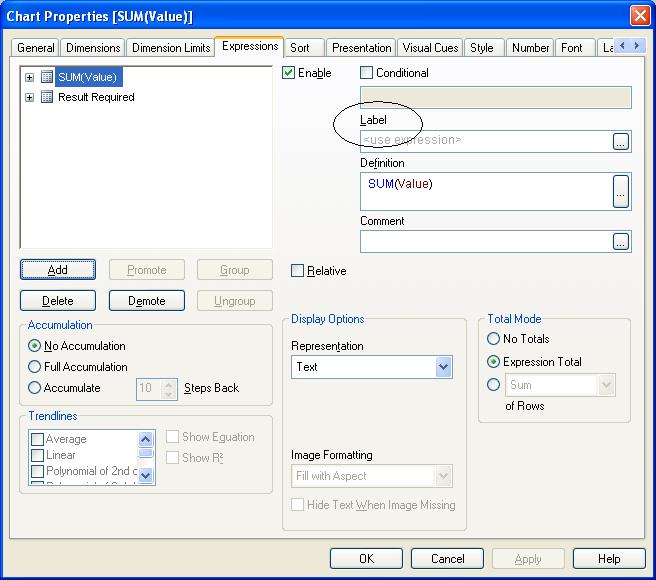
If you go to Expression Tab, You will find a Label space, here you give lable for your expression which you have written in Definition Space.
Regards,
Kaushik Solanki
- Mark as New
- Bookmark
- Subscribe
- Mute
- Subscribe to RSS Feed
- Permalink
- Report Inappropriate Content
Hello
What do you mean you can not find it? From what I see, what did you use as a field is painted red and is not underlined, so already detected in preloaded data.
If you can, a little more detail what happens.
Regards

 sushil353
- Mark as New
- Bookmark
- Subscribe
- Mute
- Subscribe to RSS Feed
- Permalink
- Report Inappropriate Content
if you know the table name which contains the required field.
then first select the table name from LABEL Table and then try to search the required field.
HTH
Sushil
 er_mohit
- Mark as New
- Bookmark
- Subscribe
- Mute
- Subscribe to RSS Feed
- Permalink
- Report Inappropriate Content
Try to use that particular field which you make a label field.... hope it helps
- Mark as New
- Bookmark
- Subscribe
- Mute
- Subscribe to RSS Feed
- Permalink
- Report Inappropriate Content
Thanks guys..but still I guess I should give more clarity on what's my confusion is.
If you see what the author has mentioned just below the attached screen shot-
We will assign a label to our expression by entering # of flights in the LABEL field of Expression dialog.
So, I am not getting where exactly I should write # of flights because there is nothing called LABEL.
kaushiknsolanki
- Mark as New
- Bookmark
- Subscribe
- Mute
- Subscribe to RSS Feed
- Permalink
- Report Inappropriate Content
Hi,
If you go to Expression Tab, You will find a Label space, here you give lable for your expression which you have written in Definition Space.
Regards,
Kaushik Solanki
sushil353
- Mark as New
- Bookmark
- Subscribe
- Mute
- Subscribe to RSS Feed
- Permalink
- Report Inappropriate Content
is it what you are looking for?
- Mark as New
- Bookmark
- Subscribe
- Mute
- Subscribe to RSS Feed
- Permalink
- Report Inappropriate Content
This is exactly what I was looking for.
Thanks to Sushil and Kaushik and rest all as well.
Unfortunately, I can mark only one answer as correct.