Unlock a world of possibilities! Login now and discover the exclusive benefits awaiting you.

- Qlik Community
- :
- All Forums
- :
- QlikView
- :
- Num Conversion
- Subscribe to RSS Feed
- Mark Topic as New
- Mark Topic as Read
- Float this Topic for Current User
- Bookmark
- Subscribe
- Mute
- Printer Friendly Page

- Mark as New
- Bookmark
- Subscribe
- Mute
- Subscribe to RSS Feed
- Permalink
- Report Inappropriate Content
Num Conversion
Hi,
the below expression is returning for eg 120
=num(sum([Jun 30, 2013 - Jul 06, 2013 - Rev]),'$#,##0 K')
in dta labels i want it to be displayed as $ 120 k......how the above expression should be modified for that?
Thanks
- Tags:
- new_to_qlikview
Accepted Solutions

 preminqlik
- Mark as New
- Bookmark
- Subscribe
- Mute
- Subscribe to RSS Feed
- Permalink
- Report Inappropriate Content
hi find attachment

 Clever_Anjos
- Mark as New
- Bookmark
- Subscribe
- Mute
- Subscribe to RSS Feed
- Permalink
- Report Inappropriate Content
It seems correct to me, could you post a qvw?
Clever_Anjos
- Mark as New
- Bookmark
- Subscribe
- Mute
- Subscribe to RSS Feed
- Permalink
- Report Inappropriate Content
How are those variables set into your app?
SET ThousandSep='.';
SET DecimalSep=',';
SET MoneyThousandSep='.';
SET MoneyDecimalSep=',';
SET MoneyFormat='R$ #.##0,00;-R$ #.##0,00';
- Mark as New
- Bookmark
- Subscribe
- Mute
- Subscribe to RSS Feed
- Permalink
- Report Inappropriate Content
Attached is the sample qvw
preminqlik
- Mark as New
- Bookmark
- Subscribe
- Mute
- Subscribe to RSS Feed
- Permalink
- Report Inappropriate Content
hi find attachment

 rustyfishbones
- Mark as New
- Bookmark
- Subscribe
- Mute
- Subscribe to RSS Feed
- Permalink
- Report Inappropriate Content
PFA,
it works using
NUM(sum([Jun 30, 2013 - Jul 06, 2013 - Rev]),'$,##0 K')
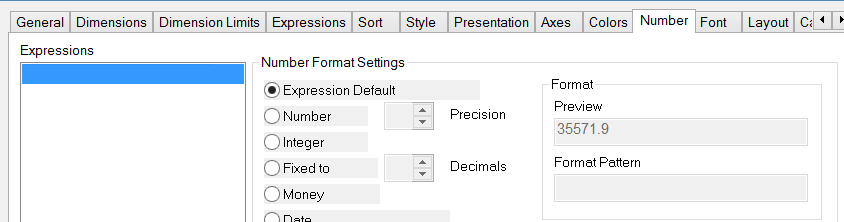
I think in the numbers tab you were not choosing Expression Default
like below
- Mark as New
- Bookmark
- Subscribe
- Mute
- Subscribe to RSS Feed
- Permalink
- Report Inappropriate Content
Hi Prem,
can u pls post the procedure for me.
regards
Mahesh
- Mark as New
- Bookmark
- Subscribe
- Mute
- Subscribe to RSS Feed
- Permalink
- Report Inappropriate Content
Thanks Allan...
preminqlik
- Mark as New
- Bookmark
- Subscribe
- Mute
- Subscribe to RSS Feed
- Permalink
- Report Inappropriate Content
hi mahesh,
you have to just choose money radio button in >Number tab> Money