Unlock a world of possibilities! Login now and discover the exclusive benefits awaiting you.

- Qlik Community
- :
- All Forums
- :
- QlikView
- :
- Offset in the table
- Subscribe to RSS Feed
- Mark Topic as New
- Mark Topic as Read
- Float this Topic for Current User
- Bookmark
- Subscribe
- Mute
- Printer Friendly Page
.png "dzmitry_shmurye")
 dzmitry_shmurye
- Mark as New
- Bookmark
- Subscribe
- Mute
- Subscribe to RSS Feed
- Permalink
- Report Inappropriate Content
Offset in the table
Hi community!
I have the table with the large values in dimention. Some values are in the 2 or more line:
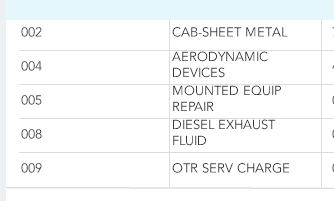
I need add the offset for this values bettween the separator line and the first letter of dimension.
This is the result that I want to get for dimension values (yellow - 2 spaces for every line of the dimension values)
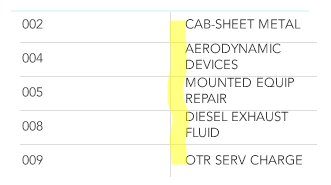
Could enybody help me with this design feature if it is possible?
Thanks!
- « Previous Replies
- Next Replies »

 sunny_talwar
- Mark as New
- Bookmark
- Subscribe
- Mute
- Subscribe to RSS Feed
- Permalink
- Report Inappropriate Content
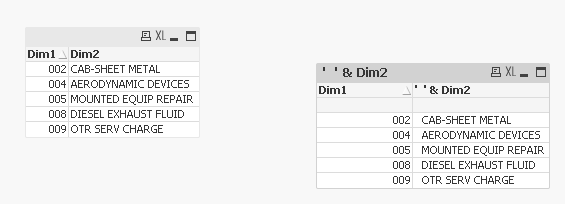
May be like an expression in straight table:
' ' & Dim2
dzmitry_shmurye
- Mark as New
- Bookmark
- Subscribe
- Mute
- Subscribe to RSS Feed
- Permalink
- Report Inappropriate Content
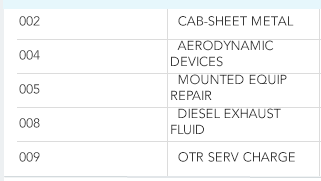
Thanks for your reply, but some values have 2 line and if I add ' ' & Dim I get the next:
sunny_talwar
- Mark as New
- Bookmark
- Subscribe
- Mute
- Subscribe to RSS Feed
- Permalink
- Report Inappropriate Content
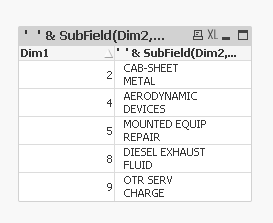
May be this:
' ' & SubField(Dim2, Chr(10), 1) & Chr(10) & ' ' & SubField(Dim2, Chr(10), 2)
dzmitry_shmurye
- Mark as New
- Bookmark
- Subscribe
- Mute
- Subscribe to RSS Feed
- Permalink
- Report Inappropriate Content
How you got this result for Dim1 = 5? I think it should be
MOUNTED
EQUIP
REPAIR
according your formula...
 florentina_doga
- Mark as New
- Bookmark
- Subscribe
- Mute
- Subscribe to RSS Feed
- Permalink
- Report Inappropriate Content
try presentetion wrap cell text
sunny_talwar
- Mark as New
- Bookmark
- Subscribe
- Mute
- Subscribe to RSS Feed
- Permalink
- Report Inappropriate Content
So I am not using a space for SubField. I am using Chr(10) which might be coming from your original database, right? Attached is the Excel file I used
dzmitry_shmurye
- Mark as New
- Bookmark
- Subscribe
- Mute
- Subscribe to RSS Feed
- Permalink
- Report Inappropriate Content
In the column 2 you can see initial data (without) separators
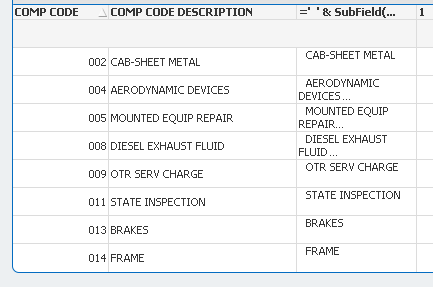
In the column 3 you can see the results of your expresion...

 t_chetirbok
- Mark as New
- Bookmark
- Subscribe
- Mute
- Subscribe to RSS Feed
- Permalink
- Report Inappropriate Content
If I understand you, you haven't string separated by "Enter" in your data.
so try expression:
=Chr(32)&
if(len(DIM)<=16
,DIM
,if(len(keepchar(DIM,chr(32)))+1=2
, SubField(DIM, Chr(32), 1) & Chr(10) & Chr(32) & SubField(DIM, Chr(32), 2)
, if(len(keepchar(DIM,chr(32)))+1=3
, if(len(SubField(DIM, Chr(32), 1)&SubField(DIM, Chr(32), 2))<=16
, SubField(DIM, Chr(32), 1)&chr(32)&SubField(DIM, Chr(32), 2)& Chr(10) & Chr(32) & SubField(DIM, Chr(32),3)
, SubField(DIM, Chr(32), 1)&chr(10)&chr(10)&Chr(32)&
if(len(SubField(DIM, Chr(32), 2)&SubField(DIM, Chr(32), 3))<=16
, SubField(DIM, Chr(32), 2)&chr(32)&SubField(DIM, Chr(32), 3)
, SubField(DIM, Chr(32), 2)&chr(10)&Chr(32)&SubField(DIM, Chr(32), 3)
)
)
)
)
)
But it would work if you have 3 words
sunny_talwar
- Mark as New
- Bookmark
- Subscribe
- Mute
- Subscribe to RSS Feed
- Permalink
- Report Inappropriate Content
Can you share the qvw where you tried it out?

- « Previous Replies
- Next Replies »