Unlock a world of possibilities! Login now and discover the exclusive benefits awaiting you.

- Qlik Community
- :
- All Forums
- :
- QlikView
- :
- Offset in the table
- Subscribe to RSS Feed
- Mark Topic as New
- Mark Topic as Read
- Float this Topic for Current User
- Bookmark
- Subscribe
- Mute
- Printer Friendly Page
.png "dzmitry_shmurye")
 dzmitry_shmurye
- Mark as New
- Bookmark
- Subscribe
- Mute
- Subscribe to RSS Feed
- Permalink
- Report Inappropriate Content
Offset in the table
Hi community!
I have the table with the large values in dimention. Some values are in the 2 or more line:
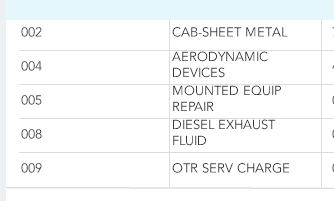
I need add the offset for this values bettween the separator line and the first letter of dimension.
This is the result that I want to get for dimension values (yellow - 2 spaces for every line of the dimension values)
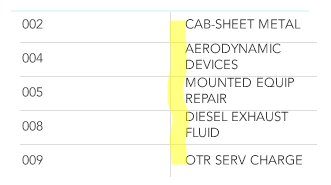
Could enybody help me with this design feature if it is possible?
Thanks!
dzmitry_shmurye
- Mark as New
- Bookmark
- Subscribe
- Mute
- Subscribe to RSS Feed
- Permalink
- Report Inappropriate Content
Please find the qvw in attachement.

 sunny_talwar
- Mark as New
- Bookmark
- Subscribe
- Mute
- Subscribe to RSS Feed
- Permalink
- Report Inappropriate Content
May be this:
=' ' & SubField(Dim2, ' ', 1) & Chr(10) & ' ' & Right(Dim2, Len(Dim2) - Index(Dim2, ' ', 1))
dzmitry_shmurye
- Mark as New
- Bookmark
- Subscribe
- Mute
- Subscribe to RSS Feed
- Permalink
- Report Inappropriate Content
In your example the second words of value always will be on the new line, but it is not correctly, for example, if the length of the first words is only 3 symbols?
I need that the first line include for example 16 symbols always, and if first and second words have < 16 symbols, they should be desplays on the first line and the third words - on the second line if it not placed in 16 symbols.
Thanks!
dzmitry_shmurye
- Mark as New
- Bookmark
- Subscribe
- Mute
- Subscribe to RSS Feed
- Permalink
- Report Inappropriate Content
Regard your example I need get the next:
CAB-SHEET METAL
- <16 symbols (1 line)
AERODYNAMIC
DEVICES
- 2 lines because two words length > 16 symbols
MOUNTED EQUIP
REPAIR
- 2 lines, but the first and second words on the 1 line length < 16 symbols
etc...
sunny_talwar
- Mark as New
- Bookmark
- Subscribe
- Mute
- Subscribe to RSS Feed
- Permalink
- Report Inappropriate Content
May be this:
=If(Len(Dim2) < 16, ' ' & Dim2,
' ' & Left(Left(Dim2, 16), Index(Left(Dim2, 16), ' ', -1)) & Chr(10) &
' ' & Right(Dim2, Len(Dim2) - Len(Left(Left(Dim2, 16), Index(Left(Dim2, 16), ' ', -1)))))
 MarcoWedel
- Mark as New
- Bookmark
- Subscribe
- Mute
- Subscribe to RSS Feed
- Permalink
- Report Inappropriate Content
why do you want to indent this column?
dzmitry_shmurye
- Mark as New
- Bookmark
- Subscribe
- Mute
- Subscribe to RSS Feed
- Permalink
- Report Inappropriate Content
Thanks Tatsiana. Your solution is work. For every word in the field I should write own If(). It is useful.
dzmitry_shmurye
- Mark as New
- Bookmark
- Subscribe
- Mute
- Subscribe to RSS Feed
- Permalink
- Report Inappropriate Content
Thanks Sunny!
It is work for me, but if i will have 3 or more line in the table cell, I should add new If() for every line.
It is useful.
dzmitry_shmurye
- Mark as New
- Bookmark
- Subscribe
- Mute
- Subscribe to RSS Feed
- Permalink
- Report Inappropriate Content
This is the design requirement of the customer.

 oknotsen
- Mark as New
- Bookmark
- Subscribe
- Mute
- Subscribe to RSS Feed
- Permalink
- Report Inappropriate Content
What is the idea behind the requirement?
In other words: What is it that the customer really wants to achieve?
