Unlock a world of possibilities! Login now and discover the exclusive benefits awaiting you.

- Qlik Community
- :
- All Forums
- :
- QlikView
- :
- Re: On Click Expand
- Subscribe to RSS Feed
- Mark Topic as New
- Mark Topic as Read
- Float this Topic for Current User
- Bookmark
- Subscribe
- Mute
- Printer Friendly Page

- Mark as New
- Bookmark
- Subscribe
- Mute
- Subscribe to RSS Feed
- Permalink
- Report Inappropriate Content
On Click Expand
Dear All,
Can we do this in Qlikview ?
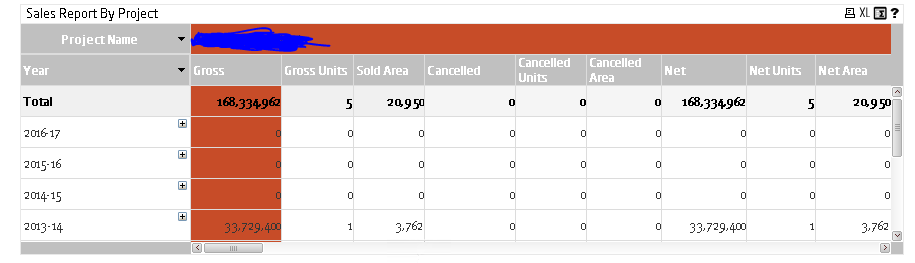
In the above image there are 9 Expressions. I need to group it.
Lets say Gross, Gross Units and Sold Area into one Group.
On Click of Gross , Gross Units and Sold Area has to expand.
Let me know if you need any other details.
Regards,
Keerthi KS

 marcus_sommer
- Mark as New
- Bookmark
- Subscribe
- Mute
- Subscribe to RSS Feed
- Permalink
- Report Inappropriate Content
This isn't possible. Alternatives could be to use expression-groups and cycling through different expressions per circle-icon or the use of separate buttons which switch a variable-value which is used as visibility-condition for the expressions.
- Marcus

 jagan
jagan
- Mark as New
- Bookmark
- Subscribe
- Mute
- Subscribe to RSS Feed
- Permalink
- Report Inappropriate Content
Hi,
You have to create a Island table and need to use this as dimensions, then in the expression based on the dimension you have to give your expression.
LOAD
*
INLINE [
Group, KPI
Group1, Gross
Group1, Gross Units
Group1, Sold Area
Group2, KPI1
Group2, KPI2];
Expression: If(KPI = 'Gross', Gross Expression,
If(KPI = 'Gross Units', Gross Units Expression,
,
,
,
,
,
Like this you have to write single expression for all the KPIs.
Hope this helps you.
Regards,
Jagan.