Unlock a world of possibilities! Login now and discover the exclusive benefits awaiting you.

- Qlik Community
- :
- All Forums
- :
- QlikView
- :
- Re: One decimal
- Subscribe to RSS Feed
- Mark Topic as New
- Mark Topic as Read
- Float this Topic for Current User
- Bookmark
- Subscribe
- Mute
- Printer Friendly Page

 danialier
- Mark as New
- Bookmark
- Subscribe
- Mute
- Subscribe to RSS Feed
- Permalink
- Report Inappropriate Content
One decimal
Hello,
What else do I need to add to this formula so it only shows ONE decimal ?
=((num(sum({<Period={'Feb'},BA={'Net Revenues'}>}Amount)/1000))/
(num(sum({<Period={'Jan'},BA={'Net Revenues'}>}Amount)/1000))-1)*100
thks,dani
- Tags:
- new_to_qlikview
Accepted Solutions

 its_anandrjs
- Mark as New
- Bookmark
- Subscribe
- Mute
- Subscribe to RSS Feed
- Permalink
- Report Inappropriate Content
Hi,
Try like this
=num( ((num(sum({<Period={'Feb'},BA={'Net Revenues'}>}Amount)/1000))/
(num(sum({<Period={'Jan'},BA={'Net Revenues'}>}Amount)/1000))-1)*100,'#,##0.0')
Hope this helps
Thanks & Regards

 maxgro
- Mark as New
- Bookmark
- Subscribe
- Mute
- Subscribe to RSS Feed
- Permalink
- Report Inappropriate Content
=num(1/3, '#.##0,0')
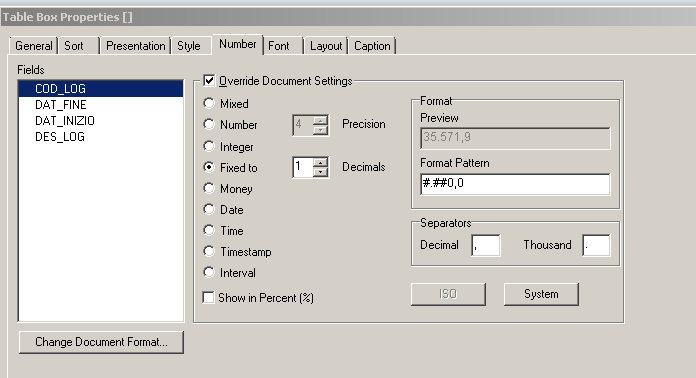
EDIT: or go here (tablebox, chart) to choose format

- Mark as New
- Bookmark
- Subscribe
- Mute
- Subscribe to RSS Feed
- Permalink
- Report Inappropriate Content
just use the "round" funtion...for ex; round(3.88, 0, 1) = 3,9
its_anandrjs
- Mark as New
- Bookmark
- Subscribe
- Mute
- Subscribe to RSS Feed
- Permalink
- Report Inappropriate Content
Hi,
Try like this
=num( ((num(sum({<Period={'Feb'},BA={'Net Revenues'}>}Amount)/1000))/
(num(sum({<Period={'Jan'},BA={'Net Revenues'}>}Amount)/1000))-1)*100,'#,##0.0')
Hope this helps
Thanks & Regards

 preminqlik
- Mark as New
- Bookmark
- Subscribe
- Mute
- Subscribe to RSS Feed
- Permalink
- Report Inappropriate Content
num(expression,'#.#')
or else go to number format tab and you can do over there
 MK_QSL
- Mark as New
- Bookmark
- Subscribe
- Mute
- Subscribe to RSS Feed
- Permalink
- Report Inappropriate Content
NUM(yourexpression, '#,##0.0')
- Mark as New
- Bookmark
- Subscribe
- Mute
- Subscribe to RSS Feed
- Permalink
- Report Inappropriate Content
In addition:
Note that it is related to the setting of your decimal separator:
This is a setting that normally is set on the Main tab of your loadscript:
SET DecimalSep=',';
So when this value is a comma (like above) then this is correct
=num(1/3, '#.##0,0')
When it is a dot (like below)
SET DecimalSep='.';
=num(1/3, '#.##0.0')
is correct
its_anandrjs
- Mark as New
- Bookmark
- Subscribe
- Mute
- Subscribe to RSS Feed
- Permalink
- Report Inappropriate Content
Hi,
Check your decimal separator is and according to separator change comma or decimal in this script '#,##0.0'
=num( ((num(sum({<Period={'Feb'},BA={'Net Revenues'}>}Amount)/1000))/
(num(sum({<Period={'Jan'},BA={'Net Revenues'}>}Amount)/1000))-1)*100,'#,##0.0')
Otherwise change is Properties -> Number -> change fixed to upto 1 decimal place.
Hope this helps
Thanks & Regards