Unlock a world of possibilities! Login now and discover the exclusive benefits awaiting you.

- Qlik Community
- :
- All Forums
- :
- QlikView
- :
- Re: Only include certain values in straight table
- Subscribe to RSS Feed
- Mark Topic as New
- Mark Topic as Read
- Float this Topic for Current User
- Bookmark
- Subscribe
- Mute
- Printer Friendly Page

 martin_hamilton
- Mark as New
- Bookmark
- Subscribe
- Mute
- Subscribe to RSS Feed
- Permalink
- Report Inappropriate Content
Only include certain values in straight table
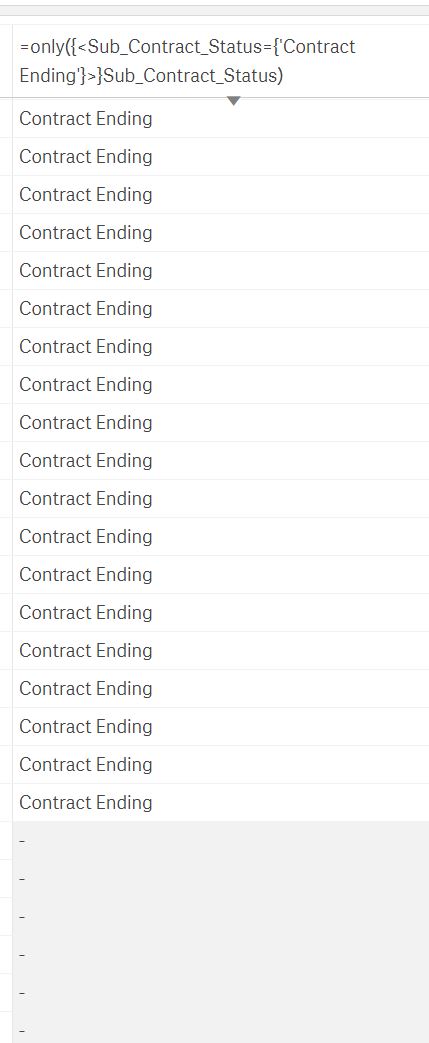
Hi - am using a set analysis in a straight table but it doesnt seem to be filtering out the data.
Am using qliksense.
=only({<Sub_Contract_Status={'Contract Ending'}>}Sub_Contract_Status)
I only want records with a Sub_Contract_Status of 'Contract Ending' to show in the table.
It seems to be showing all records but blanking out the values and I dont know how to filter out these other records.
Thanks
Martin
Accepted Solutions

 sunny_talwar
- Mark as New
- Bookmark
- Subscribe
- Mute
- Subscribe to RSS Feed
- Permalink
- Report Inappropriate Content
Are there more expressions in your chart? If not, then try to uncheck 'Include Zero Values' under Add-Ons-> Data Handling
sunny_talwar
- Mark as New
- Bookmark
- Subscribe
- Mute
- Subscribe to RSS Feed
- Permalink
- Report Inappropriate Content
Are there more expressions in your chart? If not, then try to uncheck 'Include Zero Values' under Add-Ons-> Data Handling
martin_hamilton
- Mark as New
- Bookmark
- Subscribe
- Mute
- Subscribe to RSS Feed
- Permalink
- Report Inappropriate Content
There was and this has fixed it, although I also want to have 2 expressions in the chart, would I have to combine it into a single 1 for it to work?
e.g. I only want to include records with a Sub_Status of 'Connected' as well as Sub_Contract_Status of 'Contract Ending'
Thanks
martin_hamilton
- Mark as New
- Bookmark
- Subscribe
- Mute
- Subscribe to RSS Feed
- Permalink
- Report Inappropriate Content
actually figure that one out myself.
=only({<Sub_Contract_Status={'Out Of Contract'},Sub_Status={'Connected'}>}Sub_Contract_Status)
cheers
Martin
martin_hamilton
- Mark as New
- Bookmark
- Subscribe
- Mute
- Subscribe to RSS Feed
- Permalink
- Report Inappropriate Content
Thanks for this Sunny appreciated
sunny_talwar
- Mark as New
- Bookmark
- Subscribe
- Mute
- Subscribe to RSS Feed
- Permalink
- Report Inappropriate Content
Super 
