Unlock a world of possibilities! Login now and discover the exclusive benefits awaiting you.

- Qlik Community
- :
- All Forums
- :
- QlikView
- :
- Re: Open on server
- Subscribe to RSS Feed
- Mark Topic as New
- Mark Topic as Read
- Float this Topic for Current User
- Bookmark
- Subscribe
- Mute
- Printer Friendly Page

 infopilot
- Mark as New
- Bookmark
- Subscribe
- Mute
- Subscribe to RSS Feed
- Permalink
- Report Inappropriate Content
Open on server
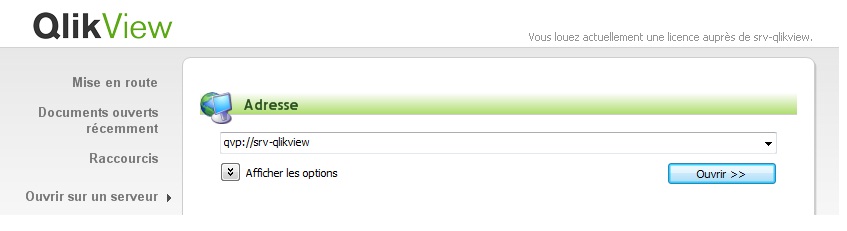 Hello,
Hello,
We migrate from Qlikview V9 (Wich works fine) to Qlikview 11, and now when we want click on button to open on a server, it is very very long (about 30 seconds).
Is someone got the same mistake ? and how to solve it ?
Best regards
- Tags:
- qlikview_deployment
Accepted Solutions

 Peter_Cammaert
- Mark as New
- Bookmark
- Subscribe
- Mute
- Subscribe to RSS Feed
- Permalink
- Report Inappropriate Content
Also: the qvp protocol uses port 4747 to communicate. Check your QV11 server to see whether its firewall blocks this port.
Peter

 vikasmahajan
- Mark as New
- Bookmark
- Subscribe
- Mute
- Subscribe to RSS Feed
- Permalink
- Report Inappropriate Content
Give following command
qvp://100.0.7.17 100.0.7.17 will Ip address of your server.
Vikas
If the issue is solved please mark the answer with Accept as Solution & like it.
If you want to go quickly, go alone. If you want to go far, go together.
infopilot
- Mark as New
- Bookmark
- Subscribe
- Mute
- Subscribe to RSS Feed
- Permalink
- Report Inappropriate Content
Unfortunately it doesn't work ...Same mistake
Peter_Cammaert
- Mark as New
- Bookmark
- Subscribe
- Mute
- Subscribe to RSS Feed
- Permalink
- Report Inappropriate Content
Does it just take a long time to open the document list, or do you get an error message? In the last case, could you tell us what message you got?
BTW Open a command window (e.g. black window with a C:\> prompt) and enter "ping srv-qlikview". Do you get any replies?
Best,
Peter
Peter_Cammaert
- Mark as New
- Bookmark
- Subscribe
- Mute
- Subscribe to RSS Feed
- Permalink
- Report Inappropriate Content
Also: the qvp protocol uses port 4747 to communicate. Check your QV11 server to see whether its firewall blocks this port.
Peter
infopilot
- Mark as New
- Bookmark
- Subscribe
- Mute
- Subscribe to RSS Feed
- Permalink
- Report Inappropriate Content
I opened 4747 port on my server and it works.Great !
Thanks a lot
