Unlock a world of possibilities! Login now and discover the exclusive benefits awaiting you.

- Qlik Community
- :
- All Forums
- :
- QlikView
- :
- Re: Opening Amount
- Subscribe to RSS Feed
- Mark Topic as New
- Mark Topic as Read
- Float this Topic for Current User
- Bookmark
- Subscribe
- Mute
- Printer Friendly Page

 Frank_Hartmann
- Mark as New
- Bookmark
- Subscribe
- Mute
- Subscribe to RSS Feed
- Permalink
- Report Inappropriate Content
Opening Amount
Hi,
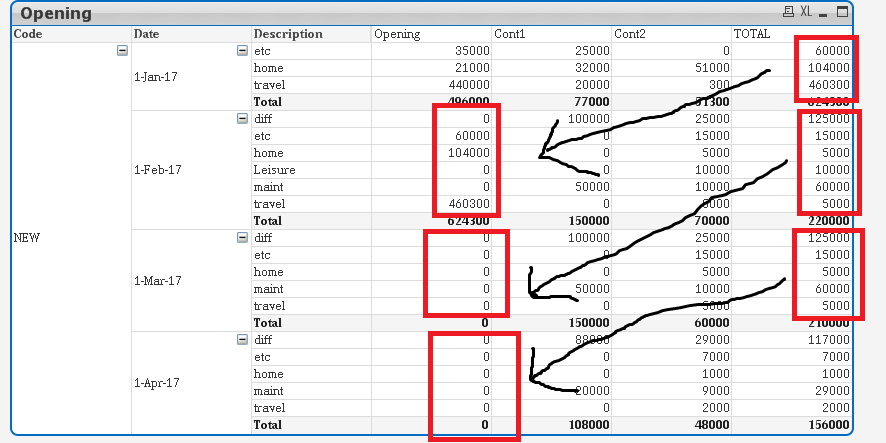
i try to show Opening Amount over a period of four months.
however only the second month (Feb) shows the correct values for Opening .
Mar and Apr are showing 0.
How to get the TOTAL Values of the above months Description into the Opening Field ?
And how to get the correct Value for TOTAL in Feb, Mar, Apr?
Accepted Solutions

 sunny_talwar
- Mark as New
- Bookmark
- Subscribe
- Mute
- Subscribe to RSS Feed
- Permalink
- Report Inappropriate Content
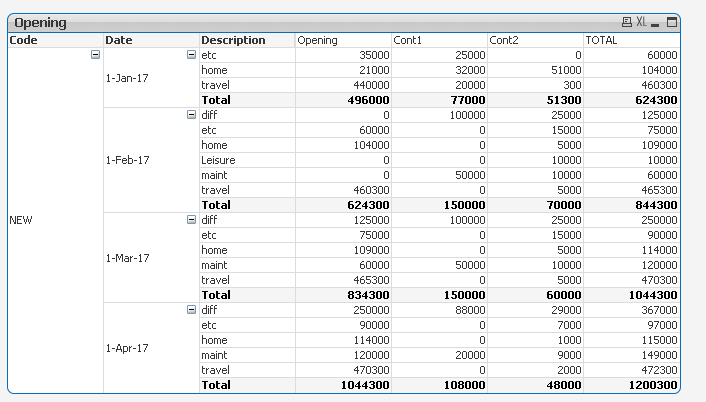
Check this out
if(sum(Opening)=0,
Sum(Aggr(RangeSum(Above(Sum(Opening) + Sum(Contributions1) + Sum(Contributions2), 1, RowNo())), Description, Date)), Sum(Opening))
sunny_talwar
- Mark as New
- Bookmark
- Subscribe
- Mute
- Subscribe to RSS Feed
- Permalink
- Report Inappropriate Content
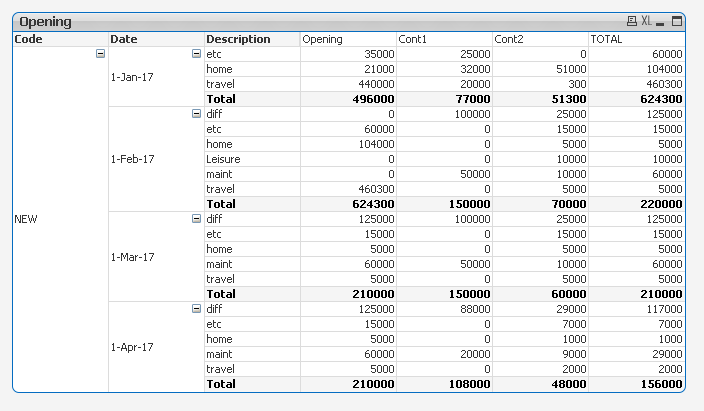
May be this
If(sum(Opening)=0,
Sum(Aggr(Above(Sum(Opening) + Sum(Contributions1) + Sum(Contributions2)), Description, Date)), Sum(Opening))
sunny_talwar
- Mark as New
- Bookmark
- Subscribe
- Mute
- Subscribe to RSS Feed
- Permalink
- Report Inappropriate Content
But shouldn't the total change based on the new opening and then the opening for the subsequent month should also change?
Frank_Hartmann
- Mark as New
- Bookmark
- Subscribe
- Mute
- Subscribe to RSS Feed
- Permalink
- Report Inappropriate Content
Yes exactly! The Opening is now correct but
the TOTAL should always consider the new Opening Amount!
sunny_talwar
- Mark as New
- Bookmark
- Subscribe
- Mute
- Subscribe to RSS Feed
- Permalink
- Report Inappropriate Content
Use this for Total....
Column(1) + Column(2) + Column(3)
But since the total changed, would you not want the Opening to be based on new Total 
Frank_Hartmann
- Mark as New
- Bookmark
- Subscribe
- Mute
- Subscribe to RSS Feed
- Permalink
- Report Inappropriate Content
Exactly , thats the problem 🙂
sunny_talwar
- Mark as New
- Bookmark
- Subscribe
- Mute
- Subscribe to RSS Feed
- Permalink
- Report Inappropriate Content
Check this out
if(sum(Opening)=0,
Sum(Aggr(RangeSum(Above(Sum(Opening) + Sum(Contributions1) + Sum(Contributions2), 1, RowNo())), Description, Date)), Sum(Opening))
Frank_Hartmann
- Mark as New
- Bookmark
- Subscribe
- Mute
- Subscribe to RSS Feed
- Permalink
- Report Inappropriate Content
thank you so much sunny
sunny_talwar
- Mark as New
- Bookmark
- Subscribe
- Mute
- Subscribe to RSS Feed
- Permalink
- Report Inappropriate Content
No problem at all... I am glad I was able to help
