Unlock a world of possibilities! Login now and discover the exclusive benefits awaiting you.

- Qlik Community
- :
- All Forums
- :
- QlikView
- :
- Re: Order for month
- Subscribe to RSS Feed
- Mark Topic as New
- Mark Topic as Read
- Float this Topic for Current User
- Bookmark
- Subscribe
- Mute
- Printer Friendly Page

- Mark as New
- Bookmark
- Subscribe
- Mute
- Subscribe to RSS Feed
- Permalink
- Report Inappropriate Content
Order for month
hi all,
i have created new qv qocument with fields month,year,reportname,path.Here if i select year as 2013 then month order is displaying in jan,feb,mar...nov,dec.but if i select 2014 month order is changing with selections like dec,nov,jan,feb,mar.i need show month order as if we select 2014 then jan,feb,mar..nov,dec.
i have created in script inline for month along with number and i change in sort tab expression=number.
it is working for 2013 but not for 2014 .i am attaching qlikview document please check
- Tags:
- new_to_qlikview

 ashfaq_haseeb
- Mark as New
- Bookmark
- Subscribe
- Mute
- Subscribe to RSS Feed
- Permalink
- Report Inappropriate Content
Hi
did you try my solution?
Regards
ASHFAQ
- Mark as New
- Bookmark
- Subscribe
- Mute
- Subscribe to RSS Feed
- Permalink
- Report Inappropriate Content
yes but is is not working

 amit_saini
- Mark as New
- Bookmark
- Subscribe
- Mute
- Subscribe to RSS Feed
- Permalink
- Report Inappropriate Content
Select as Correct Answer.
Thanks,
AS
ashfaq_haseeb
- Mark as New
- Bookmark
- Subscribe
- Mute
- Subscribe to RSS Feed
- Permalink
- Report Inappropriate Content
I have application attache
Have a look

 aveeeeeee7en
- Mark as New
- Bookmark
- Subscribe
- Mute
- Subscribe to RSS Feed
- Permalink
- Report Inappropriate Content
Hi Venkatesh
There is a solution for this. You don't need to create Inline Table and Number field for it.
Do it in the Sort Expression option. Like this:
Dual(month,Match(month,'jan','feb','mar','apr','may','jun','jul','aug','sep','oct','nov','dec'))
and also do other changes
See the Snapshot below:
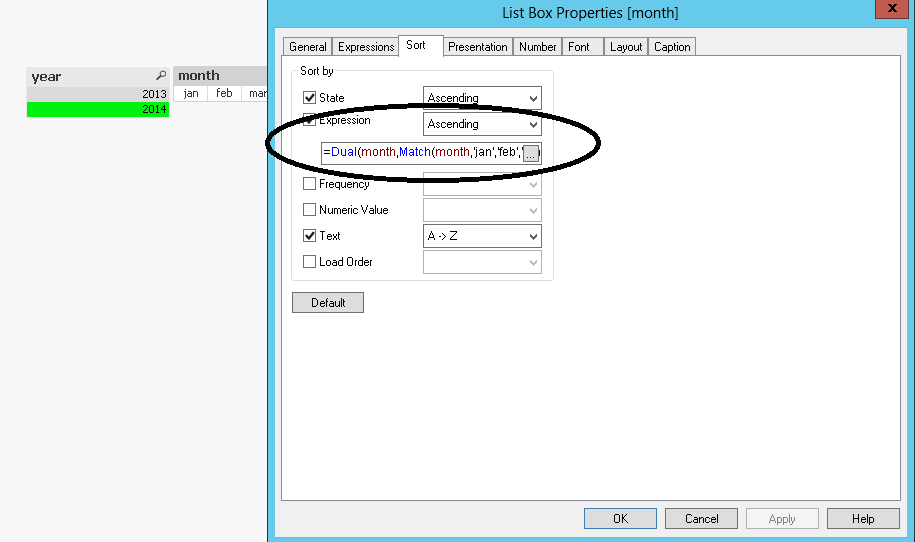
Hope that helps.
See the Attachment.
You can also follow Angad's Approach.
Regards
Aviral Nag
- Mark as New
- Bookmark
- Subscribe
- Mute
- Subscribe to RSS Feed
- Permalink
- Report Inappropriate Content
Hi Amit it is working but if i make selections on Month list box order is changing now is there any solution for that???
- Mark as New
- Bookmark
- Subscribe
- Mute
- Subscribe to RSS Feed
- Permalink
- Report Inappropriate Content
Hi Angad it is working but if i make selections on Month list box order is changing now is there any solution for that???
ashfaq_haseeb
- Mark as New
- Bookmark
- Subscribe
- Mute
- Subscribe to RSS Feed
- Permalink
- Report Inappropriate Content
Hi,
Have a look at my app.
Download it again
I fixed it for you.
Regards
ASHFAQ
- Mark as New
- Bookmark
- Subscribe
- Mute
- Subscribe to RSS Feed
- Permalink
- Report Inappropriate Content
Thanks for that Ashfaq
ashfaq_haseeb
- Mark as New
- Bookmark
- Subscribe
- Mute
- Subscribe to RSS Feed
- Permalink
- Report Inappropriate Content
If if fixed then mark relevant answer.
Regards
ASHFAQ