Unlock a world of possibilities! Login now and discover the exclusive benefits awaiting you.

- Qlik Community
- :
- All Forums
- :
- QlikView
- :
- Re: PAST SIX MONTH COMPARISON
- Subscribe to RSS Feed
- Mark Topic as New
- Mark Topic as Read
- Float this Topic for Current User
- Bookmark
- Subscribe
- Mute
- Printer Friendly Page

- Mark as New
- Bookmark
- Subscribe
- Mute
- Subscribe to RSS Feed
- Permalink
- Report Inappropriate Content
PAST SIX MONTH COMPARISON
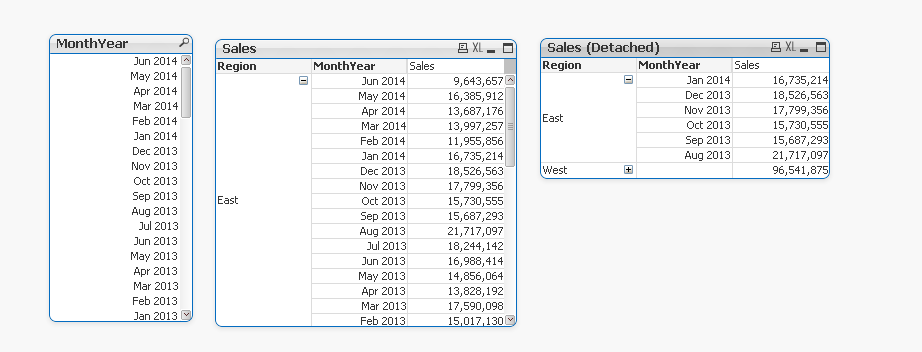
I WANT TO COMPARE MY CURRENT MONTH WITH LAST SIX MONTH SALES.
EG. WHEN I SELECT (JAN 2014) I WANT THE PIVOT TABLE TO SHOW ME LAST SIX MONTHS AS SHOWN BELOW IN SALES (DETACHED) PIVOT TABLE.
ANY SUGGESTIONS???

 aveeeeeee7en
- Mark as New
- Bookmark
- Subscribe
- Mute
- Subscribe to RSS Feed
- Permalink
- Report Inappropriate Content
Hi
Use this in your expression:
Sum( {$<Date={">=$(=MonthStart(AddMonths(Max(Date),-6)))<$(=MonthEnd(Max(Date)))"}>} Sales)
 jerem1234
- Mark as New
- Bookmark
- Subscribe
- Mute
- Subscribe to RSS Feed
- Permalink
- Report Inappropriate Content
Maybe something like:
sum({<MonthYear = {'>=$(=addmonths(max(MonthYear), -6))<=$(=max(MonthYear))'}>}Sales)
If nothing is selected, it will take show the latest 6 months.
Hope this helps!
- Mark as New
- Bookmark
- Subscribe
- Mute
- Subscribe to RSS Feed
- Permalink
- Report Inappropriate Content
Hey jerem,
i am using the same expression to get my sales for last six month but when i change -6 to -5 its giving me the same result as -6.
jerem1234
- Mark as New
- Bookmark
- Subscribe
- Mute
- Subscribe to RSS Feed
- Permalink
- Report Inappropriate Content
Does it also give the same result as -4? Have you tried using Nag Aviral's formula? Can't be sure why its giving you that result, could you post a sample qvw demonstrating the problem?
- Mark as New
- Bookmark
- Subscribe
- Mute
- Subscribe to RSS Feed
- Permalink
- Report Inappropriate Content
I figured it out With Jerem's/nag expression.
thanks guys.