Unlock a world of possibilities! Login now and discover the exclusive benefits awaiting you.

- Qlik Community
- :
- All Forums
- :
- QlikView
- :
- Partial count is not coming proper
- Subscribe to RSS Feed
- Mark Topic as New
- Mark Topic as Read
- Float this Topic for Current User
- Bookmark
- Subscribe
- Mute
- Printer Friendly Page

- Mark as New
- Bookmark
- Subscribe
- Mute
- Subscribe to RSS Feed
- Permalink
- Report Inappropriate Content
Partial count is not coming proper
Hi
I am trying to get correct right generation data in my project.the total sum of generation is coming right but when i am selecting single state in my project as dimension than the generation is coming wrong.
this is total installed capacity which is coming right (fig.1)

but in (fig2) when i am select single state like AP then the installed capacity is not coming right .instead of giving 222.63
it will give 279
the expression used is::SUM(CapacityPerEquipment) / 1000
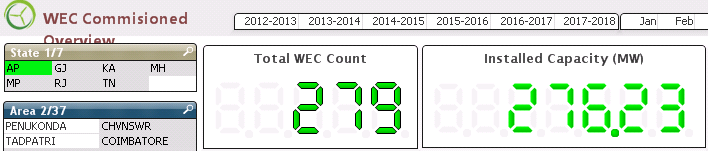
please help me out .
thanx in advance.

 sunny_talwar
- Mark as New
- Bookmark
- Subscribe
- Mute
- Subscribe to RSS Feed
- Permalink
- Report Inappropriate Content
Would you be able to share your app to look into it?

- Mark as New
- Bookmark
- Subscribe
- Mute
- Subscribe to RSS Feed
- Permalink
- Report Inappropriate Content
May be State AP has that values only?
- Mark as New
- Bookmark
- Subscribe
- Mute
- Subscribe to RSS Feed
- Permalink
- Report Inappropriate Content
No
when i am performing same task with pivot table than it will give me right result .
as Ap-279 and 222.63
- Mark as New
- Bookmark
- Subscribe
- Mute
- Subscribe to RSS Feed
- Permalink
- Report Inappropriate Content
The size of application is too large.
i want to know that when i am perfoming same task with pivot chart the result is coming right but when it is performed with gauge chart then it is giving me wrong ans .
for Eg:
Pivot chart:
selecting state AP it gives 279 and 222.63
but in gauge chart for AP it gives 279 and 276
expression was same for both chart::: SUM({<IsAvailable={1}>}CapacityPerEquipment)/1000
sunny_talwar
- Mark as New
- Bookmark
- Subscribe
- Mute
- Subscribe to RSS Feed
- Permalink
- Report Inappropriate Content
May be this link can help you address the size concerns
Preparing examples for Upload - Reduction and Data Scrambling