Unlock a world of possibilities! Login now and discover the exclusive benefits awaiting you.

- Qlik Community
- :
- All Forums
- :
- QlikView
- :
- Re: Percentage Pivot table
- Subscribe to RSS Feed
- Mark Topic as New
- Mark Topic as Read
- Float this Topic for Current User
- Bookmark
- Subscribe
- Mute
- Printer Friendly Page

- Mark as New
- Bookmark
- Subscribe
- Mute
- Subscribe to RSS Feed
- Permalink
- Report Inappropriate Content
Percentage Pivot table
Hey, everyone!
I'm trying to solve this issue, but it's not working. see:
I have a Pivot table, where I have the total produced by machine and by product
| Machine A | Machine B | Machine C | Total Per Product | |
|---|---|---|---|---|
| Product A | 59 | 47 | 79 | 185 |
| Product B | 27 | 52 | 22 | 101 |
| Product C | 26 | 12 | 55 | 93 |
| Total Per Machine | 112 | 111 | 156 | 379 |
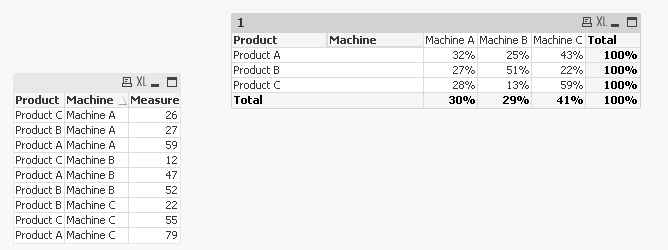
I want to show the respective percentage for each one of these (like that below):
| Machine A | Machine B | Machine C | Total Per Product | |
|---|---|---|---|---|
| Product A | 32% | 25% | 43% | 1 |
| Product B | 27% | 51% | 22% | 1 |
| Product C | 28% | 13% | 59% | 1 |
| Total Per Machine | 30% | 29% | 41% | 1 |
Can anyone help me, please?
Kind regards, Luiz Bisco
Accepted Solutions

 sunny_talwar
- Mark as New
- Bookmark
- Subscribe
- Mute
- Subscribe to RSS Feed
- Permalink
- Report Inappropriate Content
sunny_talwar
- Mark as New
- Bookmark
- Subscribe
- Mute
- Subscribe to RSS Feed
- Permalink
- Report Inappropriate Content
Try this may be:
Count(Measure)/Count(TOTAL <Product> Measure)
or if you are doing Sum, then this:
Sum(Measure)/Sum(TOTAL <Product> Measure)
- Mark as New
- Bookmark
- Subscribe
- Mute
- Subscribe to RSS Feed
- Permalink
- Report Inappropriate Content
Thank you for the attention, Sunny!
Ok, but It will give me the % of the general not by product by machine.
sunny_talwar
- Mark as New
- Bookmark
- Subscribe
- Mute
- Subscribe to RSS Feed
- Permalink
- Report Inappropriate Content
I think it should, let me create a small sample for you 
sunny_talwar
- Mark as New
- Bookmark
- Subscribe
- Mute
- Subscribe to RSS Feed
- Permalink
- Report Inappropriate Content
Check this out
- Mark as New
- Bookmark
- Subscribe
- Mute
- Subscribe to RSS Feed
- Permalink
- Report Inappropriate Content
Sunny, can I make it inside a set analysis.
I'm trying to do something like that, I have to show only one process:
Sum( Total {$<
Process={'Extrusion'}
>} Measure)
sunny_talwar
- Mark as New
- Bookmark
- Subscribe
- Mute
- Subscribe to RSS Feed
- Permalink
- Report Inappropriate Content
Sure, may be like this:
If you want it in both numerator and denominator
Sum({<Process = {'Extrusion'}>}Measure)/Sum(TOTAL <Product> {<Process = {'Extrusion'}>}Measure)
If you want it only in denominator
Sum(Measure)/Sum(TOTAL <Product> {<Process = {'Extrusion'}>}Measure)
- Mark as New
- Bookmark
- Subscribe
- Mute
- Subscribe to RSS Feed
- Permalink
- Report Inappropriate Content
You're so smart, really! hahaha. Thank you very much!