Unlock a world of possibilities! Login now and discover the exclusive benefits awaiting you.

Announcements
Share your agentic AI experience, learn from others, and earn a new badge: Put Agentic AI to Work
- Qlik Community
- :
- All Forums
- :
- QlikView
- :
- Re: Pie Chart Desgin
Options
- Subscribe to RSS Feed
- Mark Topic as New
- Mark Topic as Read
- Float this Topic for Current User
- Bookmark
- Subscribe
- Mute
- Printer Friendly Page
Turn on suggestions
Auto-suggest helps you quickly narrow down your search results by suggesting possible matches as you type.
Showing results for

Anonymous
Not applicable
2015-05-06
09:23 AM
- Mark as New
- Bookmark
- Subscribe
- Mute
- Subscribe to RSS Feed
- Permalink
- Report Inappropriate Content
Pie Chart Desgin
Hi,
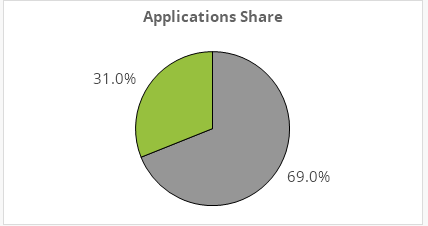
Does anyone knows how to remove the chart borders?
I mean the one on the pie itself (not the box)
Thanks
753 Views
1 Solution
Accepted Solutions

 morganaaron
Specialist
2015-05-06
09:26 AM
- Mark as New
- Bookmark
- Subscribe
- Mute
- Subscribe to RSS Feed
- Permalink
- Report Inappropriate Content
Upgrade to 11.2 SR10 and set the sector outline to white - though this will also make the separating line white too.
2 Replies
morganaaron
Specialist
2015-05-06
09:26 AM
- Mark as New
- Bookmark
- Subscribe
- Mute
- Subscribe to RSS Feed
- Permalink
- Report Inappropriate Content
Upgrade to 11.2 SR10 and set the sector outline to white - though this will also make the separating line white too.

 Gysbert_Wassena
Partner - Champion III
2015-05-06
09:27 AM
- Mark as New
- Bookmark
- Subscribe
- Mute
- Subscribe to RSS Feed
- Permalink
- Report Inappropriate Content
In Qlikview SR10 or higher you can remove the borders of the segments by setting the Sector Outline color setting on the Colors tab to 100% transparent.
talk is cheap, supply exceeds demand