Unlock a world of possibilities! Login now and discover the exclusive benefits awaiting you.

- Qlik Community
- :
- All Forums
- :
- QlikView
- :
- Pivot table Expression
- Subscribe to RSS Feed
- Mark Topic as New
- Mark Topic as Read
- Float this Topic for Current User
- Bookmark
- Subscribe
- Mute
- Printer Friendly Page

- Mark as New
- Bookmark
- Subscribe
- Mute
- Subscribe to RSS Feed
- Permalink
- Report Inappropriate Content
Pivot table Expression
Hi All,
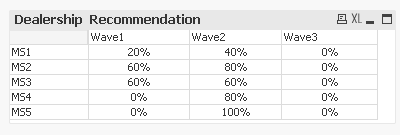
I am facing issue with null values. if the value is null it is displaying as 0.
This is the expression
=Sum({<WAVE = {"WAVE1"}>} DEALER_RECOMMENDATION_VALUE_CURRENT_WAVE) *0.2*100)
Please help.
Accepted Solutions
- Mark as New
- Bookmark
- Subscribe
- Mute
- Subscribe to RSS Feed
- Permalink
- Report Inappropriate Content
= if ( Sum({<WAVE = {"WAVE1"}>} DEALER_RECOMMENDATION_VALUE_CURRENT_WAVE) > 0 ,
Sum({<WAVE = {"WAVE1"}>} DEALER_RECOMMENDATION_VALUE_CURRENT_WAVE) *0.2*100) ,
null() )

 maxgro
- Mark as New
- Bookmark
- Subscribe
- Mute
- Subscribe to RSS Feed
- Permalink
- Report Inappropriate Content
maybe you can use the nullcount to check for null, example
if(NullCount(exp)>0, '???', sum(exp))

 jonathandienst
- Mark as New
- Bookmark
- Subscribe
- Mute
- Subscribe to RSS Feed
- Permalink
- Report Inappropriate Content
If displaying 0 is not correct, what would you like to see if the underlying field is null?
- Mark as New
- Bookmark
- Subscribe
- Mute
- Subscribe to RSS Feed
- Permalink
- Report Inappropriate Content
Hi,
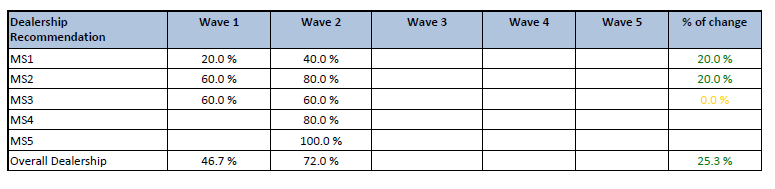
i need to display null as empty. (Wave3, Wave4, Wave5 columns are empty)
This is how i display in SSRS report. I am trying to replicate the same in QV report.
Also i need to display the average. please help.
Thanks
- Mark as New
- Bookmark
- Subscribe
- Mute
- Subscribe to RSS Feed
- Permalink
- Report Inappropriate Content
= if ( Sum({<WAVE = {"WAVE1"}>} DEALER_RECOMMENDATION_VALUE_CURRENT_WAVE) > 0 ,
Sum({<WAVE = {"WAVE1"}>} DEALER_RECOMMENDATION_VALUE_CURRENT_WAVE) *0.2*100) ,
null() )
- Mark as New
- Bookmark
- Subscribe
- Mute
- Subscribe to RSS Feed
- Permalink
- Report Inappropriate Content
Thank you Bill.