Unlock a world of possibilities! Login now and discover the exclusive benefits awaiting you.

- Qlik Community
- :
- All Forums
- :
- QlikView
- :
- Re: Pivot table avg
- Subscribe to RSS Feed
- Mark Topic as New
- Mark Topic as Read
- Float this Topic for Current User
- Bookmark
- Subscribe
- Mute
- Printer Friendly Page

- Mark as New
- Bookmark
- Subscribe
- Mute
- Subscribe to RSS Feed
- Permalink
- Report Inappropriate Content
Pivot table avg
Hi,
using a pivot table I have this situation:
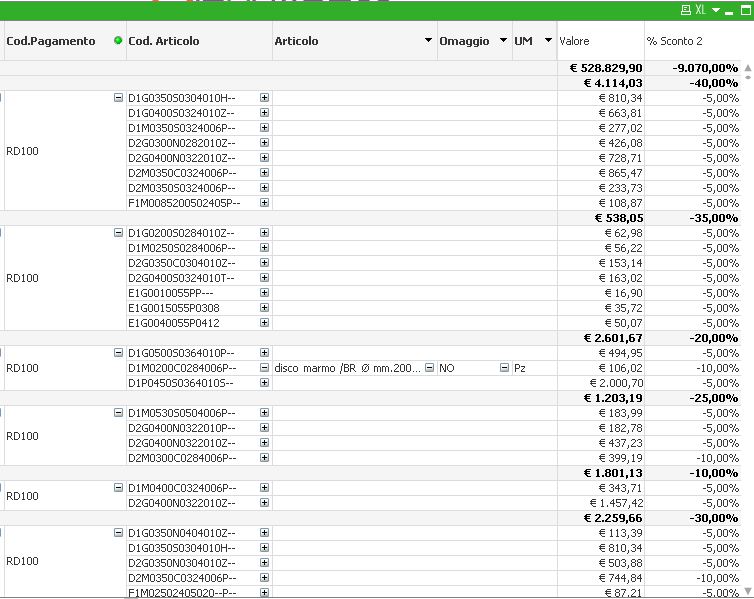
so I have total for both columns: I wouldn't have total for the second one but the average of the percentage.
Can I do it? How?
Thank you!
- Tags:
- aggr
- analysis
- chart
- expression
- expressions
- function
- pivot
- pivot_column
- pivot_percentage
- pivot_table
- qlikview_layout_visualizations
- set_analisys
- set_analysis
- straight_table
- sum
- table
- « Previous Replies
-
- 1
- 2
- Next Replies »
Accepted Solutions
- Mark as New
- Bookmark
- Subscribe
- Mute
- Subscribe to RSS Feed
- Permalink
- Report Inappropriate Content
you need to change expression from sum to avg 
- Mark as New
- Bookmark
- Subscribe
- Mute
- Subscribe to RSS Feed
- Permalink
- Report Inappropriate Content
try this:
if(rowno()=0, expressionyyy, expressionxxx)
- Mark as New
- Bookmark
- Subscribe
- Mute
- Subscribe to RSS Feed
- Permalink
- Report Inappropriate Content
Pari Pari ha scritto:
try this:
if(rowno()=0, expressionyyy, expressionxxx)
I tried
if(rowno()=0, avg(VEN_PERC_SCONTO2)/100, sum(VEN_PERC_SCONTO2)/100)
but doesn't work...
- Mark as New
- Bookmark
- Subscribe
- Mute
- Subscribe to RSS Feed
- Permalink
- Report Inappropriate Content
you can try range avg function
it will be easier if you post a small sample file:)
- Mark as New
- Bookmark
- Subscribe
- Mute
- Subscribe to RSS Feed
- Permalink
- Report Inappropriate Content
Thank you Pari Pari, the qvw is attached below.
- Mark as New
- Bookmark
- Subscribe
- Mute
- Subscribe to RSS Feed
- Permalink
- Report Inappropriate Content
can you explain why
if(rowno()=0, avg(VEN_PERC_SCONTO2)/100, sum(VEN_PERC_SCONTO2)/100)
doesn't work? IMO works fine (see att qvw file)
- Mark as New
- Bookmark
- Subscribe
- Mute
- Subscribe to RSS Feed
- Permalink
- Report Inappropriate Content
YOU must be use for modify a total the function dimensionality().
Bye marchetto
- Mark as New
- Bookmark
- Subscribe
- Mute
- Subscribe to RSS Feed
- Permalink
- Report Inappropriate Content
Pari Pari ha scritto:
can you explain why
if(rowno()=0, avg(VEN_PERC_SCONTO2)/100, sum(VEN_PERC_SCONTO2)/100)
doesn't work? IMO works fine (see att qvw file)
It doesn't work fine... (5+5+10)/3=6,67, not 5 😉

- Mark as New
- Bookmark
- Subscribe
- Mute
- Subscribe to RSS Feed
- Permalink
- Report Inappropriate Content
Thank you Marchetto, I also tried to use dimensionality(), but I'm not able to make it work.
Any suggestion?
- Mark as New
- Bookmark
- Subscribe
- Mute
- Subscribe to RSS Feed
- Permalink
- Report Inappropriate Content
take a look at this....
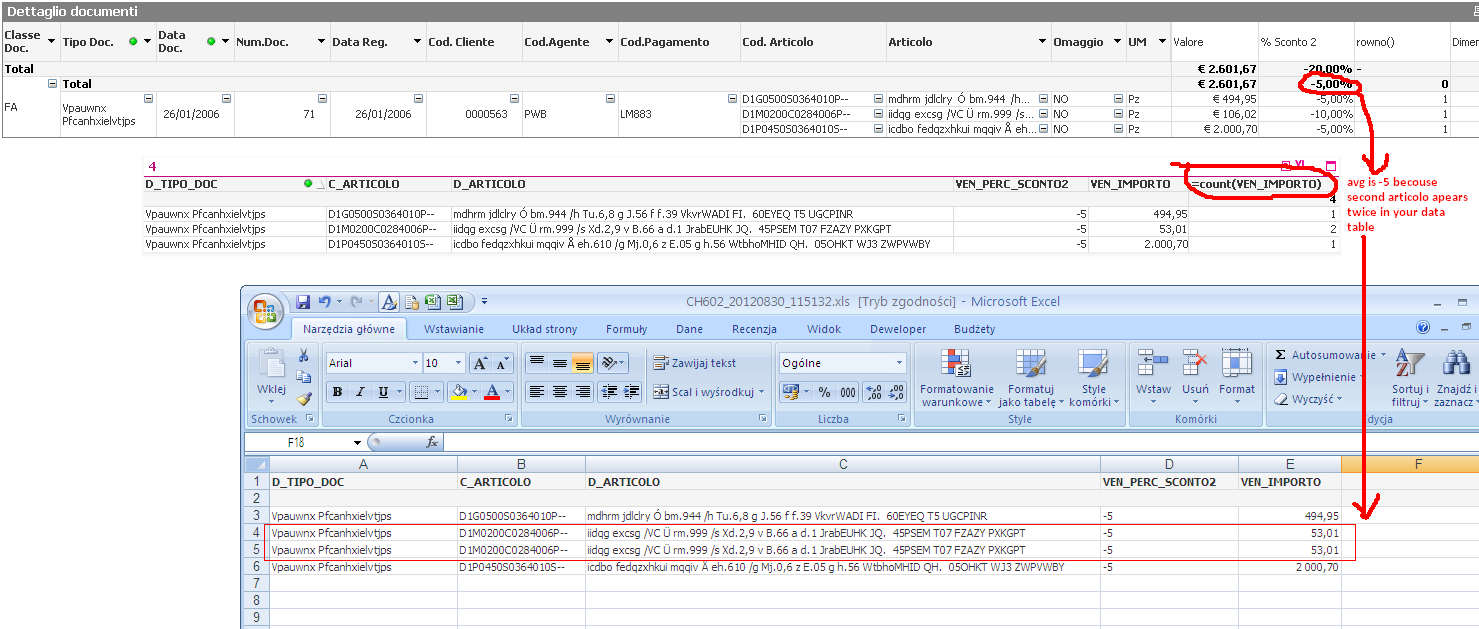
let's start from the beginning:)
what you want to achieve in this selection (presented on attached screen)?
- « Previous Replies
-
- 1
- 2
- Next Replies »