Unlock a world of possibilities! Login now and discover the exclusive benefits awaiting you.

- Qlik Community
- :
- All Forums
- :
- QlikView
- :
- Re: Pivoting/Straigh Table chart
- Subscribe to RSS Feed
- Mark Topic as New
- Mark Topic as Read
- Float this Topic for Current User
- Bookmark
- Subscribe
- Mute
- Printer Friendly Page

- Mark as New
- Bookmark
- Subscribe
- Mute
- Subscribe to RSS Feed
- Permalink
- Report Inappropriate Content
Pivoting/Straigh Table chart
Hi
I have the following excel where in group 1 there are 3 teams and group 2 has 3 teams. Each team has certain number of players. I want number of players to be aggregated at group level.Kindly help
Accepted Solutions

 sunny_talwar
- Mark as New
- Bookmark
- Subscribe
- Mute
- Subscribe to RSS Feed
- Permalink
- Report Inappropriate Content
Is this what is needed?
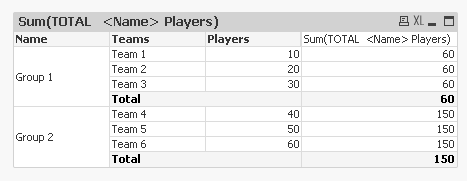
Script changes (you might not need this)
LOAD If(Len(Trim(Name)) > 0, Name, Peek('Name')) as Name,
Teams,
Players
FROM
[test (1).xlsx]
(ooxml, embedded labels, table is Sheet1);
Expression:
Sum(TOTAL <Name> Players)
- Mark as New
- Bookmark
- Subscribe
- Mute
- Subscribe to RSS Feed
- Permalink
- Report Inappropriate Content
Hi ,
In your Name Column , you hve null data .
Inorder to aggregate or group by , you should not have any blanks or nulls in the column which you'll use for grouping .

 Colin-Albert
- Mark as New
- Bookmark
- Subscribe
- Mute
- Subscribe to RSS Feed
- Permalink
- Report Inappropriate Content
Remove Players from your chart dimensions.
Remove the Players>0 measure
Add Sum(Players) as a measure to your chart.
sunny_talwar
- Mark as New
- Bookmark
- Subscribe
- Mute
- Subscribe to RSS Feed
- Permalink
- Report Inappropriate Content
Is this what is needed?
Script changes (you might not need this)
LOAD If(Len(Trim(Name)) > 0, Name, Peek('Name')) as Name,
Teams,
Players
FROM
[test (1).xlsx]
(ooxml, embedded labels, table is Sheet1);
Expression:
Sum(TOTAL <Name> Players)
- Mark as New
- Bookmark
- Subscribe
- Mute
- Subscribe to RSS Feed
- Permalink
- Report Inappropriate Content
Hi Sunny
As always, thanks for your prompt help. I implemented this in my PIVOT table. Now I want 60 and 150 the totals to be displayed only once and the Players column should not be displayed. Kindly help me as to how to achieve that
sunny_talwar
- Mark as New
- Bookmark
- Subscribe
- Mute
- Subscribe to RSS Feed
- Permalink
- Report Inappropriate Content
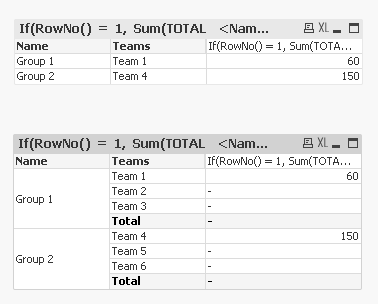
Like this?
- Mark as New
- Bookmark
- Subscribe
- Mute
- Subscribe to RSS Feed
- Permalink
- Report Inappropriate Content
Hi Sunny,
Thanks again for your response. I implemented it today at work with my tables and it is fine. Now the last help in this series, can I have group name and Team Name in the same column and the number aggr against each team at top, something like this
Group 1 60
Team 1 60
Team 2
Team 3
Group 2 150
Team 4 150
Team 5
Team 6
Is this possible? I have multiple levels and this is just an example of my application. I have to aggregate all children to it parent upto the root