Unlock a world of possibilities! Login now and discover the exclusive benefits awaiting you.

- Qlik Community
- :
- All Forums
- :
- QlikView
- :
- Previous date Value- Set analysis
- Subscribe to RSS Feed
- Mark Topic as New
- Mark Topic as Read
- Float this Topic for Current User
- Bookmark
- Subscribe
- Mute
- Printer Friendly Page

- Mark as New
- Bookmark
- Subscribe
- Mute
- Subscribe to RSS Feed
- Permalink
- Report Inappropriate Content
Previous date Value- Set analysis
Hi all,
I'm trying to work out the previous day's stock - using
sum
( {$<[Stock Date] = {$([Stock Date]-1)>} [SOH Total Units] )
But it doesn't return any values?
Any ideas?
Thanks!

 Sokkorn
- Mark as New
- Bookmark
- Subscribe
- Mute
- Subscribe to RSS Feed
- Permalink
- Report Inappropriate Content
Hi beanz,
Your set expression seem to be right. Please note that field [Stock Date] have data in date format ex. 20-09-2012.
And ([Stock Date] - 1) will return in number format equal to 41172. So it will return 0 or null when you compare [20-09-2012] to 41172.
I two solution to get this job done. Let try
1. Use this set analysis : =SUM({$<[Stock Date] = {"$(=DATE(Max([Stock Date])-1))"}>} Unit)
2. Use variable
a. Create variable : vPreviousDate = DATE(Max([Stock Date])-1)
b. Use set analysis : =Sum({$<[Stock Date] = {"$(=vPreviousDate)"}>} Unit)
Hope this help.
Regards,
Sokkorn
- Mark as New
- Bookmark
- Subscribe
- Mute
- Subscribe to RSS Feed
- Permalink
- Report Inappropriate Content
As Sokkorn rightly pointed the return value would be a number hence you have to convert into Date before you do the comparison.
But, if you want to have a chart/table you have various other ways.
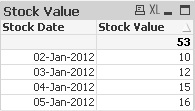
Original Table:

1. Altering the Dimension and keeping the expression simple
Dimension: =Date([Stock Date]+1,'DD-MMM-YYYY')
Expression: Sum([SOH Total Units])
2. If you want to display both Current and Prev value, you can choose ABOVE function
Dimension: = [Stock Date]
Expresson:
Curr: = Sum([SOH Total Units])
Prev: = Above(Column(1))
