Unlock a world of possibilities! Login now and discover the exclusive benefits awaiting you.

- Qlik Community
- :
- All Forums
- :
- QlikView
- :
- Re: Previous day set analysis
- Subscribe to RSS Feed
- Mark Topic as New
- Mark Topic as Read
- Float this Topic for Current User
- Bookmark
- Subscribe
- Mute
- Printer Friendly Page

- Mark as New
- Bookmark
- Subscribe
- Mute
- Subscribe to RSS Feed
- Permalink
- Report Inappropriate Content
Previous day set analysis
Hi guys,
Consider the following Chart type Straight Table,
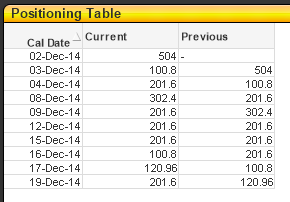
Cal Date is the dimension.
Current is an expression as follows:
Sum( {$<[Cal Day]={"<=$(=Max([Cal Day]))"}, [Sales Type]={"SPOT"}>} [Sales Qty])
Previous is an expression as follows:
above(column(1))
While using the the above(column(1)) yielded the result that I wanted, which is to display the previous day current values, I was wondering if I could express it in the form of a set analysis expression like what I did on Current rather than using the above(column()) function.
Can someone show me the correct way?
Thank you very much for your kind attention guys.
Regards,
Khairul
Accepted Solutions

 tresB
tresB
- Mark as New
- Bookmark
- Subscribe
- Mute
- Subscribe to RSS Feed
- Permalink
- Report Inappropriate Content
Using set analysis would not be an easy way in this case, because set analysis doesn't evaluate row-wise but once for a chart.
tresB
- Mark as New
- Bookmark
- Subscribe
- Mute
- Subscribe to RSS Feed
- Permalink
- Report Inappropriate Content
Using set analysis would not be an easy way in this case, because set analysis doesn't evaluate row-wise but once for a chart.

 Oleg_Troyansky
- Mark as New
- Bookmark
- Subscribe
- Mute
- Subscribe to RSS Feed
- Permalink
- Report Inappropriate Content
Khairul,
You should keep in mind that the Set Analysis expression is performed only once, before the chart is generated. It is not performed for each line of the chart, and therefore it cannot be sensitive to the Dimension values in the chart.
Your "Current" expression works because the Date is used as the dimension, and therefore the current sales for that date are displayed by default. Set Analysis has nothing to do with it.
In order to implement a universal solution that can allow showing Current and Previous for Dates, Weeks, Months, etc... - you need to implement a data modeling solution called "As of Date". There are many documents that explain how to build the "As of Date" table, including my blog at:
www.naturalsynergies.com/blog
cheers,
Oleg Troyansky
www.masterssummit.com - take your QlikView skills to the next level!

 krishna20
- Mark as New
- Bookmark
- Subscribe
- Mute
- Subscribe to RSS Feed
- Permalink
- Report Inappropriate Content
Hi
Try this,
Sum( {$<[Cal Day]={"<=$(=Max([Cal Day])-1)"}, [Sales Type]={"SPOT"}>} [Sales Qty])
Regards
Krishna
 AbhijitBansode
- Mark as New
- Bookmark
- Subscribe
- Mute
- Subscribe to RSS Feed
- Permalink
- Report Inappropriate Content
I assume [Cal Day] is a data counter in your script. Use below expression
Sum({< [Cal Day]={"$(=Max([Cal Day]))-1"}, [Sales Type]={"SPOT"}>}[Sales Qty])

 jagan
jagan
- Mark as New
- Bookmark
- Subscribe
- Mute
- Subscribe to RSS Feed
- Permalink
- Report Inappropriate Content
Hi,
It is not possible using set analysis, because the set analysis is calculated at chart level but not by row level, instead if you want to do it in front end we need to use Above() or if you want to do it in backend you can use Peek() or Prev().
Hope this helps you.
Regards,
Jagan.

 robert_mika
- Mark as New
- Bookmark
- Subscribe
- Mute
- Subscribe to RSS Feed
- Permalink
- Report Inappropriate Content
Max([Dt])-1 - fails for first row....
and in addition for any row where Max-1 gives date that does not exist in Cal Day Column
- Mark as New
- Bookmark
- Subscribe
- Mute
- Subscribe to RSS Feed
- Permalink
- Report Inappropriate Content
Hi tresesco,
Thank you for your kind attention. It gave me another understanding of set analysis. I have thought so when I could not find any sample to do so. Guess got to go the with the above() function or do it in my ETL scripting then.
Thank you again 
Regards,
Khairul