Unlock a world of possibilities! Login now and discover the exclusive benefits awaiting you.

- Qlik Community
- :
- All Forums
- :
- QlikView
- :
- Re: Previous
- Subscribe to RSS Feed
- Mark Topic as New
- Mark Topic as Read
- Float this Topic for Current User
- Bookmark
- Subscribe
- Mute
- Printer Friendly Page

 soha1902
- Mark as New
- Bookmark
- Subscribe
- Mute
- Subscribe to RSS Feed
- Permalink
- Report Inappropriate Content
Previous
Hi All,
I have following Data:
Load * Inline [
Date,Sales
12/12/2014,50
01/01/2015,100
01/02/2015,200
01/03/2015,300
01/04/2015,500
01/05/2015,600 ];
Tab1:
Load
Date as Date,
Sales as Sales,
Previous(Previous(Sales)) as PreSales
Resident Tab;
Drop Table Tab;
As of now in "Presales" column I am getting values of last 2 days but in future this value will be change for last 5 or some other number.
So please let me the dynamic way which I can use in place of previous.
- Tags:
- new_to_qlikview
- « Previous Replies
-
- 1
- 2
- Next Replies »
soha1902
- Mark as New
- Bookmark
- Subscribe
- Mute
- Subscribe to RSS Feed
- Permalink
- Report Inappropriate Content
it gives only sum of previus(Sales) + First value of sales. but I want sum of previous, plus all the record till first record.

 sunny_talwar
- Mark as New
- Bookmark
- Subscribe
- Mute
- Subscribe to RSS Feed
- Permalink
- Report Inappropriate Content
This?
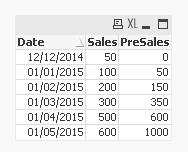
Tab:
Load * Inline [
Date, Sales
12/12/2014, 50
01/01/2015, 100
01/02/2015, 200
01/03/2015, 300
01/04/2015, 500
01/05/2015, 600
];
Tab1:
Load Date,
Sales,
RangeSum(Peek(Sales, -1), Peek(Sales, -2), Peek(Sales, -3)) as PreSales
Resident Tab;
Drop Table Tab;

 SreeniJD
- Mark as New
- Bookmark
- Subscribe
- Mute
- Subscribe to RSS Feed
- Permalink
- Report Inappropriate Content
Hi There,
are you looking something like...
RangeSum(Previous(Sales),Peek(Sales)) as PreSales..
which will give you 1000 if you select 01/05/2015..
Happy to help
Sreeni
 Digvijay_Singh
- Mark as New
- Bookmark
- Subscribe
- Mute
- Subscribe to RSS Feed
- Permalink
- Report Inappropriate Content
Something like this -
Tab1:
Load
Date as Date,
Sales as Sales,
RangeSum(Sales,Peek('PrevSales',-1)) as PrevSales
Resident Tab;
Drop Table Tab;

- Mark as New
- Bookmark
- Subscribe
- Mute
- Subscribe to RSS Feed
- Permalink
- Report Inappropriate Content
SreeniJD
- Mark as New
- Bookmark
- Subscribe
- Mute
- Subscribe to RSS Feed
- Permalink
- Report Inappropriate Content
Soha -
Are you looking for the desired results as mentioned in below tables (1st refers to presales by year, second one is across years)... Please clarify.
| Date | Sales | PreSales |
| 12/12/2014 | 50 | 0 |
| 01/01/2015 | 100 | 0 |
| 01/02/2015 | 200 | 100 |
| 01/03/2015 | 300 | 300 |
| 01/04/2015 | 500 | 600 |
| 01/05/2015 | 600 | 1100 |
Date | Sales | PreSales |
| 12/12/2014 | 50 | 0 |
| 01/01/2015 | 100 | 50 |
| 01/02/2015 | 200 | 150 |
| 01/03/2015 | 300 | 350 |
| 01/04/2015 | 500 | 650 |
| 01/05/2015 | 600 | 1150 |
Sreeni
soha1902
- Mark as New
- Bookmark
- Subscribe
- Mute
- Subscribe to RSS Feed
- Permalink
- Report Inappropriate Content
This is correct sunny. I am looking the same but suppose I want to add last 30 days then I need to write 30 Peek(). How I will do the same in dynamically.
Thanks.
sunny_talwar
- Mark as New
- Bookmark
- Subscribe
- Mute
- Subscribe to RSS Feed
- Permalink
- Report Inappropriate Content
For dynamic solution, you might have to use Loop. I don't think there is an easier solution.
Best,
Sunny
- « Previous Replies
-
- 1
- 2
- Next Replies »