Unlock a world of possibilities! Login now and discover the exclusive benefits awaiting you.

- Qlik Community
- :
- All Forums
- :
- QlikView
- :
- Re: Problem Sum
- Subscribe to RSS Feed
- Mark Topic as New
- Mark Topic as Read
- Float this Topic for Current User
- Bookmark
- Subscribe
- Mute
- Printer Friendly Page

- Mark as New
- Bookmark
- Subscribe
- Mute
- Subscribe to RSS Feed
- Permalink
- Report Inappropriate Content
Problem Sum
Hi,
I have a problem with Function "Sum"
I try to calculate "Stock UC a date" with this :
FirstSortedValue(aggr(DISTINCT Sum(Qte_UC_Stock_BDD)+ sum(Qte_PCU_STOJOU),Date_Mvt, Code_Article,Stat_2_Article),-aggr(Date_Mvt,Date_Mvt,Code_Article,Stat_2_Article ))
and
FirstSortedValue(aggr(DISTINCT Sum(Qte_UC_Stock_BDD)+ rangesum(Above(TOTAL (Sum(Qte_PCU_STOJOU)) , 0, RowNo())),Date_Mvt, Code_Article,Stat_2_Article),-aggr(Date_Mvt,Date_Mvt,Code_Article,Stat_2_Article ))
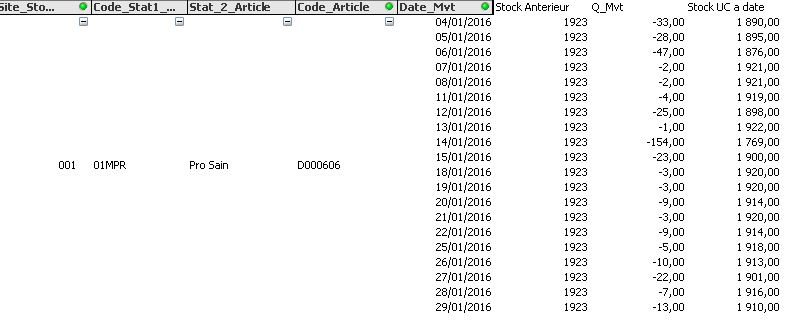
It's Ok for collapse or expand but my results is not good.
Normally subtract every operation of movement of the result obtained previously on "Stock UC a date"
Maybe anyone have an idea where is my problem?
- Tags:
- new_to_qlikview
- « Previous Replies
-
- 1
- 2
- Next Replies »
Accepted Solutions

 jolivares
- Mark as New
- Bookmark
- Subscribe
- Mute
- Subscribe to RSS Feed
- Permalink
- Report Inappropriate Content
I forget attach the sample QVW
jolivares
- Mark as New
- Bookmark
- Subscribe
- Mute
- Subscribe to RSS Feed
- Permalink
- Report Inappropriate Content
Try to post a small sample with data and show what is your problem better, i can't see what is happening or what you really want.
Let me help you.
- Mark as New
- Bookmark
- Subscribe
- Mute
- Subscribe to RSS Feed
- Permalink
- Report Inappropriate Content
a demo with my problem
Best regards
- Mark as New
- Bookmark
- Subscribe
- Mute
- Subscribe to RSS Feed
- Permalink
- Report Inappropriate Content
i join a demo for explain my problem
Best regards
- Mark as New
- Bookmark
- Subscribe
- Mute
- Subscribe to RSS Feed
- Permalink
- Report Inappropriate Content
anyone can help me  ?
?
jolivares
- Mark as New
- Bookmark
- Subscribe
- Mute
- Subscribe to RSS Feed
- Permalink
- Report Inappropriate Content
You need to user dimensionality()
If(Dimensionality()>4,(Sum(StockAnterieur))+ rangesum(Above(TOTAL (Sum(Q_Mvt)) , 0, RowNo())),
FirstSortedValue(aggr(DISTINCT Sum(StockAnterieur)+ sum(Q_Mvt),Date_Mvt, Code_Article,Stat_2_Article),-aggr(Date_Mvt,Date_Mvt,Code_Article,Stat_2_Article )))
jolivares
- Mark as New
- Bookmark
- Subscribe
- Mute
- Subscribe to RSS Feed
- Permalink
- Report Inappropriate Content
Ups... I think this is the solution to your question.
- Mark as New
- Bookmark
- Subscribe
- Mute
- Subscribe to RSS Feed
- Permalink
- Report Inappropriate Content
Hello,
Nor working, i have the same results.
when i expand my board on "date_Mvt" i found 1520 in QTY and is the good results;
but when i collapse to "Code_Article" or "Stat_2_Article" my results is not good i found 1910..
Thanks to the help
jolivares
- Mark as New
- Bookmark
- Subscribe
- Mute
- Subscribe to RSS Feed
- Permalink
- Report Inappropriate Content
Ok... Pascal, see the example below. I just simply yours.


This is what you are looking for:
jolivares
- Mark as New
- Bookmark
- Subscribe
- Mute
- Subscribe to RSS Feed
- Permalink
- Report Inappropriate Content
I forget attach the sample QVW
- « Previous Replies
-
- 1
- 2
- Next Replies »