Unlock a world of possibilities! Login now and discover the exclusive benefits awaiting you.

- Qlik Community
- :
- All Forums
- :
- QlikView
- :
- Problem with Aggr & Set Analysis
- Subscribe to RSS Feed
- Mark Topic as New
- Mark Topic as Read
- Float this Topic for Current User
- Bookmark
- Subscribe
- Mute
- Printer Friendly Page

 ecolomer
- Mark as New
- Bookmark
- Subscribe
- Mute
- Subscribe to RSS Feed
- Permalink
- Report Inappropriate Content
Problem with Aggr & Set Analysis
Hi,
I need to obtain in a table with (Ventas) Sales >0 in the Actual Year and the same for the last Year and but my expression don't work.
- count({<Año={$(AñoActual)}, Mes={'<=$(MesActual)'}>} distinct Cliente)
- Sum(if(Aggr(Sum({<Año={$(AñoActual)}, Mes={'<=$(MesActual)'}>} imVentaTAM), Cliente)>0, 1,0) )
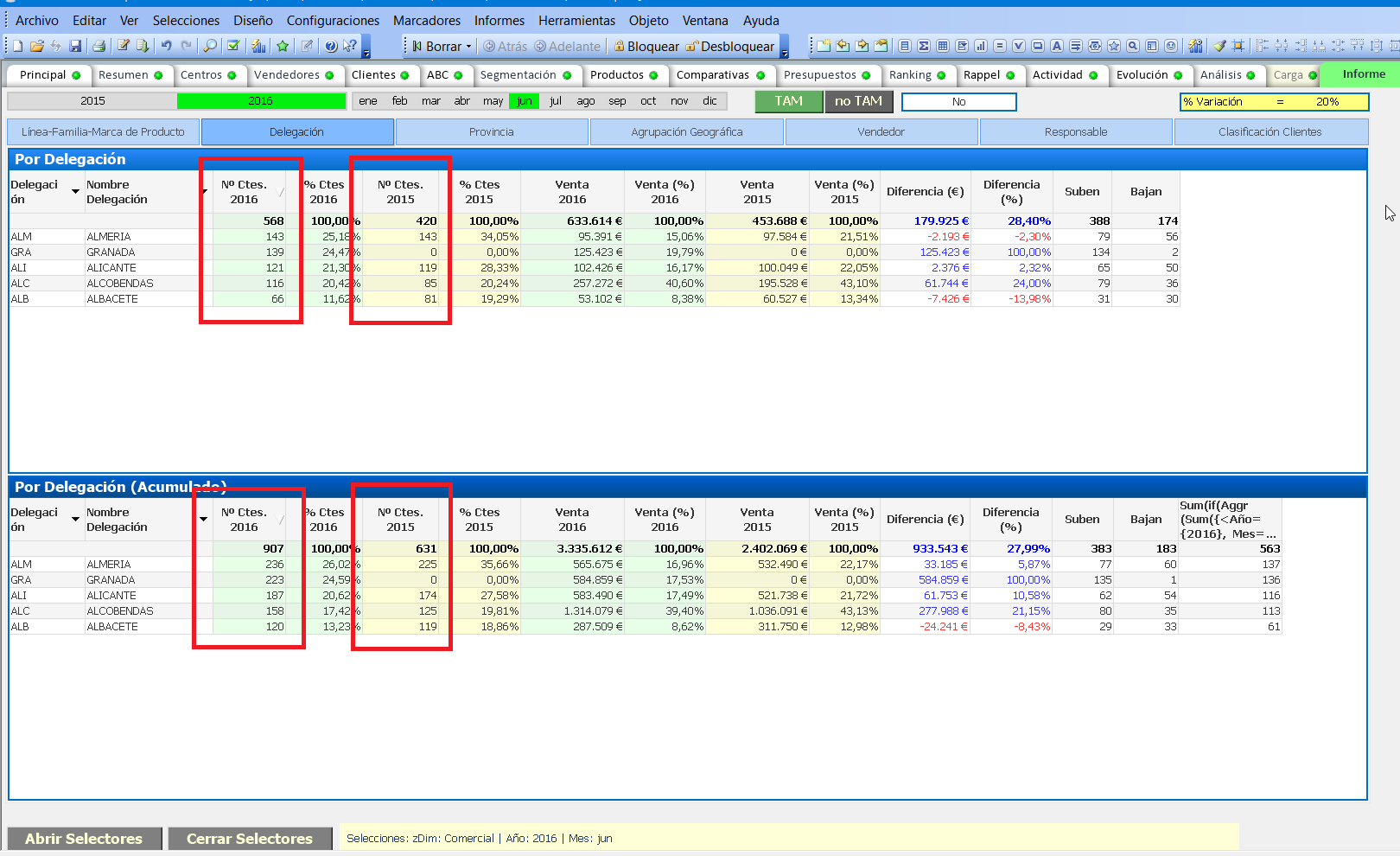 the number of Customer
Accepted Solutions
 antoniotiman
- Mark as New
- Bookmark
- Subscribe
- Mute
- Subscribe to RSS Feed
- Permalink
- Report Inappropriate Content
Hi Enrique,
In Your Doc I tried
count({<Año={$(AñoActual)}, Mes={'<=$(MesActual)'},Cliente={"=Sum({<Año={$(AñoActual)}, Mes={'<=$(MesActual)'}>} imVentaTAM) > 0"}>} distinct Cliente)
The result is 111
Regards,
Antonio

 sunny_talwar
- Mark as New
- Bookmark
- Subscribe
- Mute
- Subscribe to RSS Feed
- Permalink
- Report Inappropriate Content
What are the expected numbers here?
ecolomer
- Mark as New
- Bookmark
- Subscribe
- Mute
- Subscribe to RSS Feed
- Permalink
- Report Inappropriate Content
Hi Sunny T,
Attached I send a excel file with the list customers and marked error in column
ecolomer
- Mark as New
- Bookmark
- Subscribe
- Mute
- Subscribe to RSS Feed
- Permalink
- Report Inappropriate Content
For Nº Clientes 2016 = 111 (no 120) and for Nº Clientes 2015 = 119 (is OK)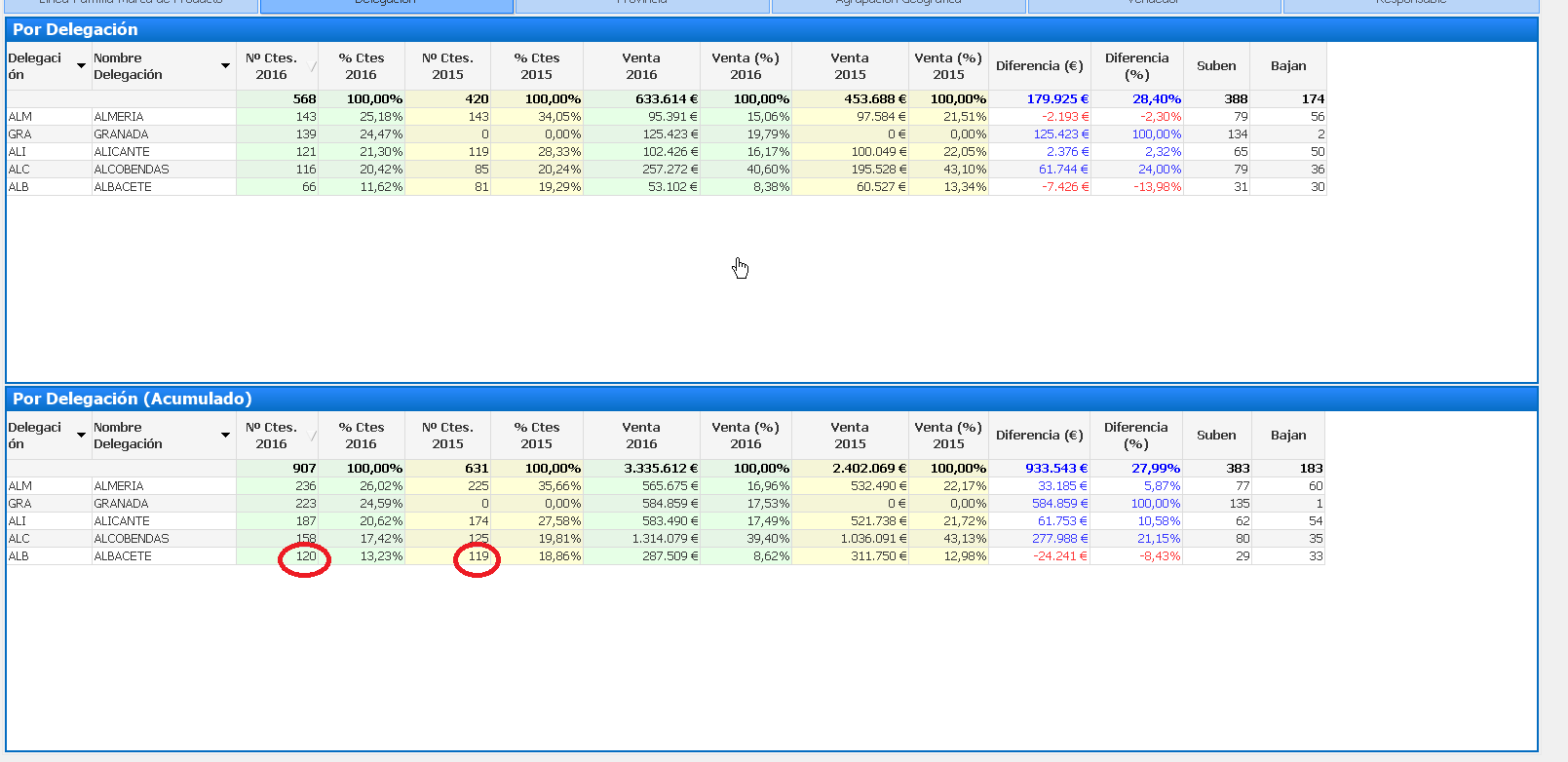
This data por a selected line (ALB ALBACETE
Attached you have an excel with detailed data

- Mark as New
- Bookmark
- Subscribe
- Mute
- Subscribe to RSS Feed
- Permalink
- Report Inappropriate Content
Can you please post sample Application?
ecolomer
- Mark as New
- Bookmark
- Subscribe
- Mute
- Subscribe to RSS Feed
- Permalink
- Report Inappropriate Content
In the original post is a qv file
antoniotiman
- Mark as New
- Bookmark
- Subscribe
- Mute
- Subscribe to RSS Feed
- Permalink
- Report Inappropriate Content
Hi Enrique,
In Your Doc I tried
count({<Año={$(AñoActual)}, Mes={'<=$(MesActual)'},Cliente={"=Sum({<Año={$(AñoActual)}, Mes={'<=$(MesActual)'}>} imVentaTAM) > 0"}>} distinct Cliente)
The result is 111
Regards,
Antonio
