Unlock a world of possibilities! Login now and discover the exclusive benefits awaiting you.

- Qlik Community
- :
- All Forums
- :
- QlikView
- :
- Re: Product Allocation
- Subscribe to RSS Feed
- Mark Topic as New
- Mark Topic as Read
- Float this Topic for Current User
- Bookmark
- Subscribe
- Mute
- Printer Friendly Page

- Mark as New
- Bookmark
- Subscribe
- Mute
- Subscribe to RSS Feed
- Permalink
- Report Inappropriate Content
Product Allocation
Hi everyone !!
This is my problem:
I need to allocate some products based on a Inventory.
This is my inventory:
| Warehouse | Product | Color | Size | Quantity |
| W1 | P1 | 1 | P | 10 |
| W2 | P1 | 1 | G | 15 |
| W1 | P2 | 2 | G | 12 |
| W3 | P2 | 1 | P | 11 |
| W4 | P3 | 3 | G | 9 |
And this is my demand:
| Store | Product | Color | Size | Demand |
| S1 | P1 | 1 | P | 4 |
| S2 | P1 | 1 | P | 3 |
| S3 | P1 | 1 | P | 3 |
| S1 | P1 | 1 | G | 7 |
| S2 | P1 | 1 | G | 6 |
| S3 | P1 | 1 | G | 8 |
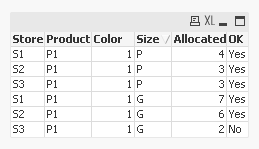
This should be my result:
| Store | Product | Color | Size | Allocated | OK | Remaining |
| S1 | P1 | 1 | P | 4 | Yes | 0 |
| S2 | P1 | 1 | P | 3 | Yes | 0 |
| S3 | P1 | 1 | P | 4 | No | 1 |
| S1 | P1 | 1 | G | 7 | Yes | 0 |
| S2 | P1 | 1 | G | 6 | Yes | 0 |
| S3 | P1 | 1 | G | 2 | No | 6 |
As you can see, I need to allocate line by line, based on Product/Color/Size that I have in my inventory.
In this example, I manage to attend the demand of the product P1/1/P in the stores S1 and S2, however, in the store S3, I only had 2 available items (my total inventory for product P1/1/P was 10 itens).
How can I achieve that ?
Thanks!!
Josué
- Tags:
- qlikview_scripting
Accepted Solutions

 swuehl
- Mark as New
- Bookmark
- Subscribe
- Mute
- Subscribe to RSS Feed
- Permalink
- Report Inappropriate Content
Maybe like attached for a front end solution?
(a script based could be derived from that if needed)
swuehl
- Mark as New
- Bookmark
- Subscribe
- Mute
- Subscribe to RSS Feed
- Permalink
- Report Inappropriate Content
Maybe like attached for a front end solution?
(a script based could be derived from that if needed)

 sunny_talwar
- Mark as New
- Bookmark
- Subscribe
- Mute
- Subscribe to RSS Feed
- Permalink
- Report Inappropriate Content
May be this in the script:
Table:
LOAD Store,
Product,
Color,
Size,
Demand
FROM
[https://community.qlik.com/thread/212364]
(html, codepage is 1252, embedded labels, table is @2);
Table1:
LOAD *,
If(Product = Peek('Product') and Color = Peek('Color') and Size = Peek('Size'), RangeSum(Demand, Peek('CumDemand')), Demand) as CumDemand
Resident Table
Order By Product, Color, Size, Store;
DROP Table Table;
Left Join (Table1)
LOAD Product,
Color,
Size,
Quantity
FROM
[https://community.qlik.com/thread/212364]
(html, codepage is 1252, embedded labels, table is @1);
FinalTable:
LOAD Store,
Product,
Color,
Size,
If(CumDemand <= Quantity, Demand, RangeSum(Quantity, -Previous(CumDemand))) as Allocated,
If(CumDemand <= Quantity, 'Yes', 'No') as OK
Resident Table1;
DROP Table Table1;
- Mark as New
- Bookmark
- Subscribe
- Mute
- Subscribe to RSS Feed
- Permalink
- Report Inappropriate Content
Hello swuehl !
Thanks, this solution helped me !