Unlock a world of possibilities! Login now and discover the exclusive benefits awaiting you.

- Qlik Community
- :
- All Forums
- :
- QlikView
- :
- Progress calculation information on accesspoint
- Subscribe to RSS Feed
- Mark Topic as New
- Mark Topic as Read
- Float this Topic for Current User
- Bookmark
- Subscribe
- Mute
- Printer Friendly Page

 Kushal_Chawda
- Mark as New
- Bookmark
- Subscribe
- Mute
- Subscribe to RSS Feed
- Permalink
- Report Inappropriate Content
Progress calculation information on accesspoint
Hi All,
when we go to setting ->User preference->object -> Progress Calculation Information ->Verbose, on desktop client we will be able to see calculation time of object like below
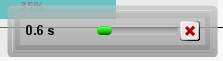
Can same will be implemented on access point ? When I open application access point and some selection made, I want to see the calculation time as desktop client.
Kushal_Chawda
- Mark as New
- Bookmark
- Subscribe
- Mute
- Subscribe to RSS Feed
- Permalink
- Report Inappropriate Content
 marcus_sommer
- Mark as New
- Bookmark
- Subscribe
- Mute
- Subscribe to RSS Feed
- Permalink
- Report Inappropriate Content
I'm not sure. You could try to transfer per copy+paste these setting from your local settings.ini (maybe you need to switch these option once or twice to find it in the ini-file) into the settings.ini from your server (you need to stop the server-services for it).
- Marcus
 sunny_talwar
- Mark as New
- Bookmark
- Subscribe
- Mute
- Subscribe to RSS Feed
- Permalink
- Report Inappropriate Content
Didn't know about these settings, but seems very informative for user. Would be interested about reading about this more.
Kushal_Chawda
- Mark as New
- Bookmark
- Subscribe
- Mute
- Subscribe to RSS Feed
- Permalink
- Report Inappropriate Content
But is it advisable to change the setting.ini file? If so can you tell me which setting I need to do?
marcus_sommer
- Mark as New
- Bookmark
- Subscribe
- Mute
- Subscribe to RSS Feed
- Permalink
- Report Inappropriate Content
It would be the following parameter:
CalculationProgressInformation=2
within the [Settings 7] area.
If it's advisable to change the settings.ini - I think if you are careful and you changed only things which you know about (and you made a BACKUP for the worst-case) it's not extremly risky - if these setting make sense and it's worth to spend additional resources Idon't know.
- Marcus

 adamdavi3s
- Mark as New
- Bookmark
- Subscribe
- Mute
- Subscribe to RSS Feed
- Permalink
- Report Inappropriate Content
Same, but if Rob doesn't know then it might not be documented anywhere
