Unlock a world of possibilities! Login now and discover the exclusive benefits awaiting you.

- Qlik Community
- :
- All Forums
- :
- QlikView
- :
- Re: QMC Issue Unknown File Showing
- Subscribe to RSS Feed
- Mark Topic as New
- Mark Topic as Read
- Float this Topic for Current User
- Bookmark
- Subscribe
- Mute
- Printer Friendly Page


- Mark as New
- Bookmark
- Subscribe
- Mute
- Subscribe to RSS Feed
- Permalink
- Report Inappropriate Content
QMC Issue Unknown File Showing
Hello,
Can you please check the Images
3rd Image is My Folder - There is no File (Empty Folder)
2nd Image is qvs (Mount Point)
1st Image is User Documents
Expecting : I don't want to show that file, Because in my folder there is no file
- Help Need


- « Previous Replies
-
- 1
- 2
- Next Replies »

 PaulVerkooijen_
- Mark as New
- Bookmark
- Subscribe
- Mute
- Subscribe to RSS Feed
- Permalink
- Report Inappropriate Content
Run the follow the (changed) directions in the post above the hyperlink
- Mark as New
- Bookmark
- Subscribe
- Mute
- Subscribe to RSS Feed
- Permalink
- Report Inappropriate Content
Paul, Upto first image it's done. But, from filter i did manually to add the File with Caps Letter.
After that what i need to do?
Help me please
PaulVerkooijen_- Mark as New
- Bookmark
- Subscribe
- Mute
- Subscribe to RSS Feed
- Permalink
- Report Inappropriate Content
filter is not case sensitive.
- Click OK, procmon will start to monitor.
- Go to the QlikView management console and open de Documents --> User Documents
- Procmon will show the full path of the security.qvw
- Open QlikView and create the file in the exact path
- Remove document call's assigned
- Remove the security.qvw
- Mark as New
- Bookmark
- Subscribe
- Mute
- Subscribe to RSS Feed
- Permalink
- Report Inappropriate Content
Check this For that QVW


If you want anything, Please ask me i can do that
PaulVerkooijen_- Mark as New
- Bookmark
- Subscribe
- Mute
- Subscribe to RSS Feed
- Permalink
- Report Inappropriate Content
Could you paste a full screenshot of procmon?
- Mark as New
- Bookmark
- Subscribe
- Mute
- Subscribe to RSS Feed
- Permalink
- Report Inappropriate Content

PaulVerkooijen_- Mark as New
- Bookmark
- Subscribe
- Mute
- Subscribe to RSS Feed
- Permalink
- Report Inappropriate Content
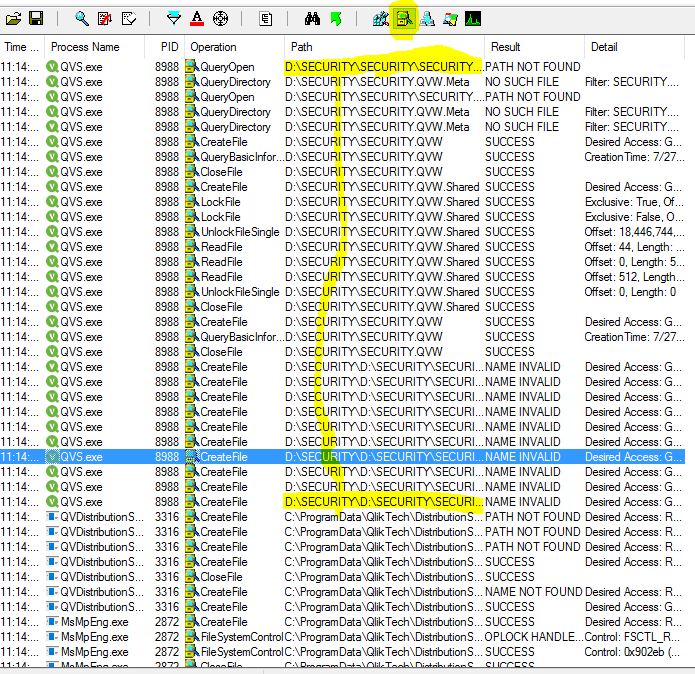
You need to enable the yellow file cabinet and disable the rest.
Now you've selected the opposit
- Mark as New
- Bookmark
- Subscribe
- Mute
- Subscribe to RSS Feed
- Permalink
- Report Inappropriate Content
Joseph,
For First link - I checked first two, There is no luck
How about third one
Resolution 3:
Clear the license information and reapply again Note:This resolution can be applied where the assigned CALs are in LOW in number.
Note: If we clear the license, Then what's happen. And i want to ask you before going that. We can apply again that license???
- Mark as New
- Bookmark
- Subscribe
- Mute
- Subscribe to RSS Feed
- Permalink
- Report Inappropriate Content
I just did that, PFA

- « Previous Replies
-
- 1
- 2
- Next Replies »