Unlock a world of possibilities! Login now and discover the exclusive benefits awaiting you.

- Qlik Community
- :
- All Forums
- :
- QlikView
- :
- Re: QlikView Expression - Error in set modifier ad...
- Subscribe to RSS Feed
- Mark Topic as New
- Mark Topic as Read
- Float this Topic for Current User
- Bookmark
- Subscribe
- Mute
- Printer Friendly Page

 jonnaamb
- Mark as New
- Bookmark
- Subscribe
- Mute
- Subscribe to RSS Feed
- Permalink
- Report Inappropriate Content
QlikView Expression - Error in set modifier ad hoc element list: ',' or ')' expected
Hello all,
I'm using an expression in QlikView for a series of values from a field. In this period of the year, currently we have the below days.
'20180812','20180813','20180814','20180815','20180816','20180817','20180818','20180820','20180821','20180822','20180823','20180824','20180827','20180828','20180829','20180830','20180831','20180903','20180904','20180905','20180906','20180907'
Out of which, I need days until yesterday, (assume today is 20180820)
'20180812','20180813','20180814','20180815','20180816','20180817','20180818'
So I used the below script, and it works as expected, by using a variable - $(vCurPeriodDatesSep_UntilYesterday)
Chr(39)
&
LEFT(REPLACE(
CONCAT({<PeriodInd = {$(vCurPeriodIndStatic)},
[Calendar Date] = P([Calendar Date])>}distinct [Calendar Date], '*,*')
,
'*',
Chr(39))
,
INDEX(REPLACE(
CONCAT({<PeriodInd = {$(vCurPeriodIndStatic)},
[Calendar Date] = P([Calendar Date])>}distinct [Calendar Date], '*,*')
,
'*',
Chr(39)), Date(Today(), 'YYYYMMDD'))-3)
But when I'm using the same in a table within Set Analysis like shown below, it shows blank and mentions the error - Error in set modifier ad hoc element list: ',' or ')' expected
=Sum({1<[Business Segment] = {'*'},
[Calendar Date] = {$(vCurPeriodDatesSep_UntilYesterday)},
PeriodInd = {$(vCurPeriodIndStatic)},
Country = {'$(vCountrySelected)'},
[KeyFigure] = {'$(vCurSAKeyFigure)'}>}[Value])
Please help me with this issue dear experts.
Thanks and regards,
Ambareesh Jonnavittula
Accepted Solutions

 sunny_talwar
- Mark as New
- Bookmark
- Subscribe
- Mute
- Subscribe to RSS Feed
- Permalink
- Report Inappropriate Content
Try this
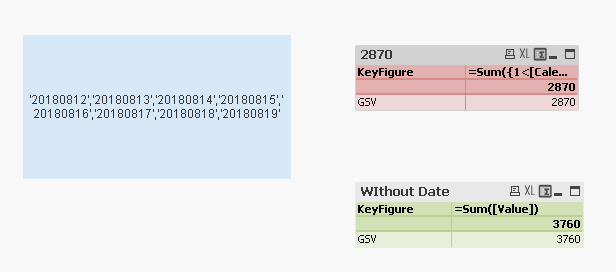
=Sum({1<[Calendar Date] = {$(=$(vCurPeriodDatesSep_UntilYesterday))}>}[Value])
sunny_talwar
- Mark as New
- Bookmark
- Subscribe
- Mute
- Subscribe to RSS Feed
- Permalink
- Report Inappropriate Content
Would you be able to share a sample where we can see the issue?
jonnaamb
- Mark as New
- Bookmark
- Subscribe
- Mute
- Subscribe to RSS Feed
- Permalink
- Report Inappropriate Content
Hello Sunny, thank you for your quick response. Please see the attachment scenario.
sunny_talwar
- Mark as New
- Bookmark
- Subscribe
- Mute
- Subscribe to RSS Feed
- Permalink
- Report Inappropriate Content
Try this
=Sum({1<[Calendar Date] = {$(=$(vCurPeriodDatesSep_UntilYesterday))}>}[Value])

 Frank_Hartmann
- Mark as New
- Bookmark
- Subscribe
- Mute
- Subscribe to RSS Feed
- Permalink
- Report Inappropriate Content
Add an equal sign to your variable declaration
=Chr(39)
&
LEFT(REPLACE(
CONCAT({<
[Calendar Date] = P([Calendar Date])>}distinct [Calendar Date], '*,*')
,
'*',
Chr(39))
,
INDEX(REPLACE(
CONCAT({<
[Calendar Date] = P([Calendar Date])>}distinct [Calendar Date], '*,*')
,
'*',
Chr(39)), Date(Today(), 'YYYYMMDD'))-3)
jonnaamb
- Mark as New
- Bookmark
- Subscribe
- Mute
- Subscribe to RSS Feed
- Permalink
- Report Inappropriate Content
Thank you both. The issue is resolved. 


 vishsaggi
- Mark as New
- Bookmark
- Subscribe
- Mute
- Subscribe to RSS Feed
- Permalink
- Report Inappropriate Content
Do you always calculate the expression until yesterday then may be you can also use like
=Sum({<
[Calendar Date] = {"<$(=Date(Today(), 'YYYYMMDD'))" }>}[Value])
