Unlock a world of possibilities! Login now and discover the exclusive benefits awaiting you.

- Qlik Community
- :
- All Forums
- :
- QlikView
- :
- QlikView editor font
- Subscribe to RSS Feed
- Mark Topic as New
- Mark Topic as Read
- Float this Topic for Current User
- Bookmark
- Subscribe
- Mute
- Printer Friendly Page

 Ben_P
Ben_P
- Mark as New
- Bookmark
- Subscribe
- Mute
- Subscribe to RSS Feed
- Permalink
- Report Inappropriate Content
QlikView editor font
Hi
I'm having trouble with the font in the QlikView script editor (v12.10.1).
What I want is to set it to the default of 9 point Courier New. The problem is that I have to change this manually each time that I open QlikView. I've tried selecting 9 point Courier New and then 'apply', and I've also tried clicking the 'defaults' button. This works fine until I close QlikView.
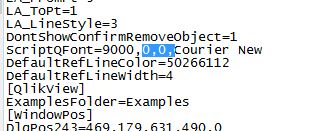
The problem is that next time I open QlikView, the font has changed to '0,0, Courier New' - which looks very different in the editor.
Does anyone have any advice? I assume I'm missing something obvious. Thanks in advance.
- Tags:
- qlikview_deployment

Accepted Solutions

.png "Former Employee") hic
hic
- Mark as New
- Bookmark
- Subscribe
- Mute
- Subscribe to RSS Feed
- Permalink
- Report Inappropriate Content
This is stored in C:\Users\<username>\AppData\Roaming\QlikTech\QlikView\Settings.ini under the tag "ScriptQFont". Could it be that you for some reason don't have rights to make changes to this file?
hic
- Mark as New
- Bookmark
- Subscribe
- Mute
- Subscribe to RSS Feed
- Permalink
- Report Inappropriate Content
This is stored in C:\Users\<username>\AppData\Roaming\QlikTech\QlikView\Settings.ini under the tag "ScriptQFont". Could it be that you for some reason don't have rights to make changes to this file?
Ben_P
- Mark as New
- Bookmark
- Subscribe
- Mute
- Subscribe to RSS Feed
- Permalink
- Report Inappropriate Content
Thanks Henric, that's fixed it!
I went into the settings file (after making a back-up copy), and deleted the '0,0' reference.
This has solved the problem.