Unlock a world of possibilities! Login now and discover the exclusive benefits awaiting you.

- Qlik Community
- :
- All Forums
- :
- QlikView
- :
- Qlikview Not Rounding a value with .9999999
- Subscribe to RSS Feed
- Mark Topic as New
- Mark Topic as Read
- Float this Topic for Current User
- Bookmark
- Subscribe
- Mute
- Printer Friendly Page

- Mark as New
- Bookmark
- Subscribe
- Mute
- Subscribe to RSS Feed
- Permalink
- Report Inappropriate Content
Qlikview Not Rounding a value with .9999999
Hi All,
So I have seen a strange occurrence in Qlikview, Qlikview is refusing to round my values ending with a recurring number i.e 34.63999999. This specific value is calculated through a calculated-dimension field (Not sure if this has an impact as to why it is not working)
I have tried the following functions on this dimension:
ROUND(value,0.01)
NUM(value, '#,##0.00')
CEIL(value, 0.1)
FLOOR(value, 0.1)
Each of the above rounds all my other values except those that end in a recurring decimal value. Is there something I am missing, or another rounding function that accommodates for this?
Thanks!

 MK_QSL
- Mark as New
- Bookmark
- Subscribe
- Mute
- Subscribe to RSS Feed
- Permalink
- Report Inappropriate Content
Something like this
Aggr(ROUND(YourExpression),Dimension)

 jagan
jagan
- Mark as New
- Bookmark
- Subscribe
- Mute
- Subscribe to RSS Feed
- Permalink
- Report Inappropriate Content
Hi,
The below example gives me 34.64, what is your expected value? Which version you are using?
=Round(34.63999999, 0.01)
- Mark as New
- Bookmark
- Subscribe
- Mute
- Subscribe to RSS Feed
- Permalink
- Report Inappropriate Content
I have created a calculated dimension and used Round. It worked perfectly.
=Round(D1/D2,0.01)
Is it possible for you to upload your QVW with sample data.
Regards,
KKR
- Mark as New
- Bookmark
- Subscribe
- Mute
- Subscribe to RSS Feed
- Permalink
- Report Inappropriate Content
So my calculated dimension looks like this:
=class(aggr(([Results_Difference]),[Results_Difference]),num(round(vIncrement, 0.01),'#,##0.00'),'x',num(round(vLowerLimit,0.01),'#,##0.00'))
And my result looks like this:
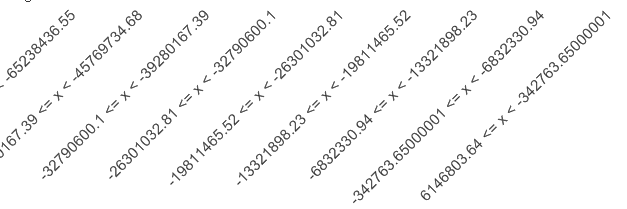
The values ending with .65000001 is the recurring decimal values, the NUM should be limiting it to 2 decimal values, but it does not.

.png "Former Employee") hic
hic
- Mark as New
- Bookmark
- Subscribe
- Mute
- Subscribe to RSS Feed
- Permalink
- Report Inappropriate Content
It seems to me as if you want to format the numbers rather than rounding them. Use
Num( Number, '#.00' )
instead.
Also, note that the internal binary representation cannot be rounded to exact decimal numbers. See Rounding Errors
HIC
 marcus_sommer
- Mark as New
- Bookmark
- Subscribe
- Mute
- Subscribe to RSS Feed
- Permalink
- Report Inappropriate Content
Rounding of numbers has always technically limitations: Rounding Errors. As an alternatively you could try some way of cut the results with string-functions like:
left(YourAggr, index(YourAggr, '.') + 2)
also possible could be ways to split the number with floor() and frac() and multiply and/or format them and adds together again - maybe included in a dual().
- Marcus
- Mark as New
- Bookmark
- Subscribe
- Mute
- Subscribe to RSS Feed
- Permalink
- Report Inappropriate Content
Thanks Henric. I solved the rounding problem by restarting Qlikview (not sure why this worked) and then I got the result in the picture posted, but the NUM is still as issue.
I tried using the expression '#.00' instead but it still gives me the same result.

 qlikviewwizard
- Mark as New
- Bookmark
- Subscribe
- Mute
- Subscribe to RSS Feed
- Permalink
- Report Inappropriate Content
Hi anekotze913,
Could you provide the sample application with the dummy data?