Unlock a world of possibilities! Login now and discover the exclusive benefits awaiting you.

- Qlik Community
- :
- All Forums
- :
- QlikView
- :
- Re: Question about date in set analyst with variab...
- Subscribe to RSS Feed
- Mark Topic as New
- Mark Topic as Read
- Float this Topic for Current User
- Bookmark
- Subscribe
- Mute
- Printer Friendly Page

 uacg0009
- Mark as New
- Bookmark
- Subscribe
- Mute
- Subscribe to RSS Feed
- Permalink
- Report Inappropriate Content
Question about date in set analyst with variable
Hi All,
I have data :
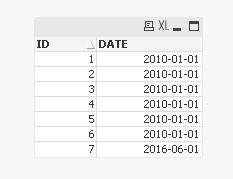
And I have a variable = today()
I just want to calculate that count(id) before the variable(today).
I want to make it using set analyst not if else.
So I try to use =Count({<DATE={"<=Variable1"}>}ID), but it shows 0.
I think it's a easy request, but i don't know why, maybe it's because of type.
Could you please help?
Thanks.
Aiolos Zhao
- « Previous Replies
-
- 1
- 2
- Next Replies »

 tamilarasu
- Mark as New
- Bookmark
- Subscribe
- Mute
- Subscribe to RSS Feed
- Permalink
- Report Inappropriate Content
Either change the variable like
Variable1
=Date(today()-5,'YYYY-MM-DD')
Or Change expression like
=Count({<delivery_date={"<$(=Date($(Variable1),'YYYY-MM-DD'))"}>}id)
uacg0009
- Mark as New
- Bookmark
- Subscribe
- Mute
- Subscribe to RSS Feed
- Permalink
- Report Inappropriate Content
Hi Sunny,
Thanks for reply, it works now.
I also think that is because of the date type, so I tried <=date($(variable)), but it's wrong.
Anyway, thanks for your help. It bothered me because I think it's a some issue and strange.
Aiolos Zhao
uacg0009
- Mark as New
- Bookmark
- Subscribe
- Mute
- Subscribe to RSS Feed
- Permalink
- Report Inappropriate Content
Hi Tamil,
Thanks for your help, it's also a good method to change the variable defination.
Thanks.
Aiolos Zhao

- « Previous Replies
-
- 1
- 2
- Next Replies »