Unlock a world of possibilities! Login now and discover the exclusive benefits awaiting you.

- Qlik Community
- :
- All Forums
- :
- QlikView
- :
- Question w Distinct Count Aggregations
- Subscribe to RSS Feed
- Mark Topic as New
- Mark Topic as Read
- Float this Topic for Current User
- Bookmark
- Subscribe
- Mute
- Printer Friendly Page

- Mark as New
- Bookmark
- Subscribe
- Mute
- Subscribe to RSS Feed
- Permalink
- Report Inappropriate Content
Question w Distinct Count Aggregations
Im not observing the expected result of an aggregation of a distinct count. See the below screenshot;
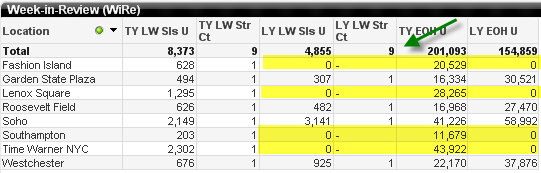
I am expecting a value of 4.
The expression is the following;
=
if(
(sum(if(vYear-1=Year and vYear_Week=Year_Week,Sales_Units,0))+
sum(if(vYear-1=Year and vmaxVYrWk=Year_Week,Ending_Inventory_Units,0))>0)
,count(DISTINCT(Location_Id))
)
Using a Total Mode = Sum will return a value of 4; however there are several other product/ calender dimensions in this chart-- and a "sum" does not appear to work when exposing them.
Also, the chart can be changed to a pivot table on-demand; so this aggregation must also support an approach that does not include a different "total mode".
Thanks.
- Mark as New
- Bookmark
- Subscribe
- Mute
- Subscribe to RSS Feed
- Permalink
- Report Inappropriate Content
i belive i may have solved.. basic problem with expression;
=
if(
(sum(if(vYear-1=Year and vYear_Week=Year_Week,Sales_Units,0))+
sum(if(vYear-1=Year and vmaxVYrWk=Year_Week,Ending_Inventory_Units,0))>0)
And
,count(DISTINCT(if(vYear-1=Year and vYear_Week=Year_Week,Location_Id)))
)

 swuehl
- Mark as New
- Bookmark
- Subscribe
- Mute
- Subscribe to RSS Feed
- Permalink
- Report Inappropriate Content
You are getting the Expression Total and I think it's calculated right be QV.
To only count the location ids where condition is fulfilled, you can try something like:
count(
{<Location_Id = {"=sum( {<Year = {$(=vYear-1)}, Year_Week= {$(vYear_Week)} >} Sales_Units)+sum({<Year = {$(=vYear-1)}, Year_Week = {$(vmaxVYrWk)} >} Ending_Inventory_Units) > 0"} >}
DISTINCT Location_Id)
- Mark as New
- Bookmark
- Subscribe
- Mute
- Subscribe to RSS Feed
- Permalink
- Report Inappropriate Content
Hi
i used your code but something strange is occurring. so the following is what i am using as my expression- i added another condition as i do not want to count DC/ warehouse locations;
count
({<
Location_Id =
{"=sum( {<Year = {$(=vYear)}, Year_Week= {$(=vYear_Week)} >} Sales_Units)
+sum({<Year = {$(=vYear)}, Year_Week = {$(=vmaxVYrWk)} >} Jeeves_Ending_Inventory_Units) > 0 And Location_Type <> 'DC'"}
>}
DISTINCT Location_Id)
so i only want to count locations that have sales or ending inventory and are not a DC-- for that time period specified (last week)
so when i have selected a product it calculates perfectly as shown below
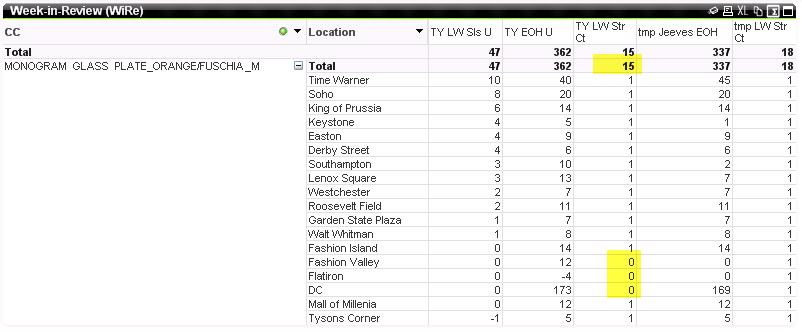
however when i dont have a product selected it doesnt seem to calculate as expected as shown below;
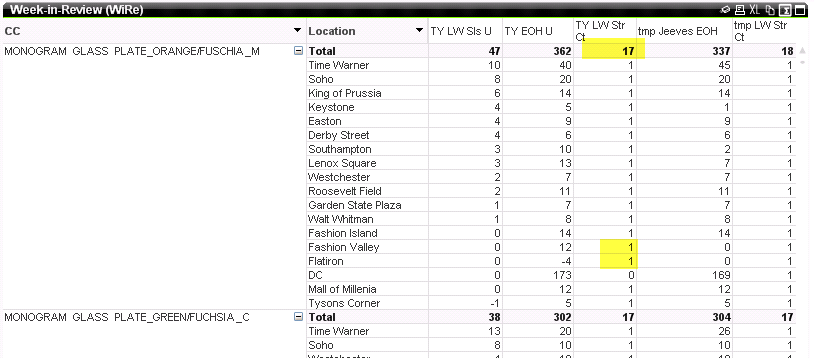
any ideas?
thanks!