Unlock a world of possibilities! Login now and discover the exclusive benefits awaiting you.

- Qlik Community
- :
- All Forums
- :
- QlikView
- :
- RE:show Hide
- Subscribe to RSS Feed
- Mark Topic as New
- Mark Topic as Read
- Float this Topic for Current User
- Bookmark
- Subscribe
- Mute
- Printer Friendly Page

 kicchu465
- Mark as New
- Bookmark
- Subscribe
- Mute
- Subscribe to RSS Feed
- Permalink
- Report Inappropriate Content
RE:show Hide
Hi all,
I have two text objects
I want to hide when I clik one text object other should hide , like that I want to achieve
how can I do that?

 avinashelite
- Mark as New
- Bookmark
- Subscribe
- Mute
- Subscribe to RSS Feed
- Permalink
- Report Inappropriate Content
On click of one text object it should hide other ? and when it should be visible again ?
create a variable
vShow =1 and in the first text object add a trigger to set the variable value to 2
and in the second text box add the condition in layout >condition vShow=1
avinashelite
- Mark as New
- Bookmark
- Subscribe
- Mute
- Subscribe to RSS Feed
- Permalink
- Report Inappropriate Content

 tresB
tresB
- Mark as New
- Bookmark
- Subscribe
- Mute
- Subscribe to RSS Feed
- Permalink
- Report Inappropriate Content
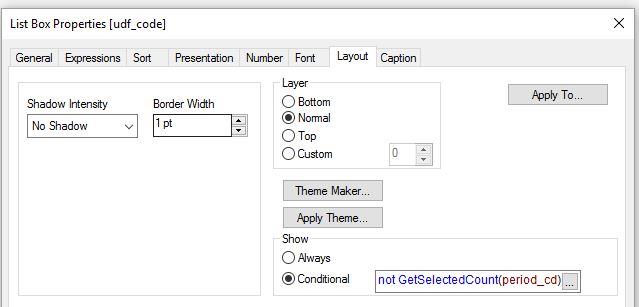
Conditional expression in layout tab like:
For listbox Field1 =Not getselectedcount(Field2)
For listbox Field2 =Not getselectedcount(Field1)
kicchu465
- Mark as New
- Bookmark
- Subscribe
- Mute
- Subscribe to RSS Feed
- Permalink
- Report Inappropriate Content
Hi All,
Thanks a lot for your replies.
The above has achieved what I am looking for.
Regards,
Kb
avinashelite
- Mark as New
- Bookmark
- Subscribe
- Mute
- Subscribe to RSS Feed
- Permalink
- Report Inappropriate Content
Ok if you have for the answers then please mark the correct answer and close this thread

- Mark as New
- Bookmark
- Subscribe
- Mute
- Subscribe to RSS Feed
- Permalink
- Report Inappropriate Content
Hi,
I have posted Basic Show Hide Object using Variable ll be useful