Unlock a world of possibilities! Login now and discover the exclusive benefits awaiting you.

- Qlik Community
- :
- All Forums
- :
- QlikView
- :
- Radar Chart & Selections
- Subscribe to RSS Feed
- Mark Topic as New
- Mark Topic as Read
- Float this Topic for Current User
- Bookmark
- Subscribe
- Mute
- Printer Friendly Page

 dinicholls
- Mark as New
- Bookmark
- Subscribe
- Mute
- Subscribe to RSS Feed
- Permalink
- Report Inappropriate Content
Radar Chart & Selections
Hi all,
I have a radar chart in my app, that has 1 dimension, and expressions summing 'total debt', '>60 day debt', and '>90 day debt'.
The radar chart is great for displaying the info I want and need, but I would like to add a filter to the expressions, so that people can select if they want to see just 'total debt', or '>60 day debt' and '>90 day debt', but not 'total debt'.
Is there a way I can do this? Would I have to use some sort of inline table that link to a field in my script?
Thanks for your ideas / help
Di

- Mark as New
- Bookmark
- Subscribe
- Mute
- Subscribe to RSS Feed
- Permalink
- Report Inappropriate Content
Hi
Yes, you have to create Inline Table and link to the field

 stigchel
- Mark as New
- Bookmark
- Subscribe
- Mute
- Subscribe to RSS Feed
- Permalink
- Report Inappropriate Content
You can load a seperate table with a field, say
Load * Inline [UserSel
'total debt',
'>60 day debt',
'>90 day debt'
];
And then in your chart make the expressions conditional (right top corner in the expression tab) with an expression like
GetSelectedCount(UserSel)=0 or Only(UserSel)='total debt'
- Mark as New
- Bookmark
- Subscribe
- Mute
- Subscribe to RSS Feed
- Permalink
- Report Inappropriate Content
Hi Diane,
Create an inline table with your options. On your chart, on expressions tab, you can hide the expressions that you wanna see:
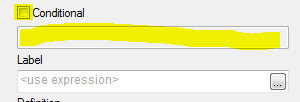
On condition write:
For totaldebt:
If(GetSelectedCount(YourNewInlineField)=0,True(),
If(GetSelectedCount(YourNewInlineField)=1 and YourNewInlineField = 'total debt', True(),
If(GetSelectedCount(YourNewInlineField)=2,True(),False())))
For non totaldebt:
If(GetSelectedCount(YourNewInlineField)=0,True(),
If(GetSelectedCount(YourNewInlineField)=1 and YourNewInlineField <> 'total debt',', True(),
If(GetSelectedCount(YourNewInlineField)=2,True(),False())))
Regards!!