Unlock a world of possibilities! Login now and discover the exclusive benefits awaiting you.

- Qlik Community
- :
- All Forums
- :
- QlikView
- :
- Re: Range Sum
- Subscribe to RSS Feed
- Mark Topic as New
- Mark Topic as Read
- Float this Topic for Current User
- Bookmark
- Subscribe
- Mute
- Printer Friendly Page

 varunreddy
- Mark as New
- Bookmark
- Subscribe
- Mute
- Subscribe to RSS Feed
- Permalink
- Report Inappropriate Content
Range Sum
Hi All,
I am trying to calculate the sum using the prior number which is aggregated by CDE and DimensionA.

Now I am trying to calculate cumulative observations, which is
A Completeness 25000
A Validity 26000 (25000+1000)
A Accuracy 26500.(25000+1000+500)
I got this using the expression:
RangeSum(Above(Total aggr(sum([Ruleset Failing Records]),[Associated DQ Dimension]CDE Name]),0,RowNo()) .
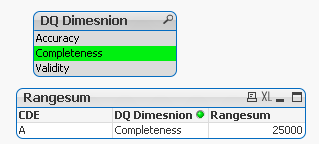
When I select Accuracy I get 500, instead of 26500.
Can anyone cme across this situation?
Thanks in advance!
Message was edited by: Varun Reddy
- « Previous Replies
- Next Replies »
Accepted Solutions

 sunny_talwar
- Mark as New
- Bookmark
- Subscribe
- Mute
- Subscribe to RSS Feed
- Permalink
- Report Inappropriate Content
You used a sort expression which needed to be fixed as well
Match(Only({1}[DQ Dimesnion]), 'Completeness', 'Validity', 'Accuracy')

- Mark as New
- Bookmark
- Subscribe
- Mute
- Subscribe to RSS Feed
- Permalink
- Report Inappropriate Content
try:
if( not isnull(Dimension),
RangeSum(Above(Total aggr(sum({1} [Ruleset Failing Records]),[Associated DQ Dimension]CDE Name]),0,RowNo())
)
varunreddy
- Mark as New
- Bookmark
- Subscribe
- Mute
- Subscribe to RSS Feed
- Permalink
- Report Inappropriate Content
Hi Robin,
Thanks or quick response. This is not working.
- Mark as New
- Bookmark
- Subscribe
- Mute
- Subscribe to RSS Feed
- Permalink
- Report Inappropriate Content
is your dimension really called "Dimension" or is it just a label?
varunreddy
- Mark as New
- Bookmark
- Subscribe
- Mute
- Subscribe to RSS Feed
- Permalink
- Report Inappropriate Content
Associated DQ Dimension
- Mark as New
- Bookmark
- Subscribe
- Mute
- Subscribe to RSS Feed
- Permalink
- Report Inappropriate Content
then try:
if( not isnull([DQ Dimension]),
RangeSum(Above(Total aggr(sum({1} [Ruleset Failing Records]),[Associated DQ Dimension]CDE Name]),0,RowNo())
)
sunny_talwar
- Mark as New
- Bookmark
- Subscribe
- Mute
- Subscribe to RSS Feed
- Permalink
- Report Inappropriate Content
May be this
RangeSum(Above(Sum({<[Associated DQ Dimension]>}[Ruleset Failing Records]), 0, RowNo()) * Avg(1)
or this
Aggr(RangeSum(Above(Sum({<[Associated DQ Dimension]>}[Ruleset Failing Records]), 0, RowNo()), [Associated DQ Dimension], [CDE Name])
varunreddy
- Mark as New
- Bookmark
- Subscribe
- Mute
- Subscribe to RSS Feed
- Permalink
- Report Inappropriate Content
Robin,
I tested by replacing Dimension with [Associated DQ Dimension]. But it is not working.
Thanks,
VK
- Mark as New
- Bookmark
- Subscribe
- Mute
- Subscribe to RSS Feed
- Permalink
- Report Inappropriate Content
if Sunny's proposal doesn't work, please post a sample...
varunreddy
- Mark as New
- Bookmark
- Subscribe
- Mute
- Subscribe to RSS Feed
- Permalink
- Report Inappropriate Content
Hi Sunny,
Thanks for your response. But it didn't work.
This is my data:
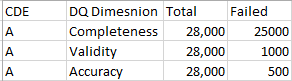
This is my o/p:

Expression USed:
RangeSum(Above(Total aggr(sum( Failed),[DQ Dimesnion],CDE),0,RowNo()))
- « Previous Replies
- Next Replies »