Unlock a world of possibilities! Login now and discover the exclusive benefits awaiting you.

- Qlik Community
- :
- All Forums
- :
- QlikView
- :
- Rangeavg in reverse
- Subscribe to RSS Feed
- Mark Topic as New
- Mark Topic as Read
- Float this Topic for Current User
- Bookmark
- Subscribe
- Mute
- Printer Friendly Page

- Mark as New
- Bookmark
- Subscribe
- Mute
- Subscribe to RSS Feed
- Permalink
- Report Inappropriate Content
Rangeavg in reverse
Hi Guys,
i have input table like
tab:
load * inline [
ID,Sale
1,100
2,200
3,500
4,600 ]
i need out put in pivot table like
ID 4,3,2,1
Rangeavg 350,267,150,100
Regards,
Mahesh
Accepted Solutions

 tresB
tresB
- Mark as New
- Bookmark
- Subscribe
- Mute
- Subscribe to RSS Feed
- Permalink
- Report Inappropriate Content
tresB
- Mark as New
- Bookmark
- Subscribe
- Mute
- Subscribe to RSS Feed
- Permalink
- Report Inappropriate Content
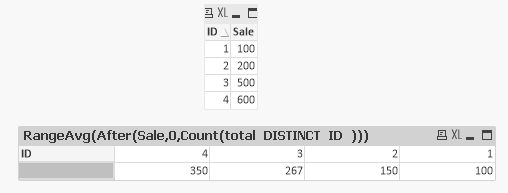
Try like:

 antoniotiman
- Mark as New
- Bookmark
- Subscribe
- Mute
- Subscribe to RSS Feed
- Permalink
- Report Inappropriate Content
Hi Mahesh,
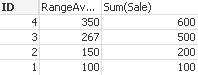
try this Expression
RangeAvg(Bottom(Sum(Sale),1,NoOfRows()-RowNo()+1))
Regards,
Antonio


- Mark as New
- Bookmark
- Subscribe
- Mute
- Subscribe to RSS Feed
- Permalink
- Report Inappropriate Content
May be this?
RangeAvg(Below(Avg(Sale),0),Above(Sale,1,RowNo(Total)))
And if pivot table, Amy be this
RangeAvg(After(Sale,0,Count(TOTAL DISTINCT ID)))
- Mark as New
- Bookmark
- Subscribe
- Mute
- Subscribe to RSS Feed
- Permalink
- Report Inappropriate Content
This may work Column level not the Row Level like Transpose for ID ??
antoniotiman
- Mark as New
- Bookmark
- Subscribe
- Mute
- Subscribe to RSS Feed
- Permalink
- Report Inappropriate Content
RangeAvg(Last(Sum(Sale),1,NoOfColumns()-ColumnNo()+1))

tresB
- Mark as New
- Bookmark
- Subscribe
- Mute
- Subscribe to RSS Feed
- Permalink
- Report Inappropriate Content
And a more efficient expression could be : RangeAvg(After(Sale,0,NoOfColumns()))