Unlock a world of possibilities! Login now and discover the exclusive benefits awaiting you.

- Qlik Community
- :
- All Forums
- :
- QlikView
- :
- Re: Reading Dates
- Subscribe to RSS Feed
- Mark Topic as New
- Mark Topic as Read
- Float this Topic for Current User
- Bookmark
- Subscribe
- Mute
- Printer Friendly Page

- Mark as New
- Bookmark
- Subscribe
- Mute
- Subscribe to RSS Feed
- Permalink
- Report Inappropriate Content
Reading Dates
Experts ,
Many times I faced dates issues but none of old techniques worked. Could you please help me to read the dates here.
[Output]:
LOAD
ALT(DATE#(Date,'D/M/YYYY'),DATE#(Date,'DD/M/YYYY'),DATE#(Date,'D/MM/YYYY'),DATE#(Date,'DD/MM/YYYY'))as Date,
Sales
RESIDENT [Dress Sales] ;
But My Output is:

My Source is:
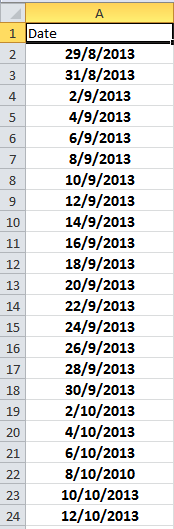

 fashid
- Mark as New
- Bookmark
- Subscribe
- Mute
- Subscribe to RSS Feed
- Permalink
- Report Inappropriate Content
Hi Guruprem,
do you have these dates somewhere else also in the application.
This could be a result of cancatenation of dates further in the script where you may not have formatted the date.
If not preferably attach your app.
Regards,
Nadeem

 jonathandienst
- Mark as New
- Bookmark
- Subscribe
- Mute
- Subscribe to RSS Feed
- Permalink
- Report Inappropriate Content
Try it on the sample you posted. It works there. So it looks like your problem is somewhere else in your data.
- Mark as New
- Bookmark
- Subscribe
- Mute
- Subscribe to RSS Feed
- Permalink
- Report Inappropriate Content
Hi Guruprem,
Can you please either change the Date format in excel - DD/MM/YYYY to M/D/YYYY or change qlikview default date format to D/M/YYYY ?
SET DateFormat='D/M/YYYY';
While reading data from excel , qlikview has converted valid date formats to number and others are strings. I don't know whether is other solutions, haven't tried it myself
Thanks & Regards,
Vipin

 avinashelite
- Mark as New
- Bookmark
- Subscribe
- Mute
- Subscribe to RSS Feed
- Permalink
- Report Inappropriate Content
Hi
use this it will work:
=if(IsNum([created Date])=-1,Date(DATE#([created Date],'DD/MM/YYYY')),Date(Date#([created Date],'DD/MM/YYYY'),'DD/MM/YYYY'))
- Mark as New
- Bookmark
- Subscribe
- Mute
- Subscribe to RSS Feed
- Permalink
- Report Inappropriate Content
Confident about this , let me check
- Mark as New
- Bookmark
- Subscribe
- Mute
- Subscribe to RSS Feed
- Permalink
- Report Inappropriate Content
Tried, Result is same ., Issue still persists
- Mark as New
- Bookmark
- Subscribe
- Mute
- Subscribe to RSS Feed
- Permalink
- Report Inappropriate Content
Did u change the format in excel or in qlikview??/
 jagan
jagan
- Mark as New
- Bookmark
- Subscribe
- Mute
- Subscribe to RSS Feed
- Permalink
- Report Inappropriate Content
Hi,
Try like this
LOAD
*,
Alt(Date(DATE#([created Date],'D/M/YYYY')), Date([created Date])) AS Formatted_Date
FROM DataSource;
Hope this helps you.
Regards,
Jagan.
- Mark as New
- Bookmark
- Subscribe
- Mute
- Subscribe to RSS Feed
- Permalink
- Report Inappropriate Content
Even this led to the only 11 dates in o/p where as I have 24 dates in Excel
- Mark as New
- Bookmark
- Subscribe
- Mute
- Subscribe to RSS Feed
- Permalink
- Report Inappropriate Content
Even this led to the only 11 dates in o/p where as I have 24 dates in Excel