Unlock a world of possibilities! Login now and discover the exclusive benefits awaiting you.

- Qlik Community
- :
- All Forums
- :
- QlikView
- :
- Re: Remove time from a date field
- Subscribe to RSS Feed
- Mark Topic as New
- Mark Topic as Read
- Float this Topic for Current User
- Bookmark
- Subscribe
- Mute
- Printer Friendly Page

- Mark as New
- Bookmark
- Subscribe
- Mute
- Subscribe to RSS Feed
- Permalink
- Report Inappropriate Content
Remove time from a date field
I have a date field with the format as 01/01/2020, 00:00 AM
I want it to only be the date, with no time. I have looked up many forum posts, but nothing recommended seems to work.
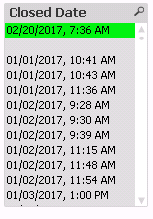
For the above data,
date#(Num#([Closed Date]), 'DD/MM/YYYY')
is not working, it still has the time appended on.
Any ideas?
Accepted Solutions

 vishsaggi
- Mark as New
- Bookmark
- Subscribe
- Mute
- Subscribe to RSS Feed
- Permalink
- Report Inappropriate Content
Yes so after you get that ClosedDateNum do a Preceding load again as mentioned above.
Date(ClosedDateNum, 'MM/DD/YYYY') AS ActualDate;
- Mark as New
- Bookmark
- Subscribe
- Mute
- Subscribe to RSS Feed
- Permalink
- Report Inappropriate Content
A solution in the load script would be preferred as well
vishsaggi
- Mark as New
- Bookmark
- Subscribe
- Mute
- Subscribe to RSS Feed
- Permalink
- Report Inappropriate Content
May be this?
LOAD *,
Date(ClosedDate, 'MM/DD/YYYY') AS ClosedDate1;
LOAD *,
Num(Floor(Subfield(ClosedDate, ',', 1))) AS ClosedDateNum
From ....;
- Mark as New
- Bookmark
- Subscribe
- Mute
- Subscribe to RSS Feed
- Permalink
- Report Inappropriate Content
I tried that but got this 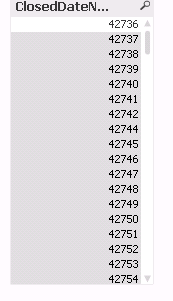
- Mark as New
- Bookmark
- Subscribe
- Mute
- Subscribe to RSS Feed
- Permalink
- Report Inappropriate Content
I have attached test data with excel. Hope this helps
vishsaggi
- Mark as New
- Bookmark
- Subscribe
- Mute
- Subscribe to RSS Feed
- Permalink
- Report Inappropriate Content
Yes so after you get that ClosedDateNum do a Preceding load again as mentioned above.
Date(ClosedDateNum, 'MM/DD/YYYY') AS ActualDate;
vishsaggi
- Mark as New
- Bookmark
- Subscribe
- Mute
- Subscribe to RSS Feed
- Permalink
- Report Inappropriate Content
Try this with your excel sheet.
LOAD *,
Date(ClosedDateNum, 'MM/DD/YYYY') AS ActualDate;
LOAD [Closed Date],
Num(Floor(Subfield([Closed Date], ',', 1))) AS ClosedDateNum
FROM
test.xlsx
(ooxml, embedded labels, table is Sheet1);
- Mark as New
- Bookmark
- Subscribe
- Mute
- Subscribe to RSS Feed
- Permalink
- Report Inappropriate Content
Thanks! This helped greatly
vishsaggi
- Mark as New
- Bookmark
- Subscribe
- Mute
- Subscribe to RSS Feed
- Permalink
- Report Inappropriate Content
No problem at all.