Unlock a world of possibilities! Login now and discover the exclusive benefits awaiting you.

Announcements
Want to see what's currently in public preview? We've pulled it all together in one place. Check it out here
- Qlik Community
- :
- All Forums
- :
- QlikView
- :
- Re: Removing '-' from chart
Options
- Subscribe to RSS Feed
- Mark Topic as New
- Mark Topic as Read
- Float this Topic for Current User
- Bookmark
- Subscribe
- Mute
- Printer Friendly Page
Turn on suggestions
Auto-suggest helps you quickly narrow down your search results by suggesting possible matches as you type.
Showing results for

Not applicable
2015-08-17
08:49 AM
- Mark as New
- Bookmark
- Subscribe
- Mute
- Subscribe to RSS Feed
- Permalink
- Report Inappropriate Content
Removing '-' from chart
Hello
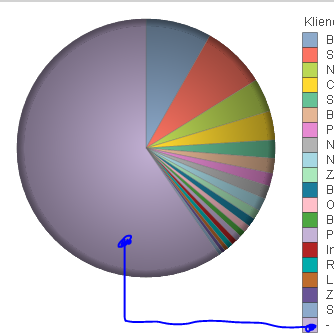
I've got a problem with a pie chart.
My dimension code is: =IF(not(Field1 = 'string'), Field2)
Expression code is just sum of field: SUM(field)
Everything works fine, but there's a '-' value, which represents values of (Field1 = 'string') from dimension.
Is there any way to remove these values from this chart?
844 Views
1 Solution
Accepted Solutions

 MK_QSL
MVP
2015-08-17
08:51 AM
- Mark as New
- Bookmark
- Subscribe
- Mute
- Subscribe to RSS Feed
- Permalink
- Report Inappropriate Content
Under dimension tab, tick suppress when value is null for this calculated dimension.
1 Reply
MK_QSL
MVP
2015-08-17
08:51 AM
- Mark as New
- Bookmark
- Subscribe
- Mute
- Subscribe to RSS Feed
- Permalink
- Report Inappropriate Content
Under dimension tab, tick suppress when value is null for this calculated dimension.