Unlock a world of possibilities! Login now and discover the exclusive benefits awaiting you.

- Qlik Community
- :
- All Forums
- :
- QlikView
- :
- Re: Removing synthetic keys
- Subscribe to RSS Feed
- Mark Topic as New
- Mark Topic as Read
- Float this Topic for Current User
- Bookmark
- Subscribe
- Mute
- Printer Friendly Page

- Mark as New
- Bookmark
- Subscribe
- Mute
- Subscribe to RSS Feed
- Permalink
- Report Inappropriate Content
Removing synthetic keys
Hello everyone,
I am working in a project which there are several tables and most of them have same fields, and the result in their relation are lot of synthetic keys:
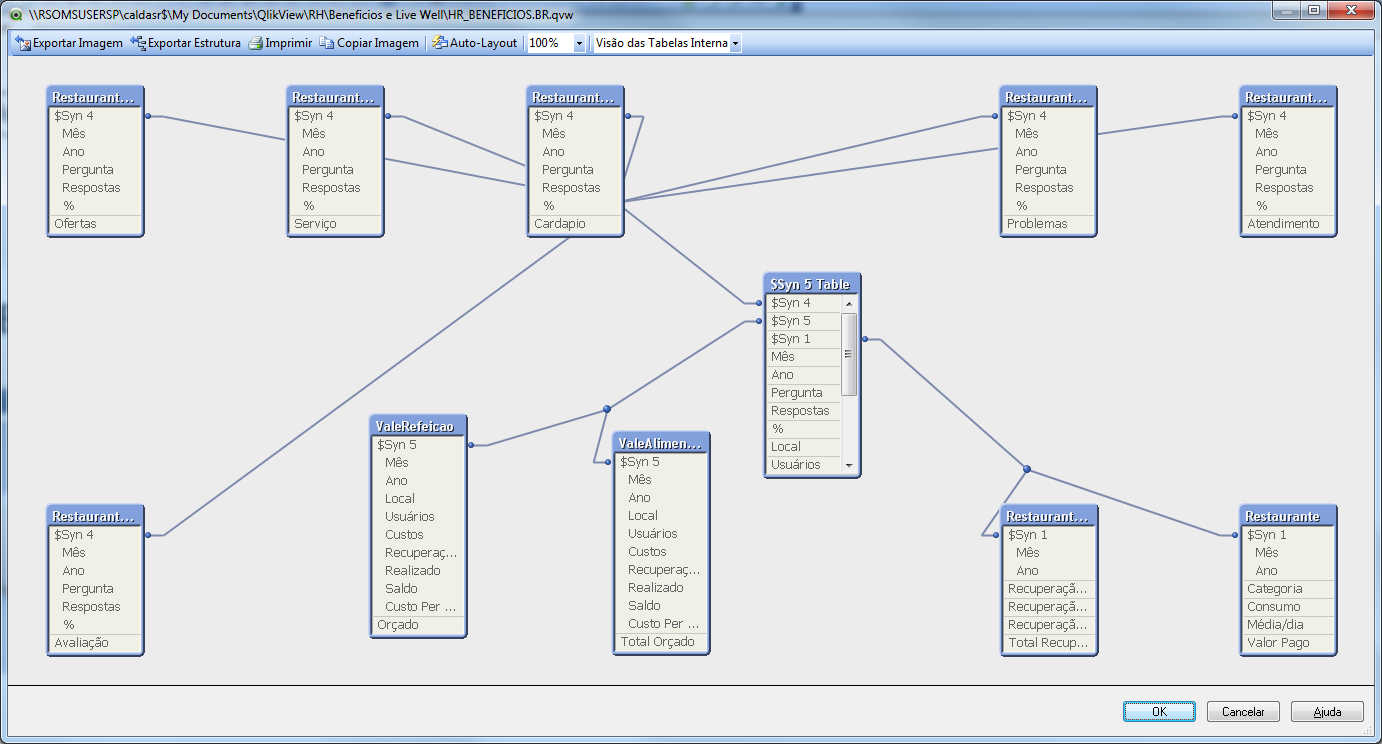
Generally, i could concatenate the tables to fix the synthetic keys, but there are distinct fields where i can´t concatenate.
Anyonve could help me how to solve the synthetic keys in this situation?
Regards,
Accepted Solutions

 vikasmahajan
- Mark as New
- Bookmark
- Subscribe
- Mute
- Subscribe to RSS Feed
- Permalink
- Report Inappropriate Content
Hi,
1) Refer this https://community.qlik.com/blogs/qlikviewdesignblog/2013/04/16/synthetic-keys and Best pratices PDF's which i have collected in the past.
another idea
2) My idea would be to use the Qualify statement.
Then all fields get the name of the table added which makes them unique
before the upload Qualify *;
Example
Qualify *;
Table1
Sales (becames Table1.Sales)
Location (becames Table1.Location)
Table2
Sales (becames Table2.Sales)
Location (becames Table2.Location)
Unqualify *;
3) You can use concatenate tables , joins
also good document from FEBRIC https://community.qlik.com/docs/DOC-5698
HTH
Vikas
If the issue is solved please mark the answer with Accept as Solution & like it.
If you want to go quickly, go alone. If you want to go far, go together.

 terezagr
- Mark as New
- Bookmark
- Subscribe
- Mute
- Subscribe to RSS Feed
- Permalink
- Report Inappropriate Content
What about using Qualify? And UnQualify those fields you want to link on.
- Mark as New
- Bookmark
- Subscribe
- Mute
- Subscribe to RSS Feed
- Permalink
- Report Inappropriate Content
Thanks Tereza,
I will try that.
 marcus_sommer
- Mark as New
- Bookmark
- Subscribe
- Mute
- Subscribe to RSS Feed
- Permalink
- Report Inappropriate Content
See here Synthetic Keys and more here Get started with developing qlik datamodels.
- Marcus
vikasmahajan
- Mark as New
- Bookmark
- Subscribe
- Mute
- Subscribe to RSS Feed
- Permalink
- Report Inappropriate Content
Hi,
1) Refer this https://community.qlik.com/blogs/qlikviewdesignblog/2013/04/16/synthetic-keys and Best pratices PDF's which i have collected in the past.
another idea
2) My idea would be to use the Qualify statement.
Then all fields get the name of the table added which makes them unique
before the upload Qualify *;
Example
Qualify *;
Table1
Sales (becames Table1.Sales)
Location (becames Table1.Location)
Table2
Sales (becames Table2.Sales)
Location (becames Table2.Location)
Unqualify *;
3) You can use concatenate tables , joins
also good document from FEBRIC https://community.qlik.com/docs/DOC-5698
HTH
Vikas
If the issue is solved please mark the answer with Accept as Solution & like it.
If you want to go quickly, go alone. If you want to go far, go together.
vikasmahajan
- Mark as New
- Bookmark
- Subscribe
- Mute
- Subscribe to RSS Feed
- Permalink
- Report Inappropriate Content
Also go through this link http://mindmajix.com/Synthetic-keys-in-Qlikview
Vikas
If the issue is solved please mark the answer with Accept as Solution & like it.
If you want to go quickly, go alone. If you want to go far, go together.
- Mark as New
- Bookmark
- Subscribe
- Mute
- Subscribe to RSS Feed
- Permalink
- Report Inappropriate Content
Thanks for your tip Vikas!!
QUALIFY is good and easy solution for synthetic keys, however i lost the conexion between the tables.
Basically, Year and Month are the synthetic fields in my data model, and when i apply a filter for month or year, i would like that filter to be applied in all objects.
Is that the case to use Autonumber?
Regards,
 alexdataiq
- Mark as New
- Bookmark
- Subscribe
- Mute
- Subscribe to RSS Feed
- Permalink
- Report Inappropriate Content
Maybe you could try Unqualifying the Month and Year fields.
QUALIFY *;
UNQUALIFY Month, Year;
Or even better make a Master Calendar.
Regards,
vikasmahajan
- Mark as New
- Bookmark
- Subscribe
- Mute
- Subscribe to RSS Feed
- Permalink
- Report Inappropriate Content
For Month, Year better to create a master calendar and link all facts
Thanks
Vikas
If the issue is solved please mark the answer with Accept as Solution & like it.
If you want to go quickly, go alone. If you want to go far, go together.