Unlock a world of possibilities! Login now and discover the exclusive benefits awaiting you.

- Qlik Community
- :
- All Forums
- :
- QlikView
- :
- Re: Rename filed names in same table
- Subscribe to RSS Feed
- Mark Topic as New
- Mark Topic as Read
- Float this Topic for Current User
- Bookmark
- Subscribe
- Mute
- Printer Friendly Page

 priya945
- Mark as New
- Bookmark
- Subscribe
- Mute
- Subscribe to RSS Feed
- Permalink
- Report Inappropriate Content
Rename filed names in same table
Hi All,
I have one Table with two columns as below
| Test | |
| ColumnA | ColumnB |
| A | D |
| B | E |
| C | F |
Loading in QV script as
| Test: |
| Load |
| ColumnA |
| ColumnB |
| From Test; |
Requirement is to have single columnA with all the values from both columns as below. Please suggest
| ColumnA |
| A |
| B |
| C |
| D |
| E |
| F |
- « Previous Replies
-
- 1
- 2
- Next Replies »


- Mark as New
- Bookmark
- Subscribe
- Mute
- Subscribe to RSS Feed
- Permalink
- Report Inappropriate Content
Can you post or clarify your expected result, Instead simple Table? that would help
priya945
- Mark as New
- Bookmark
- Subscribe
- Mute
- Subscribe to RSS Feed
- Permalink
- Report Inappropriate Content
Hi Anil,
Thanks for your response, please find below data and my requirement
| Fact1 | |||
| Product | Sales | Continent | Sub-continent |
| A | 3 | APAC | India |
| E | 5 | APAC | India |
| B | 2 | Europe | UK |
| C | 7 | Australia | Aus |
| D | 8 | Ameicas | USA |
| Fact2 | ||||
| Product | Sales | Continent | Sub-continent | Region |
| A | 1 | APAC | India | Bengaluru |
| E | 2 | APAC | India | Hyd |
| B | 2 | Europe | UK | Ireland |
| C | 3 | Australia | Aus | Aus |
| D | 5 | Ameicas | USA | USA |
Two Fact table, I am concatenating as below with keys to dimension tables
Fact1:
Load
AutoNumberHash128(Product) as %Product_Key,
AutoNumberHash128((Continent),(Sub-continent)) as %Con_Key,
Product,
Sales,
Continent,
Sub-continent
From Fact1;
Concatenate(Fact1)
Load
AutoNumberHash128(Product) as %Product_Key,
AutoNumberHash128((Continent),(Sub-continent)) as %Con_Key,
Product,
Sales,
Continent,
Sub-continent,
Region
From Fact2;
Requirement: How to handle Region field so that I can show the all Region field values in Sub-continent field as below
| Sub-continent |
| India |
| UK |
| Aus |
| USA |
| Bengaluru |
| Hyd |

 vishsaggi
- Mark as New
- Bookmark
- Subscribe
- Mute
- Subscribe to RSS Feed
- Permalink
- Report Inappropriate Content
Are you looking for this?
You create those key fields in the below load tables.
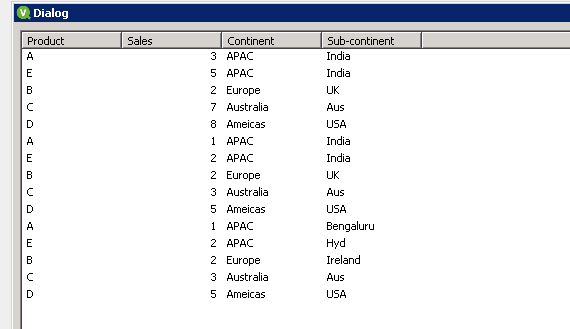
IF yes, you can try like
Fact1:
LOAD * INLINE [
Product, Sales, Continent, Sub-continent
A, 3, APAC, India
E, 5, APAC, India
B, 2, Europe, UK
C, 7, Australia, Aus
D, 8, Ameicas,USA
];
Fact2:
LOAD * INLINE [
Product, Sales, Continent,Sub-continent
A, 1, APAC, India
E, 2, APAC, India
B, 2, Europe, UK
C, 3, Australia, Aus
D, 5, Ameicas, USA
];
RegionFact:
LOAD * INLINE [
Product, Sales, Continent, Sub-continent
A, 1, APAC, Bengaluru
E, 2, APAC, Hyd
B, 2, Europe, Ireland
C, 3, Australia, Aus
D, 5, Ameicas, USA
];
priya945
- Mark as New
- Bookmark
- Subscribe
- Mute
- Subscribe to RSS Feed
- Permalink
- Report Inappropriate Content
Hi Vishwa,
Thanks for reply but you are missing Region field from my data. Please use my data and provide me some solution if possible
 vinod22kv
- Mark as New
- Bookmark
- Subscribe
- Mute
- Subscribe to RSS Feed
- Permalink
- Report Inappropriate Content
Hi
Do the above script in new qvw and store this in to qvd and call that qvd in your final qvw.
Thanks and Regards,
Vinod.
vishsaggi
- Mark as New
- Bookmark
- Subscribe
- Mute
- Subscribe to RSS Feed
- Permalink
- Report Inappropriate Content
Sorry i mean the third table where you see sub-continent i have renamed the region to sub-continent. Ok can you tell me what is your expected output with field names and values can you provide us.
 jensmunnichs
- Mark as New
- Bookmark
- Subscribe
- Mute
- Subscribe to RSS Feed
- Permalink
- Report Inappropriate Content
I'm pretty confused. Is it that you want [Sub continent] and [Region] to be displayed in a single listbox to make selections from? Or do you need [Region] to replace [Sub continent] in script if the field exists?
priya945
- Mark as New
- Bookmark
- Subscribe
- Mute
- Subscribe to RSS Feed
- Permalink
- Report Inappropriate Content
Expected out Concatenated Fact Table where Region field value are now in Sub-continent field
| Fact1 | |||
| Product | Sales | Continent | Sub-continent |
| A | 3 | APAC | India |
| E | 5 | APAC | India |
| B | 2 | Europe | UK |
| C | 7 | Australia | Aus |
| D | 8 | Ameicas | USA |
| A | 1 | APAC | Bengaluru |
| E | 2 | APAC | Hyd |
| B | 2 | Europe | Ireland |
| C | 3 | Australia | Aus |
| D | 5 | Ameicas | USA |
jensmunnichs
- Mark as New
- Bookmark
- Subscribe
- Mute
- Subscribe to RSS Feed
- Permalink
- Report Inappropriate Content
I think if you just change this
Concatenate(Fact1)
Load
AutoNumberHash128(Product) as %Product_Key,
AutoNumberHash128((Continent),(Sub-continent)) as %Con_Key,
Product,
Sales,
Continent,
Sub-continent,
Region
From Fact2;
To this
Concatenate(Fact1)
Load
AutoNumberHash128(Product) as %Product_Key,
AutoNumberHash128((Continent),(Sub-continent)) as %Con_Key,
Product,
Sales,
Continent,
Sub-continent,
Region as Sub-continent
From Fact2;
You should have what you want. This completely drops the original Sub-continent field in the second fact table and replaces it with the region field.
satishqlik
- Mark as New
- Bookmark
- Subscribe
- Mute
- Subscribe to RSS Feed
- Permalink
- Report Inappropriate Content
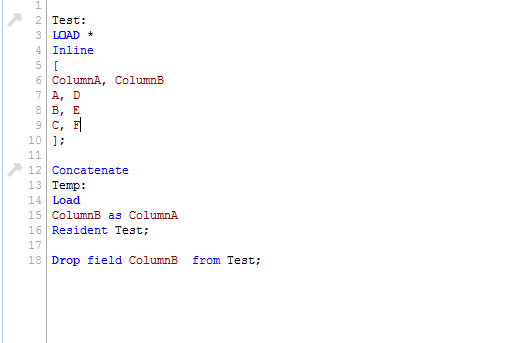
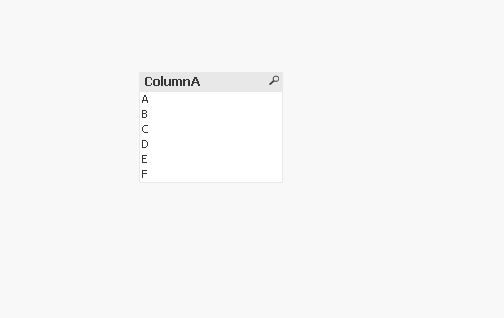
Hi,
May be something like this??
Thanks,

- « Previous Replies
-
- 1
- 2
- Next Replies »