Unlock a world of possibilities! Login now and discover the exclusive benefits awaiting you.

- Qlik Community
- :
- All Forums
- :
- QlikView
- :
- Re: Replace single quote in string
- Subscribe to RSS Feed
- Mark Topic as New
- Mark Topic as Read
- Float this Topic for Current User
- Bookmark
- Subscribe
- Mute
- Printer Friendly Page

 kris_vliegen
- Mark as New
- Bookmark
- Subscribe
- Mute
- Subscribe to RSS Feed
- Permalink
- Report Inappropriate Content
Replace single quote in string
Hello All,
I have customer-names with a single quote in it.
How can I replace this single quote into a blank in the reload-script?
Regards
Kris
Accepted Solutions
 Colin-Albert
- Mark as New
- Bookmark
- Subscribe
- Mute
- Subscribe to RSS Feed
- Permalink
- Report Inappropriate Content
PurgeChar(YourField, chr(39))
will remove all single quotes from <YourField>

 christophebraul
- Mark as New
- Bookmark
- Subscribe
- Mute
- Subscribe to RSS Feed
- Permalink
- Report Inappropriate Content
Hi,
You can use :
=replace(YourFieldName,chr(39),' ')
Colin-Albert
- Mark as New
- Bookmark
- Subscribe
- Mute
- Subscribe to RSS Feed
- Permalink
- Report Inappropriate Content
PurgeChar(YourField, chr(39))
will remove all single quotes from <YourField>

- Mark as New
- Bookmark
- Subscribe
- Mute
- Subscribe to RSS Feed
- Permalink
- Report Inappropriate Content
Try this in the script...
PurgeChar(Cust_Name, chr(39)) as Cust_Name;
kris_vliegen
- Mark as New
- Bookmark
- Subscribe
- Mute
- Subscribe to RSS Feed
- Permalink
- Report Inappropriate Content
Thanks for the quick response.
The PurgeChar is working for me.
I'm reading from an i-series database.
And I try to implement google maps.
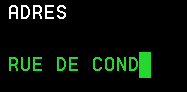
I get an error if I try to read this Field.
How Can I convert this 'blok' caracter to a space?
Regards,
Kris
kris_vliegen
- Mark as New
- Bookmark
- Subscribe
- Mute
- Subscribe to RSS Feed
- Permalink
- Report Inappropriate Content
And I see this field in Qlikview as just a normal text
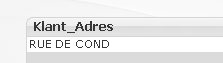
And I get this error in the script.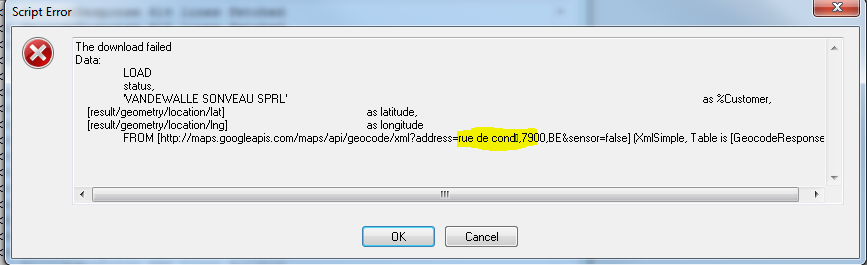
Regards,
Kris