Unlock a world of possibilities! Login now and discover the exclusive benefits awaiting you.

- Qlik Community
- :
- All Forums
- :
- QlikView
- :
- Re: Report cannot be Opened For Part User
- Subscribe to RSS Feed
- Mark Topic as New
- Mark Topic as Read
- Float this Topic for Current User
- Bookmark
- Subscribe
- Mute
- Printer Friendly Page

- Mark as New
- Bookmark
- Subscribe
- Mute
- Subscribe to RSS Feed
- Permalink
- Report Inappropriate Content
Report cannot be Opened For Part User
Hi all,
Recently, we found out that part of the QlikView users in our company cannot open two of our reports.
They can open the other report without any problem. When they tried to open one of the two, a window popping up asking to select one of the below three options:
1. Open
2. Save
3. Save as
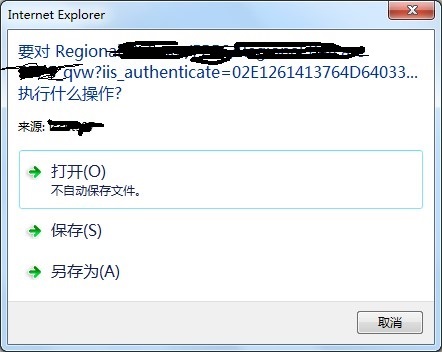
We're currently have around 500 QlikView users, but just more than 10 users having this kind of issue. and only limited to two reports (we have more than 50 reports in our server).
At first, i thought it's IE explorer security issue, i tried to run as "administrator" , reset IE and downgraded IE from 11 to 8, none of this help.
The issue disappeared when I moved these two reports to another folders and renamed the QVW file names. But when this issue disappeared, the same issue occurred on another report. It's impossible to change the file name to get the issue fixed. So i'm seeking your help to give me some advice on this issue.
!
Thanks in advance
- « Previous Replies
-
- 1
- 2
- Next Replies »
- Mark as New
- Bookmark
- Subscribe
- Mute
- Subscribe to RSS Feed
- Permalink
- Report Inappropriate Content
no error message. There's a window popping up, ask to choose 'open', 'save' and 'save as'

 Peter_Cammaert
- Mark as New
- Bookmark
- Subscribe
- Mute
- Subscribe to RSS Feed
- Permalink
- Report Inappropriate Content
If after that many weeks you're still experiencing this annoying problem, I suggest you contact Qlik Support asap. See Qlik Support
IMHO IIS is having a problem communicating the (mime) type of the html stream to the browser of these 10 users. I guess that if you select Save, you'll get a file containing html output and not the original QVW document, correct? Anything special about the content of this file?
- Mark as New
- Bookmark
- Subscribe
- Mute
- Subscribe to RSS Feed
- Permalink
- Report Inappropriate Content
G'day Peter,
Thanks for replying. It's been some days we haven't seen this issue which is resolved by changing the location of the qvw file. You're correct, it's not the qvw document but html output. I don't remember what is the content, since i can reproduce the issue. If it occurs again, i will contact the Qlik support. Thanks for your advice.
- « Previous Replies
-
- 1
- 2
- Next Replies »