Unlock a world of possibilities! Login now and discover the exclusive benefits awaiting you.

- Qlik Community
- :
- All Forums
- :
- QlikView
- :
- Re: RowNo(TOTAL) does not work
Options
- Subscribe to RSS Feed
- Mark Topic as New
- Mark Topic as Read
- Float this Topic for Current User
- Bookmark
- Subscribe
- Mute
- Printer Friendly Page
Turn on suggestions
Auto-suggest helps you quickly narrow down your search results by suggesting possible matches as you type.
Showing results for

 ananyaghosh
Creator III
2017-03-10
07:01 AM
- Mark as New
- Bookmark
- Subscribe
- Mute
- Subscribe to RSS Feed
- Permalink
- Report Inappropriate Content
RowNo(TOTAL) does not work
Hi,
I want to show the row no of a table and I ma using RowNo(TOTAL) in the expression side. But it shows nothing as below
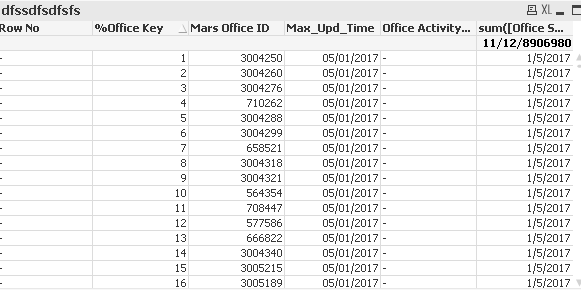
Please let me know what to correct?
4,229 Views
1 Solution
Accepted Solutions

 vinieme12
Champion III
2017-03-10
07:31 AM
- Mark as New
- Bookmark
- Subscribe
- Mute
- Subscribe to RSS Feed
- Permalink
- Report Inappropriate Content
this needs to be added as an expression, i think you trying to add it as a calculated dimension
Vineeth Pujari
If a post helps to resolve your issue, please accept it as a Solution.
If a post helps to resolve your issue, please accept it as a Solution.
3 Replies

 sunny_talwar
MVP
2017-03-10
07:08 AM
- Mark as New
- Bookmark
- Subscribe
- Mute
- Subscribe to RSS Feed
- Permalink
- Report Inappropriate Content
Can you post a screenshot of the expression on the expression tab of the chart properties?
3,693 Views
 tresB
tresB
Champion III
2017-03-10
07:16 AM
- Mark as New
- Bookmark
- Subscribe
- Mute
- Subscribe to RSS Feed
- Permalink
- Report Inappropriate Content
If you are using it as a calculated dimension, try like: = Aggr(RowNo(), [%Office Key]) and if you are looking for total number of rows, try = Aggr(NoOfRows(), [%Office Key])
3,693 Views
vinieme12
Champion III
2017-03-10
07:31 AM
- Mark as New
- Bookmark
- Subscribe
- Mute
- Subscribe to RSS Feed
- Permalink
- Report Inappropriate Content
this needs to be added as an expression, i think you trying to add it as a calculated dimension
Vineeth Pujari
If a post helps to resolve your issue, please accept it as a Solution.
If a post helps to resolve your issue, please accept it as a Solution.
