Unlock a world of possibilities! Login now and discover the exclusive benefits awaiting you.

- Qlik Community
- :
- All Forums
- :
- QlikView
- :
- Re: Running Total Scenario
- Subscribe to RSS Feed
- Mark Topic as New
- Mark Topic as Read
- Float this Topic for Current User
- Bookmark
- Subscribe
- Mute
- Printer Friendly Page

 arsal_90
- Mark as New
- Bookmark
- Subscribe
- Mute
- Subscribe to RSS Feed
- Permalink
- Report Inappropriate Content
Running Total Scenario
Hi Members,
Need help in the attached scenario. Problem is that when i calculate rolling total on expression level it didn't change on Product.
Please see the attached data. In Sheet Input, you have to used that data and what the result i want is in Desired Output Sheet.
Thanks,
Arsalan

 Chanty4u
- Mark as New
- Bookmark
- Subscribe
- Mute
- Subscribe to RSS Feed
- Permalink
- Report Inappropriate Content
hi
u can try dis expression in chart
RangeSum(above(sum(Reqmt),0,RowNo()))
hope this helps u
Thank you
suresh

 Gysbert_Wassena
- Mark as New
- Bookmark
- Subscribe
- Mute
- Subscribe to RSS Feed
- Permalink
- Report Inappropriate Content
Like this:
LOAD
Location,
Date,
Quantity,
if(Previous(Location)=Location, rangesum(Quantity,peek(Cumulative)),Quantity) as Cumulative
FROM Cummulative Scenario.xls (biff, embedded labels, table is Input$);
talk is cheap, supply exceeds demand
Chanty4u
- Mark as New
- Bookmark
- Subscribe
- Mute
- Subscribe to RSS Feed
- Permalink
- Report Inappropriate Content
hi
PFA,
hope this helps you
Suresh
arsal_90
- Mark as New
- Bookmark
- Subscribe
- Mute
- Subscribe to RSS Feed
- Permalink
- Report Inappropriate Content
Hi Gysbert,
I try this but no success. Could you please see my data set in attachment (Testing.qvw and Fact.qvd). Really appreciate your help. Pleasee.
Thanks

 qlikviewwizard
- Mark as New
- Bookmark
- Subscribe
- Mute
- Subscribe to RSS Feed
- Permalink
- Report Inappropriate Content
Hi arsal_90 , Did you try gwassenaar
's solution? It will work.

- Mark as New
- Bookmark
- Subscribe
- Mute
- Subscribe to RSS Feed
- Permalink
- Report Inappropriate Content
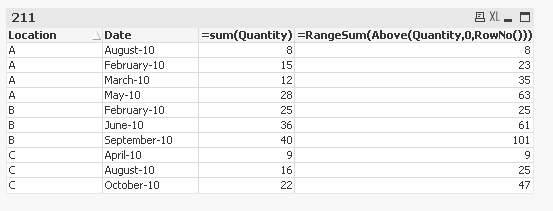
Hi
i got correct only i mean u r desired output u can see this
 settu_periasamy
- Mark as New
- Bookmark
- Subscribe
- Mute
- Subscribe to RSS Feed
- Permalink
- Report Inappropriate Content
Hi,
same thread here also. Have you tried this?. Just now i posted the file using your 'Fact.qvd'
qlikviewwizard
- Mark as New
- Bookmark
- Subscribe
- Mute
- Subscribe to RSS Feed
- Permalink
- Report Inappropriate Content
Hi arsal_90,
Can you please close the thread by selecting Correct Answer.
I think Jagan Mohan's reply is the correct one. Thanks.