Unlock a world of possibilities! Login now and discover the exclusive benefits awaiting you.

- Qlik Community
- :
- All Forums
- :
- QlikView
- :
- SHOW 1 ROW BY EXPRESSION AND GROUP
- Subscribe to RSS Feed
- Mark Topic as New
- Mark Topic as Read
- Float this Topic for Current User
- Bookmark
- Subscribe
- Mute
- Printer Friendly Page

 inigoelv
- Mark as New
- Bookmark
- Subscribe
- Mute
- Subscribe to RSS Feed
- Permalink
- Report Inappropriate Content
SHOW 1 ROW BY EXPRESSION AND GROUP
Hi everybody,
I need the help for showing the first row by group of Header1:.
Per example:
| Header 1 | Header 2 | Header 3 | Total |
|---|---|---|---|
| A | 1 | Red | 200 |
| A | 5 | Green | 400 |
| B | 2 | Red | 300 |
| B | 8 | Blue | 350 |
| B | 7 | White | 800 |
| C | 3 | Black | 123 |
| C | 9 | Green | 234 |
| C | 7 | White | 456 |
The result I expected, by expression if it is possible, is this:
| Header 1 | Header 2 | Header 3 | Total |
|---|---|---|---|
| A | 1 | Red | 200 |
| B | 2 | Red | 300 |
| C | 3 | Black | 123 |
Any idea?
Many thanks,
- Tags:
- qlikview_scripting

 sinanozdemir
- Mark as New
- Bookmark
- Subscribe
- Mute
- Subscribe to RSS Feed
- Permalink
- Report Inappropriate Content
Hi,
You can achieve this in a straight table:
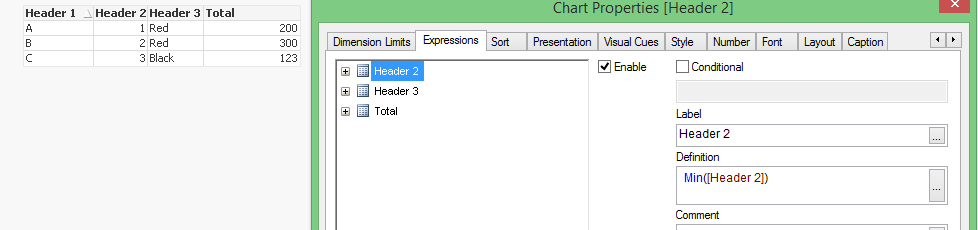
Get Header 1 as your dimension and Min(Header 2) and Min(Total), and for Header 3 I used the firstsortedvalue:
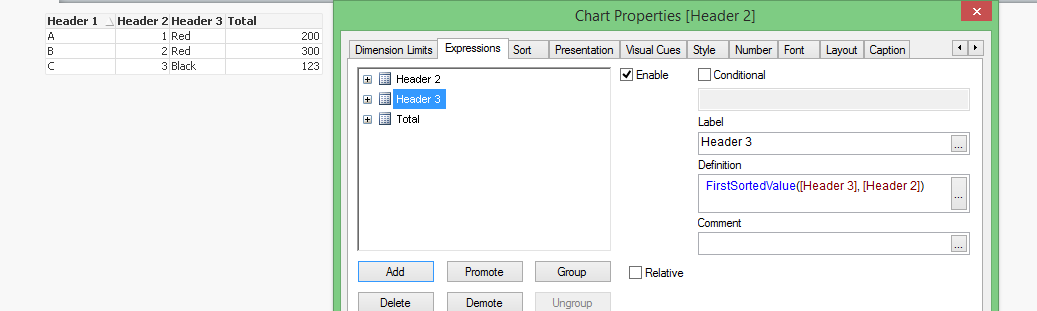
Hope this helps.
sinanozdemir
- Mark as New
- Bookmark
- Subscribe
- Mute
- Subscribe to RSS Feed
- Permalink
- Report Inappropriate Content
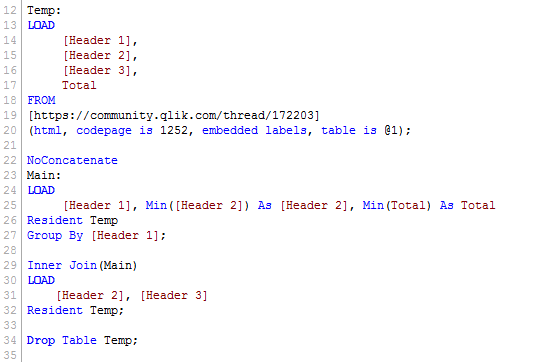
If you wanted to create it in the load script, the below is a way of doing it:
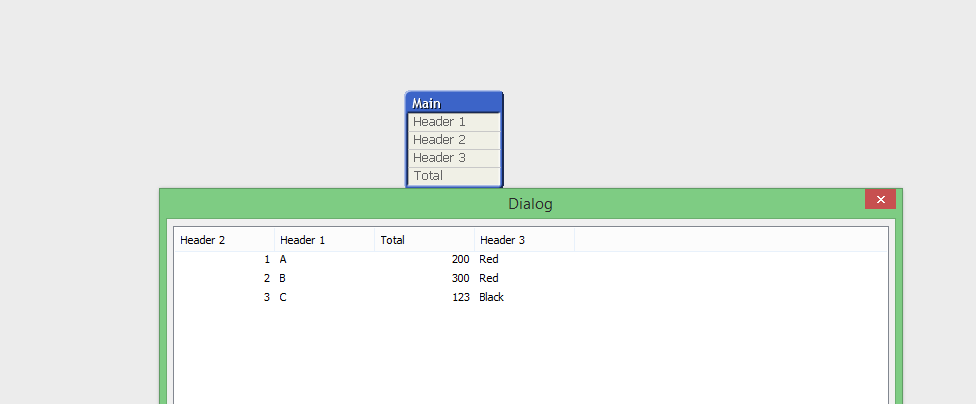
And the data model looks like this:

 sunny_talwar
- Mark as New
- Bookmark
- Subscribe
- Mute
- Subscribe to RSS Feed
- Permalink
- Report Inappropriate Content
Just to add another option is to create a flag in the script:
Table:
LOAD [Header 1],
[Header 2],
[Header 3],
Total
FROM
[https://community.qlik.com/thread/172203]
(html, codepage is 1252, embedded labels, table is @1);
Join(Table)
LOAD [Header 1],
Min([Header 2]) as [Header 2],
1 as Flag
Resident Table
Group By [Header 1];
Table Box Object below will show a 1 next to the fields you want to show in your chart object:
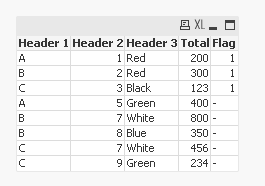
and you can use this flag in your chart to only show rows where flag = 1
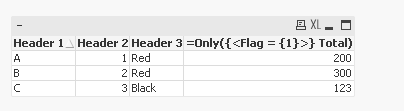
Attaching the sample qvw for reference.
Best,
Sunny
 maxgro
- Mark as New
- Bookmark
- Subscribe
- Mute
- Subscribe to RSS Feed
- Permalink
- Report Inappropriate Content
1) if you want the min Header 2 by Header 1
Source:
LOAD
[Header 1],
[Header 2],
[Header 3],
Total
FROM
[https://community.qlik.com/thread/172203]
(html, codepage is 1252, embedded labels, table is @1);
Final:
NoConcatenate LOAD *
Resident Source
Where [Header 1] <> Peek([Header 1])
order by [Header 1], [Header 2];
DROP Table Source;
2) if you want the first row in the table by Header 1 (with your data the result is the same as 1) )
Source:
LOAD
rowno() as id,
[Header 1],
[Header 2],
[Header 3],
Total
FROM
[https://community.qlik.com/thread/172203]
(html, codepage is 1252, embedded labels, table is @1);
Final:
NoConcatenate LOAD *
Resident Source
Where [Header 1] <> Peek([Header 1])
order by id;
DROP Table Source;
