Unlock a world of possibilities! Login now and discover the exclusive benefits awaiting you.

- Qlik Community
- :
- All Forums
- :
- QlikView
- :
- Re: Script error with latest extract date
- Subscribe to RSS Feed
- Mark Topic as New
- Mark Topic as Read
- Float this Topic for Current User
- Bookmark
- Subscribe
- Mute
- Printer Friendly Page

 ashmitp869
- Mark as New
- Bookmark
- Subscribe
- Mute
- Subscribe to RSS Feed
- Permalink
- Report Inappropriate Content
Script error with latest extract date
Hi there ,
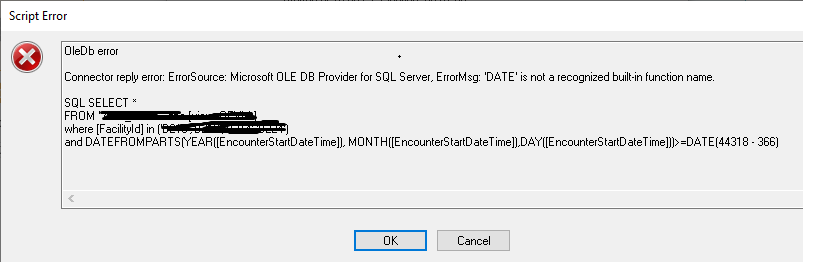
I am getting an error in qlikview script like below image -
My qlikview script :
SQL
SELECT
CAST(max([StartDateTime]) AS DATE) AS LATEST_EXTRACT
FROM "TEST".dbo.[view_test]
where [Id] in ('aaa','vv','cc');
LET vExtractDate = Num(Peek('LATEST_EXTRACT', 0, 'EXTRACT_DATE'));
SQL SELECT *
FROM "TEST".dbo.[view_test]
where [Id] in ('aaa','vv','cc')
and DATEFROMPARTS(YEAR([StartDateTime]), MONTH([StartDateTime]),DAY([StartDateTime]))>=DATE($(vExtractDate) - 366)
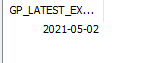
the requiement is to load the data greater than the LATEST_EXTRACT date.
Regards
Accepted Solutions

 MayilVahanan
- Mark as New
- Bookmark
- Subscribe
- Mute
- Subscribe to RSS Feed
- Permalink
- Report Inappropriate Content
Hi @ashmitp869
In SQL, there is no built function like "Date". You need to use DateAdd() function, like below
DATEFROMPARTS(YEAR([StartDateTime]), MONTH([StartDateTime]),DAY([StartDateTime]))>=
Cast(DATEAdd(Day, -366,$(vExtractDate)) as Date);
Please close the thread by marking correct answer & give likes if you like the post.
MayilVahanan
- Mark as New
- Bookmark
- Subscribe
- Mute
- Subscribe to RSS Feed
- Permalink
- Report Inappropriate Content
Hi @ashmitp869
In SQL, there is no built function like "Date". You need to use DateAdd() function, like below
DATEFROMPARTS(YEAR([StartDateTime]), MONTH([StartDateTime]),DAY([StartDateTime]))>=
Cast(DATEAdd(Day, -366,$(vExtractDate)) as Date);
Please close the thread by marking correct answer & give likes if you like the post.
