Unlock a world of possibilities! Login now and discover the exclusive benefits awaiting you.

- Qlik Community
- :
- All Forums
- :
- QlikView
- :
- Re: Section Access: ? how to solve it
- Subscribe to RSS Feed
- Mark Topic as New
- Mark Topic as Read
- Float this Topic for Current User
- Bookmark
- Subscribe
- Mute
- Printer Friendly Page

 qlikviewaf
- Mark as New
- Bookmark
- Subscribe
- Mute
- Subscribe to RSS Feed
- Permalink
- Report Inappropriate Content
Section Access: ? how to solve it
Hi,
i just implemented Section access as follow
SECTION ACCESS;
LOAD * INLINE [
ACCESS, NTNAME, REGION_DESCRIPTION
USER, EMEA\AZARRA, ITALY
];
the NTNAME is the one coming out from Upper(OSUser()) formula.
Then i flagged the 2 checkbox here.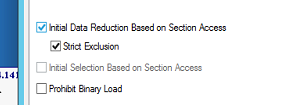
when i enter the application i'm able to see everything.
There's some step that i'm missing?
Thank you
- « Previous Replies
- Next Replies »

 YoussefBelloum
- Mark as New
- Bookmark
- Subscribe
- Mute
- Subscribe to RSS Feed
- Permalink
- Report Inappropriate Content
Hi,
you're working on Qlikview Desktop or entreprise ?
if you are testing on the desktop:
when you checked the "Strict exclusion" option, did you reloaded the app, saved and re-open it ?
qlikviewaf
- Mark as New
- Bookmark
- Subscribe
- Mute
- Subscribe to RSS Feed
- Permalink
- Report Inappropriate Content
i just reloaded the app, saved it, and moved to the server-folder to be available on the accesspoint.
i'm using Qlikview Desktop.
Any idea?
YoussefBelloum
- Mark as New
- Bookmark
- Subscribe
- Mute
- Subscribe to RSS Feed
- Permalink
- Report Inappropriate Content
I just realized that you put osuser() instead of writing the NTNAME.
if the server read osuser() what will it find ?
qlikviewaf
- Mark as New
- Bookmark
- Subscribe
- Mute
- Subscribe to RSS Feed
- Permalink
- Report Inappropriate Content
i wrote NTNAME - with formula osuser() i got exactly EMEA\AZARRA
YoussefBelloum
- Mark as New
- Bookmark
- Subscribe
- Mute
- Subscribe to RSS Feed
- Permalink
- Report Inappropriate Content
yes because on the desktop it will read YOUR NTNAME via the OSUSER() function.
but on the server it can't read OSUSER() of all the users on which you want to apply data reduction
qlikviewaf
- Mark as New
- Bookmark
- Subscribe
- Mute
- Subscribe to RSS Feed
- Permalink
- Report Inappropriate Content
Yes but as you can see from my script i used NTNAME
SECTION ACCESS;
LOAD * INLINE [
ACCESS, NTNAME, REGION_DESCRIPTION
USER, EMEA\AZARRA, ITALY
];
so what can i check?
qlikviewaf
- Mark as New
- Bookmark
- Subscribe
- Mute
- Subscribe to RSS Feed
- Permalink
- Report Inappropriate Content
btw using Upper(OSUser()) also on access-point i got the same result

 PrashantSangle
- Mark as New
- Bookmark
- Subscribe
- Mute
- Subscribe to RSS Feed
- Permalink
- Report Inappropriate Content
do you have data for Italy in application???
Uncheck strict exclusion > save > reload and then open.
Please appreciate our Qlik community members by giving Kudos for sharing their time for your query. If your query is answered, please mark the topic as resolved 🙂
YoussefBelloum
- Mark as New
- Bookmark
- Subscribe
- Mute
- Subscribe to RSS Feed
- Permalink
- Report Inappropriate Content
it is a bit confusing because you talk about the OSUSER() function on the server and at the same time you wrote NTNAME on a load inline..
if you put this at the of your script:
Section access;
SECTION ACCESS;
LOAD * INLINE [
ACCESS, NTNAME, REGION_DESCRIPTION
USER, EMEA\AZARRA, ITALY
];
Section Application;
you will see that this user will be reduced to that area.
now, if you use osuser() on your section access table, it will not work

- « Previous Replies
- Next Replies »