Unlock a world of possibilities! Login now and discover the exclusive benefits awaiting you.

- Qlik Community
- :
- All Forums
- :
- QlikView
- :
- Re: Section Access: ? how to solve it
- Subscribe to RSS Feed
- Mark Topic as New
- Mark Topic as Read
- Float this Topic for Current User
- Bookmark
- Subscribe
- Mute
- Printer Friendly Page

 qlikviewaf
- Mark as New
- Bookmark
- Subscribe
- Mute
- Subscribe to RSS Feed
- Permalink
- Report Inappropriate Content
Section Access: ? how to solve it
Hi,
i just implemented Section access as follow
SECTION ACCESS;
LOAD * INLINE [
ACCESS, NTNAME, REGION_DESCRIPTION
USER, EMEA\AZARRA, ITALY
];
the NTNAME is the one coming out from Upper(OSUser()) formula.
Then i flagged the 2 checkbox here.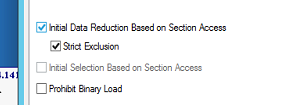
when i enter the application i'm able to see everything.
There's some step that i'm missing?
Thank you

 YoussefBelloum
- Mark as New
- Bookmark
- Subscribe
- Mute
- Subscribe to RSS Feed
- Permalink
- Report Inappropriate Content
there is something wrong because with strict exclusion if there is no Italy data, he will see a restriction message..
I'm I wrong ?
qlikviewaf
- Mark as New
- Bookmark
- Subscribe
- Mute
- Subscribe to RSS Feed
- Permalink
- Report Inappropriate Content
i just used osuser() to check if domain\user was correct: i'm not using this on the section access.
Of course i have data from italy, in the field "Region_Description" with value "Italy"
qlikviewaf
- Mark as New
- Bookmark
- Subscribe
- Mute
- Subscribe to RSS Feed
- Permalink
- Report Inappropriate Content

YoussefBelloum
- Mark as New
- Bookmark
- Subscribe
- Mute
- Subscribe to RSS Feed
- Permalink
- Report Inappropriate Content
do you wrote Section access; and Section Application; like mentioned above ?
qlikviewaf
- Mark as New
- Bookmark
- Subscribe
- Mute
- Subscribe to RSS Feed
- Permalink
- Report Inappropriate Content
This is exactly what i have on my script


 PrashantSangle
- Mark as New
- Bookmark
- Subscribe
- Mute
- Subscribe to RSS Feed
- Permalink
- Report Inappropriate Content
If there is no Italy data then user will see all data.
Please appreciate our Qlik community members by giving Kudos for sharing their time for your query. If your query is answered, please mark the topic as resolved 🙂
PrashantSangle
- Mark as New
- Bookmark
- Subscribe
- Mute
- Subscribe to RSS Feed
- Permalink
- Report Inappropriate Content
Section access is case sensitive
Italy should be in caps
Please appreciate our Qlik community members by giving Kudos for sharing their time for your query. If your query is answered, please mark the topic as resolved 🙂
PrashantSangle
- Mark as New
- Bookmark
- Subscribe
- Mute
- Subscribe to RSS Feed
- Permalink
- Report Inappropriate Content
Screen shot which you post earlier and above posted data wont match..
here REGION_DESCRIPTION is caps and Value ITALY in caps but
earlier screen shot both are in small letter.
Is there anything which we are missing\??
Please appreciate our Qlik community members by giving Kudos for sharing their time for your query. If your query is answered, please mark the topic as resolved 🙂
YoussefBelloum
- Mark as New
- Bookmark
- Subscribe
- Mute
- Subscribe to RSS Feed
- Permalink
- Report Inappropriate Content
If there is no Italy data and there is user who is reduced to Italy, what is the difference between Strict exclusion SA and NOT strict exclusion SA as a result for that user then ?
qlikviewaf
- Mark as New
- Bookmark
- Subscribe
- Mute
- Subscribe to RSS Feed
- Permalink
- Report Inappropriate Content
Good point - in the data-set the value is "Italy" - is something manageable?
What i have to write then in the Section Access? "Italy" as well? or it's required to have only CAPS value?
