Unlock a world of possibilities! Login now and discover the exclusive benefits awaiting you.

- Qlik Community
- :
- All Forums
- :
- QlikView
- :
- Re: See next three months, next year
- Subscribe to RSS Feed
- Mark Topic as New
- Mark Topic as Read
- Float this Topic for Current User
- Bookmark
- Subscribe
- Mute
- Printer Friendly Page

 JesusAlv4
- Mark as New
- Bookmark
- Subscribe
- Mute
- Subscribe to RSS Feed
- Permalink
- Report Inappropriate Content
See next three months, next year
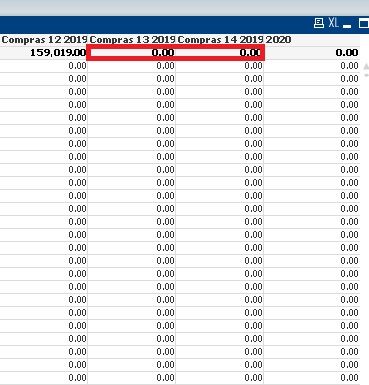
see next three months, example, I select December 2019 and show values 2020 January and February
I use : =Sum({<Month ={$(=Max(Month + 1))}>} MQTYORDERED)
It only shows the year 2019, but does not advance to the next year January 2020
Accepted Solutions

 tresB
tresB
- Mark as New
- Bookmark
- Subscribe
- Mute
- Subscribe to RSS Feed
- Permalink
- Report Inappropriate Content
Try expression like below:
sum({<Year,Month,MonthYear={"$(=Date(AddMonths(Max(MonthYear), 1), 'MMM-YY'))"}>}INVENTQTY)

 zhadrakas
- Mark as New
- Bookmark
- Subscribe
- Mute
- Subscribe to RSS Feed
- Permalink
- Report Inappropriate Content
Hello,
max(Month+1) will not work, cause from 12 it will go to 13 and not (as it should) to 1.
You should use something like this:
Date based:
Month(AddMonths(max(Date),-1)) //last Month
Month(AddMonths(max(Date),0)) //current Month
Month(AddMonths(max(Date),1)) //next Month
Month(AddMonths(max(Date),2)) //next next Month
Note that you maybe need to add a condition for year in your set analysis if you have more years of data.
regards
tim
JesusAlv4
- Mark as New
- Bookmark
- Subscribe
- Mute
- Subscribe to RSS Feed
- Permalink
- Report Inappropriate Content
It's my original qvw, I hope you can support because it doesn't work for me.
=Sum({<Month= {$(=AddMonths(Max(Date),0))}>} MQTYORDERED)
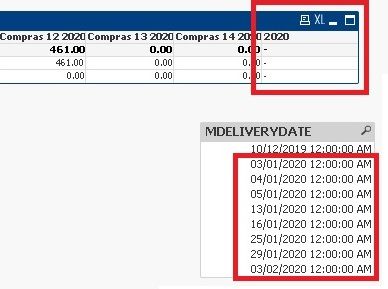
Add the sample original file qvw
Thank you for your help.
zhadrakas
- Mark as New
- Bookmark
- Subscribe
- Mute
- Subscribe to RSS Feed
- Permalink
- Report Inappropriate Content
try this expression:
=Sum({<Month= {$(=subfield(AddMonths(Max(MDELIVERYDATE),0),'/',2))}>} MQTYORDERED)maybe you want to add the year to the expression
=Sum({<Month= {$(=subfield(AddMonths(Max(MDELIVERYDATE),0),'/',2))}, Year ={$(=subfield(AddMonths(Max(MDELIVERYDATE),0),'/',3))} >} MQTYORDERED)regards
tim

.png "Former Employee") Brett_Bleess
Brett_Bleess
- Mark as New
- Bookmark
- Subscribe
- Mute
- Subscribe to RSS Feed
- Permalink
- Report Inappropriate Content
Jesus, did Tim's last post get you what you needed for your use case? If so, do not forget to return to your post and use the Accept as Solution button on Tim's post to give him credit for the assistance and let other Community Members know that worked for the use case. If you still have further questions, leave an update.
Regards,
Brett
I now work a compressed schedule, Tuesday, Wednesday and Thursday, so those will be the days I will reply to any follow-up posts.

 Prashant_Naik
- Mark as New
- Bookmark
- Subscribe
- Mute
- Subscribe to RSS Feed
- Permalink
- Report Inappropriate Content
Hi,
this might help you
You need to create a tilldate flag in script and add that flag in you set analysis script
if(datefield<=today(),1,0) as tilldateflag write this flag in script
Set Analysis script :
- sum(MonthYear={"$(=Date(Max({<tilldate={1}>}MonthYear),'MM-YYYY'))"}>}MQTYORDERED) //it will give you data for dec 2019
- sum(MonthYear={"$(=Date(AddMonths(Max({<tilldate={1}>}MonthYear),'MM-YYYY'),1))"}>}MQTYORDERED) //it will give you data for Jan 2020
- sum(MonthYear={"$(=Date(AddMonths(Max({<tilldate={1}>}MonthYear),'MM-YYYY'),2))"}>}MQTYORDERED) //it will give you data for Feb 2020
I have considered the fields that you have included in the app for reference.
Regards,
Prashant
JesusAlv4
- Mark as New
- Bookmark
- Subscribe
- Mute
- Subscribe to RSS Feed
- Permalink
- Report Inappropriate Content
Sorry, the sentence still does not do what I need, but I will try the solution that the user : Prashant
Regards.
JesusAlv4
- Mark as New
- Bookmark
- Subscribe
- Mute
- Subscribe to RSS Feed
- Permalink
- Report Inappropriate Content
Hi Prashant,
I already made the code as you say, month year, creation of the flag, but I have no result.
the current month is correct, but the following months do not work.
I was creating a "NumericDate" field to do the operation subtracting the Monthyear, but it doesn't work.
QVW file attachment.
Example:

Regards,
Thank you for your help.
tresB
- Mark as New
- Bookmark
- Subscribe
- Mute
- Subscribe to RSS Feed
- Permalink
- Report Inappropriate Content
Try expression like below:
sum({<Year,Month,MonthYear={"$(=Date(AddMonths(Max(MonthYear), 1), 'MMM-YY'))"}>}INVENTQTY)
JesusAlv4
- Mark as New
- Bookmark
- Subscribe
- Mute
- Subscribe to RSS Feed
- Permalink
- Report Inappropriate Content
Hello Tresesco,
Thank you very much, its correct, I see results now .
Regards,
Jesus