Unlock a world of possibilities! Login now and discover the exclusive benefits awaiting you.

- Qlik Community
- :
- All Forums
- :
- QlikView
- :
- Re: Select in Field action
- Subscribe to RSS Feed
- Mark Topic as New
- Mark Topic as Read
- Float this Topic for Current User
- Bookmark
- Subscribe
- Mute
- Printer Friendly Page

- Mark as New
- Bookmark
- Subscribe
- Mute
- Subscribe to RSS Feed
- Permalink
- Report Inappropriate Content
Select in Field action
I have a parameter (Items) containing the following values:
Apple, Orange, Table, Chair, Banana, Kiwi, Pen
I want to add a button + an action that that will select all those values except for Table and Chair.
Can someone please help with how I can achieve that? If at all possible?
Thanks,
Amit
Accepted Solutions

 stigchel
- Mark as New
- Bookmark
- Subscribe
- Mute
- Subscribe to RSS Feed
- Permalink
- Report Inappropriate Content
use for search expression
='('&Concat({<Items=-{'Table','Chair'}>} DISTINCT Items,'|')&')'

 sunny_talwar
- Mark as New
- Bookmark
- Subscribe
- Mute
- Subscribe to RSS Feed
- Permalink
- Report Inappropriate Content
May be this as the search string
("Apple"|"Orange"|"Banana"|"Kiwi"|"Pen")
- Mark as New
- Bookmark
- Subscribe
- Mute
- Subscribe to RSS Feed
- Permalink
- Report Inappropriate Content
I know this can be done but I was looking for something more generic in cases where I have a long list and I need to exclude only a few.
- Mark as New
- Bookmark
- Subscribe
- Mute
- Subscribe to RSS Feed
- Permalink
- Report Inappropriate Content
I think I found the answer
Basically it's 2 actions and the order is important.
Select in Field - Items
(Table|Chair)
Select Excluded - Items
Does anyone else have any better suggestions?
stigchel
- Mark as New
- Bookmark
- Subscribe
- Mute
- Subscribe to RSS Feed
- Permalink
- Report Inappropriate Content
use for search expression
='('&Concat({<Items=-{'Table','Chair'}>} DISTINCT Items,'|')&')'
stigchel
- Mark as New
- Bookmark
- Subscribe
- Mute
- Subscribe to RSS Feed
- Permalink
- Report Inappropriate Content
Example attached
sunny_talwar
- Mark as New
- Bookmark
- Subscribe
- Mute
- Subscribe to RSS Feed
- Permalink
- Report Inappropriate Content
Look at stigchel's response
- Mark as New
- Bookmark
- Subscribe
- Mute
- Subscribe to RSS Feed
- Permalink
- Report Inappropriate Content
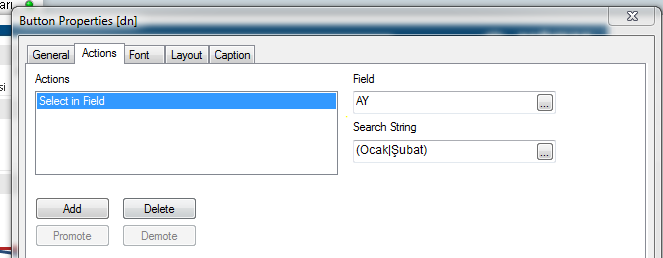
Hi,
You have to add "select in field" to button actions.
Your field should be "Items" and search string will be (Apple|Orange|Banana|Kiwi|Pen).
Hope it helps! 
- Mark as New
- Bookmark
- Subscribe
- Mute
- Subscribe to RSS Feed
- Permalink
- Report Inappropriate Content
Thank you!!!!
stigchel
- Mark as New
- Bookmark
- Subscribe
- Mute
- Subscribe to RSS Feed
- Permalink
- Report Inappropriate Content
You're welcome