Unlock a world of possibilities! Login now and discover the exclusive benefits awaiting you.

- Qlik Community
- :
- All Forums
- :
- QlikView
- :
- Select in field trigger not working
- Subscribe to RSS Feed
- Mark Topic as New
- Mark Topic as Read
- Float this Topic for Current User
- Bookmark
- Subscribe
- Mute
- Printer Friendly Page

 kris_vliegen
- Mark as New
- Bookmark
- Subscribe
- Mute
- Subscribe to RSS Feed
- Permalink
- Report Inappropriate Content
Select in field trigger not working
Hi All,
I have a map with fuel-stations.
And in that map I see the fuelstations who has changed today the fuelprice.
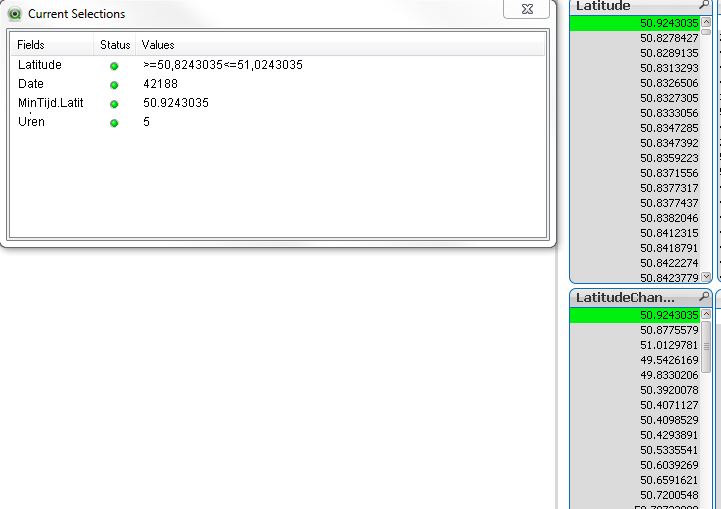
If I select a station I select a Latitude(LatitudeChange).
And I would like to see the stations in the neighbourhood.
In my model I have created a table with only the changes of today in and a map with all the prices of all the stations by hour.
So if I select 1 station I (LatitudeChange) I would sub and count 0.05 of the field latitude.
I have created 2 variables
vStartLatChange=MinTijd.(LatitudeChange)- 0.05
vEndLatChange=MinTijd.Latitude + 0.05
I also created 2 "on select" trigger
Clear field Latitude and
Select in field Latitude ='>='&vStartLatChange& '<=' & vEndLatChange
He only select the value of the LatitudeChange.
What Am I doing wrong?
- Tags:
- trigger
Accepted Solutions
kris_vliegen
- Mark as New
- Bookmark
- Subscribe
- Mute
- Subscribe to RSS Feed
- Permalink
- Report Inappropriate Content
Hi Henric,
I found the solution. There was a link between both tables. I cut-off the link and now everything is working fine.
Thanks for the help

.png "Former Employee") hic
hic
- Mark as New
- Bookmark
- Subscribe
- Mute
- Subscribe to RSS Feed
- Permalink
- Report Inappropriate Content
You could possibly have a problem in the search string. It uses decimal comma, but the field has decimal points. You should use the same decimal separator in both places.
HIC
kris_vliegen
- Mark as New
- Bookmark
- Subscribe
- Mute
- Subscribe to RSS Feed
- Permalink
- Report Inappropriate Content
I can try, but I've also created a text-field with the same trigger on And than it is working fine...
kris_vliegen
- Mark as New
- Bookmark
- Subscribe
- Mute
- Subscribe to RSS Feed
- Permalink
- Report Inappropriate Content
Hi Henric,
I found the solution. There was a link between both tables. I cut-off the link and now everything is working fine.
Thanks for the help
